

API Testing with AI
Introduction
Section titled “Introduction”What this guide covers
Section titled “What this guide covers”The AI Assistant has an API mode. In it, you describe what you want to check about an API in plain English — “log in, create an order, and check it shows up as CONFIRMED” — and the assistant sends the requests, checks the answers, saves what it built, and tells you what passed and what did not.
This guide is a tutorial. It starts with a single request and builds up, one lesson at a time, to multi-service flows, contract testing, message queues, gRPC and load. Every lesson has prompts you can copy, what happens when you send them, and what to look for in the answer. At the end there is a catalogue of every kind of test you can do, with a ready-made prompt for each.
What you can test — at a glance
Section titled “What you can test — at a glance”| Area | What it means | Lesson |
|---|---|---|
| Single requests | Call any REST or GraphQL endpoint with any method, headers, query, body and auth — including file uploads. | 1 |
| Validations | Check status, headers, body fields, text, response time and JSON Schema — not just “200 OK”. | 2 |
| Collections & environments | Save requests, organise them in folders, switch between Dev / Staging / QA with variables. Import OpenAPI / Swagger (file or URL), Postman collections, or a browser recording (HAR). | 3 |
| Chains (end-to-end flows) | Log in → create → read → update → delete, passing values from step to step. Polling for slow, eventually consistent services. | 4 |
| Data-driven runs | The same request or flow once per row of a CSV or JSON file. | 5 |
| Contract testing | The live API against its OpenAPI spec, breaking changes between spec versions, consumer-driven contracts (Pact). | 6 |
| Microservices | Readiness, service-to-service auth (OAuth2 client credentials, mTLS), proxies, correlation IDs, mocks for downstream services. | 7 |
| Events | Kafka and RabbitMQ: check a service published the right event, or trigger a consumer. | 8 |
| Real-time | WebSocket and Server-Sent Events. | 9 |
| gRPC | Unary and streaming calls from a .proto file, over plaintext, TLS or mTLS. | 10 |
| Load | Many concurrent callers: throughput, response-time percentiles, error rate, pass/fail thresholds. | 11 |
| Test code | Automated tests in your project’s own framework (REST Assured, pytest, Playwright, Cypress, …), run and fixed until they pass. | 12 |
Who this guide is for
Section titled “Who this guide is for”- Manual testers who want to test APIs without learning a tool or writing code — you type what you want, in words.
- Automation engineers who want requests, flows and contract checks built for them, and then real test code in their framework.
- Developers who want to check a service, its contract and the services around it before merging.
- Test leads who need to know what API testing can cover, and what to ask for.
You do not need to know how to code. It helps to know what an API is (a URL your application calls to get or change data) and to have the address of a test environment.
Key terms
Section titled “Key terms”| Term | Meaning |
|---|---|
| Endpoint | One URL of the API, e.g. GET /users/42. |
| Method | What the call does: GET reads, POST creates, PUT/PATCH change, DELETE removes. HEAD and OPTIONS ask about an endpoint without data. |
| Status code | The number the API answers with: 2xx success, 3xx redirect, 4xx your request was wrong (400 bad input, 401 not logged in, 403 not allowed, 404 not found), 5xx the server failed. |
| Request body / response body | The data sent to / returned by the API, usually JSON. |
| Header | Extra information on a request or response, such as Authorization or Content-Type. |
| Collection | A saved set of requests, like a folder of bookmarks for an API. |
| Environment | A named set of variables — baseUrl, token — so the same requests run against Dev, QA or Staging. |
| Variable | A placeholder written {{name}}, replaced with a value when the request is sent. |
| Validation | A rule that must hold for the response, e.g. “$.status equals ACTIVE”. |
| JSON path | The address of a field inside a JSON body: $.data.id, $.items[0].name. |
| Chain | A folder of requests run in order, passing values from one to the next. |
| Extract | Taking a value out of a response (an id, a token) to use in a later step. |
| Spec (OpenAPI / Swagger) | A file describing every endpoint of the API, its inputs and outputs. |
| Contract | What the API promises — its spec, or a Pact file agreed with a consumer. |
| Mock | A fake service that answers the way you tell it to. |
| Microservice | One of several small services that together make an application, calling each other over the network. |
How API mode works
Section titled “How API mode works”- You type what you want to test, in words.
- The assistant picks the right tools — send a request, run a chain, check a contract — and shows each one as a tool call in the conversation.
- Anything that sends traffic, runs a command or opens a port first asks for your permission (unless you switched the chat to Auto — see below).
- It reads the answers, checks them, and reports what passed and what failed, and why.
- What it builds — collections, requests, validations, environments, flows — is saved in your project, so you can run it again later from the chat.
API mode has no browser. It works only with APIs, your project’s files, and the terminal.
Before you start
Section titled “Before you start”Open API mode
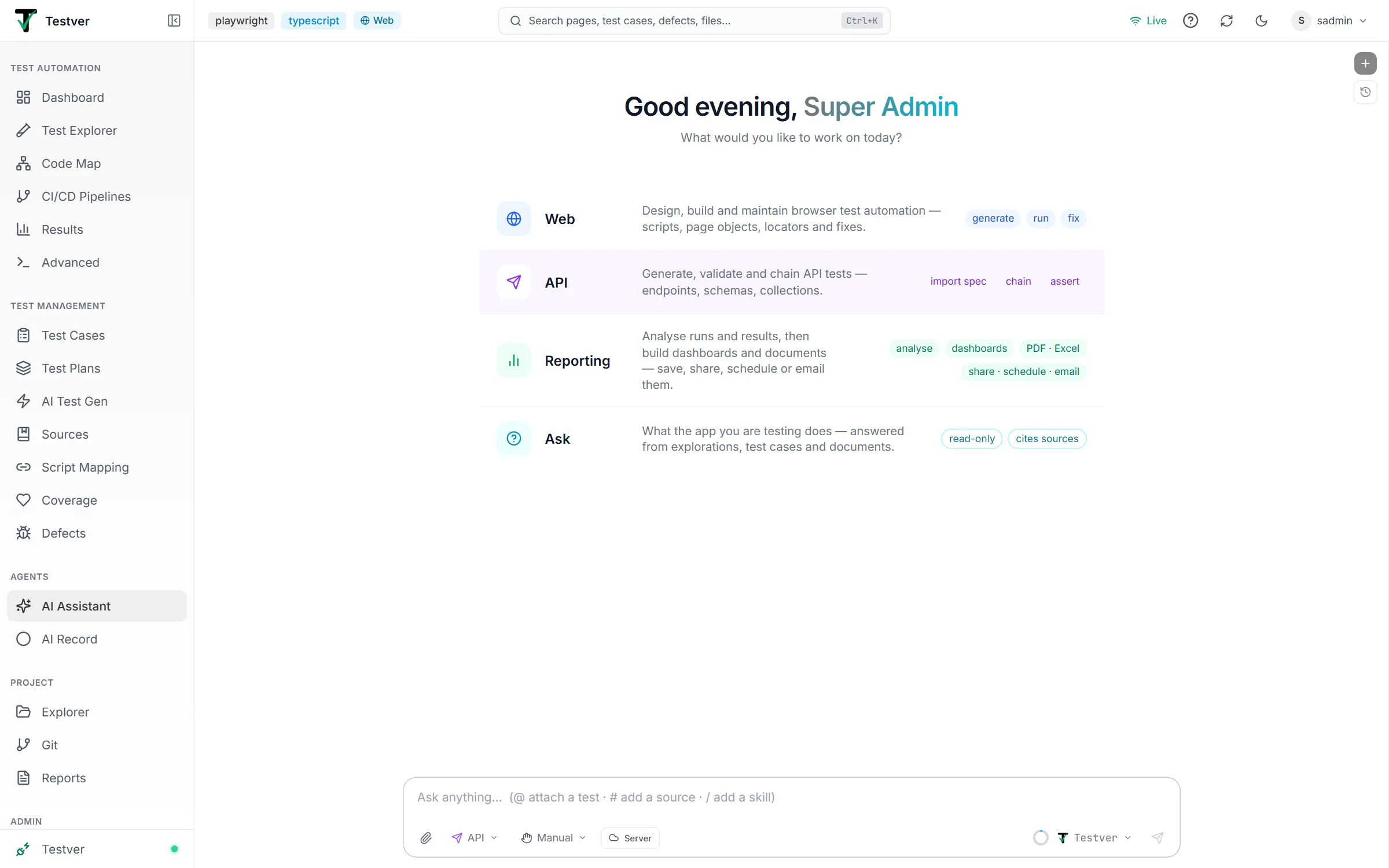
Section titled “Open API mode”- Open the AI Assistant (Agents → AI Assistant).
- In the mode picker next to the message box, choose API — or, on the welcome screen, click the API row.
- Type your request and press Enter.
Manual or Auto permissions
Section titled “Manual or Auto permissions”Next to the mode picker is the Manual / Auto permission picker. It belongs to the chat:
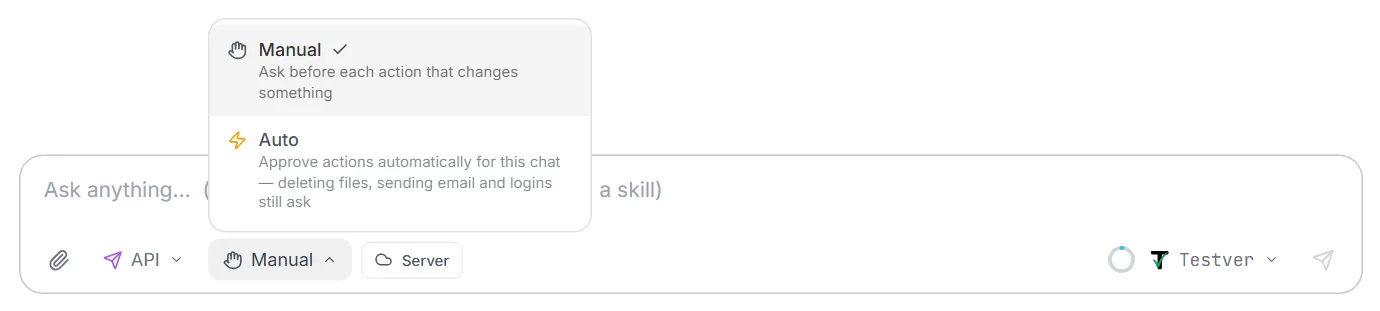
- Manual (the default) — the assistant asks before each action that sends traffic or changes your project. You see what it wants to do and click Allow or Deny.
- Auto — those actions run without asking. Choose it when you trust the target environment and want the assistant to work through a long flow uninterrupted.
| What the action does | Examples | Asks in Manual mode? |
|---|---|---|
| Reads only | List collections, read a request, read history, compare two spec files, read what a mock received | No |
| Changes your project | Create a collection, save a request, add validations, import a spec, change settings | Yes |
| Sends traffic / runs something | Send a request, run a chain, check a contract, start a mock, publish an event, load test | Yes |
What to have ready
Section titled “What to have ready”- The address of a test environment, e.g.
https://qa.example.com/api. Never start with production. - Credentials for it — a token, an API key, a username and password, or OAuth2 client credentials. You will put them in an environment variable, not in the chat history of every request.
- Optional: a description of the API — an OpenAPI / Swagger file (
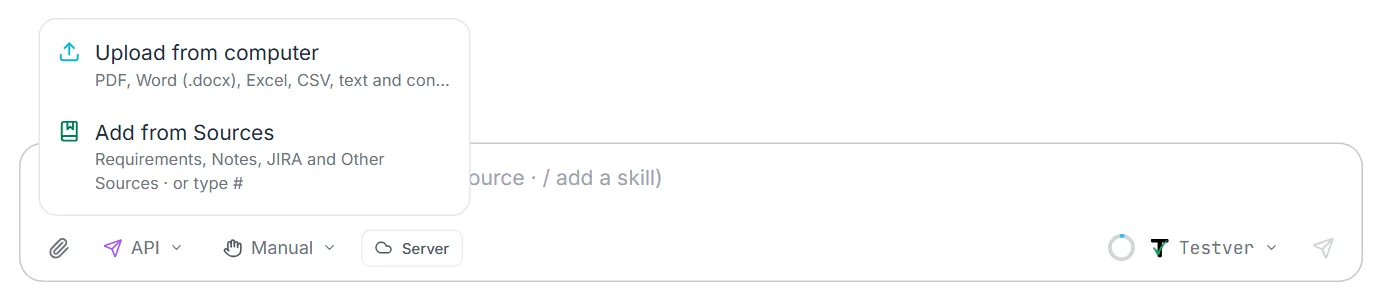
openapi.yaml,swagger.json) or its URL, a Postman collection, or a HAR recording of the app in use (Lesson 3). With one, the assistant can build requests for you and check the API against it. - Optional: files — attach them with the paperclip. In API mode every attached file is also saved into your project under
.testver/uploads/, so the assistant can import it, run it as data, or upload it to an endpoint.
Lesson 1: Your first request
Section titled “Lesson 1: Your first request”The simplest thing you can do is call one endpoint and look at the answer.
Try it:
Send a GET request to https://qa.example.com/api/users/1
What happens: the assistant asks to send the request (Manual mode), sends it, and shows you:
- the status (e.g.
200 OK) and how long it took; - the response headers;
- the response body, formatted;
- a short explanation of what came back.
Adding details to a request
Section titled “Adding details to a request”Describe any part of the request in words — the assistant fills it in.
| You want | Say |
|---|---|
| A different method | ”POST to /users with name Ann and email ann@test.io” |
| Query parameters | ”GET /products with category=books and page=2” |
| Headers | ”…with header X-Tenant: acme” |
| A JSON body | ”…with body {"name": "Ann", "role": "admin"}” |
| A form body | ”POST username and password as a form to /login” |
| Plain text / XML | ”POST this XML to /soap/orders with Content-Type text/xml: …” |
| GraphQL | ”Run this GraphQL query against /graphql: { user(id: 1) { name email } }” — variables work too |
| A timeout | ”…and fail if it takes longer than 5 seconds” |
Authentication
Section titled “Authentication”| Type | Say | What is sent |
|---|---|---|
| Bearer token | ”…with bearer token abc123” | Authorization: Bearer abc123 |
| Basic auth | ”…with basic auth user qa / pass secret” | Authorization: Basic … |
| API key in a header | ”…with API key abc in header X-API-Key” | X-API-Key: abc |
| API key in the query | ”…with API key abc as query parameter api_key” | ?api_key=abc |
| OAuth2 client credentials | ”Get a token from https://auth.example.com/oauth/token with client id orders-svc and secret from {{clientSecret}}, then call /orders” | The token is requested, cached until it expires, and sent as a Bearer token |
Uploading files
Section titled “Uploading files”Endpoints that take files — an avatar, a document, an import CSV — are tested the same way. Name the file and the form field it goes in:
Upload fixtures/photo.png as “avatar” to POST /users/42/avatar, with the text field title = “Profile photo”, and check it returns 201.
The file is sent as a multipart form (multipart/form-data), with its name and a content type from its extension (you can override both). Where the file comes from:
| Source | How |
|---|---|
| A file in your project | Give its path, e.g. fixtures/photo.png. |
| A file on your computer | Attach it with the paperclip in API mode. It is saved as .testver/uploads/<name> and the assistant uses that path. Images, PDFs, Office files, archives, audio/video and certificates are all accepted in API mode — they are sent, never read into the conversation. |
Saved requests keep the file’s path, not a copy of its contents, and read the file each time they run — replace the file and the next run sends the new one. If the file is missing, the request stops with a File Error naming it.
Example prompts
Section titled “Example prompts”Send a GET request to https://qa.example.com/api/products?category=books&page=2 and tell me how many products came back.
POST to https://qa.example.com/api/users with body
{"name": "Ann", "email": "ann@test.io", "role": "viewer"}and bearer token{{token}}, then explain the response.
Call https://qa.example.com/api/reports/monthly with API key
{{apiKey}}in header X-API-Key and a 10-second timeout.
Run this GraphQL query against https://qa.example.com/graphql with variables
{"id": "7"}:query($id: ID!) { order(id: $id) { id status total } }
(With invoice.pdf attached) Upload the attached invoice to POST /documents as field “file” with category = “invoice”, then download it from the returned URL and check the size matches.
Lesson 2: Checking the answer (validations)
Section titled “Lesson 2: Checking the answer (validations)”A 200 OK only means the server answered. A test checks that it answered correctly. Validations are rules attached to a request; every time the request runs, each rule is checked and reported as passed or failed.
Try it:
Call GET /users/1 and check that the status is 200,
$.roleis “admin”, the Content-Type header contains application/json, and it answers in under 500 ms.
What you can check
Section titled “What you can check”| Check | What it looks at | Example |
|---|---|---|
| Status | The status code | equals 201; less-than 400 |
| Header | One response header | Content-Type contains json; Cache-Control exists |
| Body field (JSON path) | One field in a JSON body | $.data.id exists; $.items[0].price greater-than 0 |
| Body text | The whole body as text | contains "success":true; not-contains password |
| Response time | Milliseconds taken | less-than 800 |
| Schema | The whole body’s shape | matches a JSON Schema or a schema from your OpenAPI spec |
Comparisons
Section titled “Comparisons”| Operator | Passes when |
|---|---|
| equals / not-equals | the value is / is not exactly the expected text |
| contains / not-contains | the value does / does not include the expected text |
| greater-than / less-than | the value is a number above / below the expected one |
| exists | the value is present (not empty, not null) |
| matches-regex | the value matches a regular expression, e.g. ^ORD-\d{6}$ |
JSON paths in a minute
Section titled “JSON paths in a minute”| Path | Points at |
|---|---|
$.name | the name field at the top |
$.data.user.email | a field inside nested objects |
$.items[0] | the first item of the items list |
$.items[2].price | the price of the third item |
$.meta.total | a count, e.g. for pagination checks |
Checking the shape with a schema
Section titled “Checking the shape with a schema”Field checks test a few values. A schema tests the whole shape: every required field is there, every type is right, no unexpected fields, formats such as email and date are valid.
Validate the response of GET /users/1 against the
Userschema in openapi.yaml.
Check this response body matches the 200 response of
GET /orders/{id}in api/openapi.yaml.
The schema check understands everything in JSON Schema and OpenAPI — $ref, oneOf/anyOf/allOf, additionalProperties, formats, min/max, patterns, nullable, readOnly/writeOnly, and OpenAPI 3.0, 3.1 and Swagger 2 — in JSON or YAML. Each failure names the exact field: /items/0/price: must be number.
Example prompts
Section titled “Example prompts”Call GET /users/1 and check the status is 200,
$.idequals 1,^[^@]+@[^@]+$and the response comes back in under 500 ms.
Add these checks to the Get order request in Orders API: status equals 200,
$.items[0].quantityis greater than 0, header Cache-Control exists, and the body does not contain “password”.
Validate the response of GET /orders/42 against the 200 response of
GET /orders/{id}in api/openapi.yaml and list every field that doesn’t match.
Call GET /products and check
$.meta.totalexists,$.data[0].priceis greater than 0 and the Content-Type header contains application/json.
Lesson 3: Collections, folders and environments
Section titled “Lesson 3: Collections, folders and environments”Everything worth keeping goes into a collection. It is saved in your project (in .testver/api-collections.json).
Build a collection
Section titled “Build a collection”Create a collection called “Orders API” with base URL
{{baseUrl}}. Add a folder “Smoke” withGET /health,GET /ordersandGET /orders/{{orderId}}.
Import what describes the API
Section titled “Import what describes the API”Import api/openapi.yaml as a collection.
Every endpoint in the spec becomes a saved request, grouped by tag, with example bodies and parameters. Importing only creates the requests — it does not call the API or write test code unless you ask.
| You have | Say | What you get |
|---|---|---|
| An OpenAPI / Swagger file (JSON or YAML, OpenAPI 3.x or Swagger 2) | “Import api/openapi.yaml” — or attach it | One request per endpoint, grouped by tag |
| The spec’s URL | ”Import the spec from https://qa.example.com/v3/api-docs” | The same, and a copy saved as .testver/specs/<host>-openapi.json for contract checks and mocks |
| A Postman collection (v2.1) | “Import the attached Postman collection” | Its folders and requests, and its variables as a “Postman Variables” environment |
| No spec at all | Record a HAR (below), then “Import the attached HAR” | One request per endpoint the app really called |
Recording an API that has no spec (HAR)
Section titled “Recording an API that has no spec (HAR)”When there is no spec, record the API the app actually uses:
- Open the application in Chrome, Edge or Firefox and press F12 → Network.
- Use the features you want to test (log in, search, create an order…).
- Right-click the list of requests → Save all as HAR (Firefox: Save All As HAR).
- Attach the
.harfile in API mode and say “Import the attached HAR as Shop API”.
The assistant keeps only the API calls (fetch / XHR) — pages, scripts, images, fonts, analytics and CORS preflights are skipped, and it tells you how many of each. Repeated calls to the same endpoint become one request, with ids in the path turned into variables (/orders/123 → /orders/{{id}}). Each request checks the status it returned when you recorded it, and requests are grouped by resource.
Environments and variables
Section titled “Environments and variables”Create environments “QA” with baseUrl https://qa.example.com/api and “Staging” with baseUrl https://staging.example.com/api for the Orders API collection.
Set clientSecret in the QA environment to … (I’ll paste it).
Then refer to variables anywhere — URL, headers, body, auth — as {{baseUrl}}, {{token}}, {{clientSecret}}, and pick the environment when you run:
Run the Smoke folder of Orders API against Staging.
Run what you saved, and look back
Section titled “Run what you saved, and look back”| You want | Say |
|---|---|
| Run one saved request | ”Send the Get order request from Orders API with orderId 42” |
| See what is saved | ”What collections do we have?” / “Show me the Orders API collection” |
| See one request’s details | ”Show me the Create order request” |
| See recent calls | ”Show the last 20 API calls” |
| Analyse calls over time | Switch to Reporting mode: “Which endpoints were slowest this week?” |
Example prompts
Section titled “Example prompts”Import api/openapi.yaml as a collection called “Shop API” and tell me which endpoints it created.
Create environments Dev, QA and Staging for Shop API with baseUrl https://dev.shop.test, https://qa.shop.test and https://staging.shop.test.
In Shop API, create a folder “Smoke” with
GET {{baseUrl}}/health,GET {{baseUrl}}/productsandGET {{baseUrl}}/categories, then run each one against QA.
Show me the last 20 API calls and which of them failed.
Import the spec from https://qa.example.com/v3/api-docs as “Shop API”, then run every GET in it against QA.
(With session.har attached) Import the attached HAR, keeping only calls to https://api.shop.test, and set
{{token}}in a new QA environment.
Lesson 4: Chains (end-to-end flows)
Section titled “Lesson 4: Chains (end-to-end flows)”Real features take several calls: log in, create something, read it back, change it, delete it. A chain is a folder of requests run in order, where values from one step flow into the next.
Try it:
In Orders API, build a chain “Order lifecycle”: log in with
{{user}}/{{password}}and keep the token; create an order for 2 × SKU-1 and keep its id; read it back and check the quantity is 2; cancel it; read it again and check the status is CANCELLED. Then run it against QA.
How values move between steps
Section titled “How values move between steps”The assistant adds extract rules to steps — “keep $.token as {{token}}” — and later steps use {{token}}. You can extract from:
| Source | Example |
|---|---|
| A body field | {{orderId}} ← $.data.id |
| A header | {{location}} ← Location |
| The status | {{createdStatus}} ← status |
For anything more involved, steps can also carry small scripts (set("total", jsonpath(body, "$.sum"))) — the assistant writes them when needed.
When does a step pass?
Section titled “When does a step pass?”A step passes only when all of these hold:
- the status is OK (
2xx/3xx) — or matches the step’s own status rule, if it expects an error such as404; - every validation on the step passes;
- every extract found its value.
A 200 with the wrong body is a failure. By default the chain stops at the first failing step and marks the rest ⏭ skipped — they would run with values that were never extracted. Say “don’t stop on failure” to run every step anyway.
Reading the result
Section titled “Reading the result”The chain appears as a card: one row per step with ✅ / ❌ / ⏭, the status, the time and — for retried steps — the number of attempts. Click a step to see the resolved URL, request body, response, headers and why it failed, e.g. body-json-path $.status: Expected equals "CANCELLED", got "OPEN".
Waiting for slow services (retry / poll)
Section titled “Waiting for slow services (retry / poll)”Many systems finish work in the background: the order is PENDING, and a few seconds later CONFIRMED. Do not add fixed sleeps — make the step poll:
Make the “Read order” step retry up to 10 times every 2 seconds until
$.statusequals CONFIRMED.
The step repeats until its validations pass (or, with “until success”, until any 2xx), and the result says how many attempts it took. It also works on a one-off call:
Poll GET /jobs/77 every second, up to 30 times, until
$.stateis DONE.
Example prompts
Section titled “Example prompts”Build a chain “Checkout” in Shop API: log in with
{{user}}and{{password}}and keep$.token; add product 12 to the cart; check out and keep the order id; then poll the order every 2 seconds until$.statusis CONFIRMED. Run it against QA.
Run the Order lifecycle folder of Orders API against Staging, and don’t stop on failure — I want to see every step.
In the Checkout chain, make the Create order step keep the Location header as
{{orderUrl}}and the status as{{createStatus}}, then read the order from{{orderUrl}}.
Build a chain that creates a user, logs in as that user, changes their password, checks the old password now fails with 401, and finally deletes the user.
Lesson 5: Data-driven testing
Section titled “Lesson 5: Data-driven testing”Run the same request or flow once per row of a data file. Each column becomes a {{variable}}.
Try it: save data/signup.csv in your project —
email,password,expected_statusann@test.io,Str0ng!pass,201not-an-email,Str0ng!pass,400bob@test.io,short,400,Str0ng!pass,400Run the Sign up request of Accounts API once per row of data/signup.csv.
You get one line per row — ✅ or ❌ with the first reason. The optional expected_status column lets a row expect a rejection: a 400 for a bad email is then a pass, and a 201 is the failure.
| Use it for | Example rows |
|---|---|
| Boundary values | length 0, 1, max, max + 1; amounts 0, 0.01, -1 |
| Invalid input | wrong formats, missing fields, wrong types |
| Many users / roles | one row per role, each with its own token and expected status |
| Locales & currencies | lang=de, lang=ja; EUR, JPY |
JSON works too — an array of objects (or {"rows": [...]}). Run a whole folder per row to data-drive an entire flow (“run the Checkout chain for every row of data/carts.json”). Up to 100 rows run by default; ask for more (up to 1000).
Example prompts
Section titled “Example prompts”Run the Sign up request of Accounts API once for every row of data/signup.csv and tell me which rows failed and why.
Create data/quantities.csv with quantities 0, 1, 99, 100 and 101 and an expected_status column (400 for 0 and 101, 201 otherwise), then run the Add to cart request with it.
Run the Checkout chain for every row of data/carts.json against QA, stopping each row at its first failing step.
For each role in data/roles.csv (admin, editor, viewer, each with its own token column), call DELETE /articles/5 and check only admin gets 204 — the others must get 403.
Lesson 6: Contract testing
Section titled “Lesson 6: Contract testing”A contract is what the API promises. Contract testing checks the API keeps its promise — which catches the changes that break other teams’ code.
6a. Check a live API against its spec
Section titled “6a. Check a live API against its spec”Check QA (https://qa.example.com/api) against api/openapi.yaml.
For every operation in the spec, the assistant calls it and checks:
- the returned status is documented for that operation;
- the content type is declared;
- the body matches that operation’s response schema, field by field;
- required response headers are present;
- the request it sent satisfies the spec (required parameters, values, body).
You get a pass/fail table and a JSON report in .testver/contracts/.
| Variation | Say |
|---|---|
| Use your saved requests (real data) | “…using the Orders API collection with the QA environment” |
| Only some operations | ”…only the orders tag” / “…only GET /orders/{id}” |
| Give parameter values | ”…use id 42 and page 1” |
| Include writes | ”…include POST/PUT/DELETE — QA is safe to write to” |
| With auth | ”…with bearer token {{token}}” |
6b. Check one response
Section titled “6b. Check one response”Does this body match the
Orderschema in openapi.yaml?{…}
6c. Find breaking changes between versions
Section titled “6c. Find breaking changes between versions”What breaks between api/openapi-v1.yaml and api/openapi-v2.yaml?
Breaking changes come first — removed endpoints or fields, changed types, new required parameters or body fields, fields no longer guaranteed, new authentication — then warnings and safe additions. Run it on every spec change before release.
6d. Consumer-driven contracts (Pact)
Section titled “6d. Consumer-driven contracts (Pact)”When your web app (the consumer) calls an API (the provider), a Pact file records exactly what the consumer relies on.
Generate a pact for consumer “web-app” and provider “orders-api” from the Web calls collection.
Verify http://localhost:8080 against pacts/web-app-orders-api.json, with provider states at http://localhost:8080/_pact/states.
Generated pacts match bodies by type, so the contract pins the shape, not today’s data. Verification supports Pact v2, v3 and v4 files, matching rules (type, regex, min/max, integer, include…) and provider states.
Example prompts
Section titled “Example prompts”Check QA (https://qa.example.com/api) against api/openapi.yaml, only the orders and payments tags, with bearer token
{{token}}, and give me the failures first.
Use the Shop API collection with the QA environment to contract-test against api/openapi.yaml, including POST, PUT and DELETE — QA is safe to write to.
What breaks between api/openapi-v1.yaml and api/openapi-v2.yaml? Explain each breaking change in plain words and who it would affect.
Generate a pact for consumer “mobile-app” and provider “orders-api” from the Mobile calls collection, then verify http://localhost:8080 against it.
Lesson 7: Microservices
Section titled “Lesson 7: Microservices”When an application is split into services — orders, payments, inventory — a real feature crosses several of them. API mode can drive and observe all of them.
7a. Wait until everything is up
Section titled “7a. Wait until everything is up”Before a flow across services, make sure every service is answering. Most services have a health URL that says whether they are up, e.g. /health, /healthz or /status. Spring Boot services use /actuator/health and answer UP. Ask your developers which one yours use.
If the services are already running (a shared QA or Staging server, or your team started them), just wait for them:
Wait until https://orders.qa.example.com/health and https://payments.qa.example.com/health both answer 200.
Each URL is checked again and again until it answers, or until the time runs out (2 minutes unless you say otherwise). You get a table of which services came up and how long they took.
If you start the services yourself, the assistant can run your start command first, then wait:
Run
npm run start:services, then wait until http://localhost:8081/health and http://localhost:8082/health answer 200.
The start command is whatever your project uses — Testver runs exactly what you type, in your project folder, and does not provide the tool behind it. Common ones:
| Your project starts services with | Needs installed on your machine |
|---|---|
docker compose up -d | Docker Desktop or Docker Engine, and a docker-compose.yml in the project |
npm run start:services (or any script in package.json) | Node.js |
mvn spring-boot:run / gradle bootRun | Java and Maven / Gradle |
./start-services.sh / start-services.bat | Whatever the script uses |
The command’s output is saved to .testver/services/. If the command fails — including when its tool is not installed, e.g. ‘docker’ is not recognized — the wait stops at once and you see the exit code and the last lines of output.
7b. One variable per service
Section titled “7b. One variable per service”Give each service its own variable so one chain can cross them:
In the QA environment set ordersSvc to http://orders.qa:8081 and paymentsSvc to http://payments.qa:8082.
Build a chain: create an order on
{{ordersSvc}}, pay it on{{paymentsSvc}}, then poll the order until it is PAID.
7c. Service-to-service auth: OAuth2 client credentials
Section titled “7c. Service-to-service auth: OAuth2 client credentials”Services usually authenticate as themselves, with a client id and secret:
Use OAuth2 client credentials for the Orders API collection: token URL https://auth.qa/oauth/token, client id orders-svc, secret
{{clientSecret}}, scope orders.read.
Every request without its own auth then gets a token — fetched once, cached until shortly before it expires, and fetched again if the secret changes. The client id and secret go in the request body by default; say “send the credentials as basic auth” if your identity server wants that.
7d. mTLS, private certificates and proxies
Section titled “7d. mTLS, private certificates and proxies”| Situation | Say |
|---|---|
| The service requires a client certificate (mTLS) | “Use certs/client.pem and certs/client.key for the Payments collection” (or a .pfx with passphrase {{certPass}}) |
| The service uses your company’s own CA | ”Trust certs/ca.pem” |
| A self-signed test server | ”Skip certificate checks for this test service” — never for production |
| Traffic must go through a proxy / gateway | ”Send the collection through http://proxy.corp:3128” |
These are collection settings, so every request and chain of the collection uses them.
7e. Follow one request through every service (correlation IDs)
Section titled “7e. Follow one request through every service (correlation IDs)”Use X-Request-ID as the correlation header for Orders API, and run the Order lifecycle chain checking that every service echoes it back.
One generated id is sent on every step; search your logs for it to see one request’s whole path. With the echo check, a service that drops the id fails its step — “the id is lost at this hop”.
7f. Mock the services you depend on
Section titled “7f. Mock the services you depend on”To test one service alone, replace what it calls with a mock:
Mock the payments service: POST /charges returns 201 with
{"id": "ch_1", "amount": "{{body.amount}}"};GET /charges/{id}returns 200 with{"id": "{{path.id}}", "status": "SUCCEEDED"}.
Then point the service under test at the mock’s URL, run your flow, and ask:
What did the payments mock receive?
You see every call it got — method, path, query, headers, body — so you can check what your service sent: the right amount, the right currency, the auth header.
| Mock feature | Example |
|---|---|
| Values from the request | {{path.id}}, {{query.page}}, {{body.customer.id}}, {{headers.X-Tenant}} |
| A sequence (test retries) | “answer 503, 503, then 200” — the last one repeats |
| Delays (test timeouts) | “answer after 5 seconds” |
| From a spec | ”Mock payments from specs/payments.yaml” — every operation answers with its example |
| Reachable from containers | ”…listening on 0.0.0.0” (exposes it on your network) |
Mocks stop after an hour of no use, or when you say “stop the mocks”.
Example prompts
Section titled “Example prompts”Wait up to 3 minutes until https://orders.qa.example.com/health, https://payments.qa.example.com/health and https://inventory.qa.example.com/health all answer 200.
(If your project runs its services in Docker, and Docker is installed) Run
docker compose up -d, then wait until http://localhost:8081/actuator/health and http://localhost:8082/actuator/health say UP.
For the Payments collection, use OAuth2 client credentials (token URL https://auth.qa/oauth/token, client id payments-svc, secret
{{paymentsSecret}}), client certificate certs/payments.pem with key certs/payments.key, and trust certs/company-ca.pem.
Start a mock of the inventory service on 0.0.0.0:
GET /stock/{sku}returns 200 with{"sku": "{{path.sku}}", "available": 5}. Then create an order for SKU-9 on{{ordersSvc}}and show me exactly what orders sent to the inventory mock.
Make the payments mock answer 503 twice and then 200, run the Checkout chain with correlation header X-Request-ID checking every service echoes it, and tell me whether orders retried correctly.
Lesson 8: Event-driven services (Kafka and RabbitMQ)
Section titled “Lesson 8: Event-driven services (Kafka and RabbitMQ)”Many services talk through messages instead of calls: the orders service publishes OrderCreated, and others consume it.
Check a service published the right event
Section titled “Check a service published the right event”The order matters: listen first, then act, then collect. A listener started after the action would miss the event.
Listen to the Kafka topic orders.events on localhost:9092. Then create an order via POST /orders. Then check an event arrives where
$.typeis OrderCreated and$.orderIdis the new order’s id.
| Broker | How the assistant listens |
|---|---|
| Kafka | A throwaway consumer group reading new messages only (or from the beginning, if you ask); it is ready before the action is sent. SSL and SASL (plain, SCRAM) are supported. |
| RabbitMQ | A private temporary queue bound to the exchange (with a routing key), so the real consumers still get their messages. |
What you can wait for: a number of messages, a message containing some text, a JSON field equal to a value, or (Kafka) a message key.
Trigger a consumer
Section titled “Trigger a consumer”Publish
{"type": "PaymentSucceeded", "orderId": "42"}to the payments exchange with routing key payment.succeeded, then poll GET /orders/42 until it is PAID.
Example prompts
Section titled “Example prompts”Listen to the Kafka topic orders.events on localhost:9092, then POST /orders with 2 × SKU-1, then check an event arrives where
$.typeis OrderCreated within 15 seconds.
Watch the RabbitMQ exchange notifications (routing key email.#) on amqp://guest:guest@localhost:5672, register a new user, and check an email.welcome message for that user’s email is published.
Publish
{"type": "PaymentFailed", "orderId": "42"}to the Kafka topic payments.events with key 42, then poll GET /orders/42 until$.statusis PAYMENT_FAILED.
Listen to orders.events from the beginning and show me the last 10 messages with their keys.
Lesson 9: Real-time APIs (WebSocket and SSE)
Section titled “Lesson 9: Real-time APIs (WebSocket and SSE)”WebSocket:
Connect to wss://qa.example.com/ws with header Authorization: Bearer
{{token}}, send{"subscribe": "order-42"}, and wait for a message where$.statusis SHIPPED (give up after 30 seconds).
Server-Sent Events:
Open https://qa.example.com/events/orders and wait until 3 events arrive.
You get the transcript of every message with its timing, and whether the expectation was met. A refused connection reports why (e.g. HTTP 401). GraphQL subscriptions over WebSocket work too — name the subprotocol (graphql-transport-ws) and the messages to send.
Example prompts
Section titled “Example prompts”Connect to wss://qa.example.com/ws/chat with bearer token
{{token}}, send{"join": "room-1"}and then{"text": "hello"}, and check the hello message is echoed back to the room.
Open the Server-Sent Events stream https://qa.example.com/api/orders/42/events and wait up to 60 seconds for an event where
$.statusis DELIVERED.
Subscribe to the GraphQL subscription orderUpdated over wss://qa.example.com/graphql with subprotocol graphql-transport-ws and collect the first 3 updates.
Connect to wss://qa.example.com/ws without a token and tell me how the server refuses it.
Lesson 10: gRPC
Section titled “Lesson 10: gRPC”Point the assistant at the service’s .proto file.
What services and methods are in protos/orders.proto?
Call shop.orders.v1.OrderService/GetOrder on localhost:50051 with
{"id": 42}and metadata authorization: Bearer{{token}}.
| Supported | |
|---|---|
| Call types | unary, server-streaming, client-streaming (send an array), bidirectional |
| Transport | plaintext, TLS (with your CA), mTLS (client certificate) |
| Extras | metadata, deadline, imports from other .proto folders, a cap on streamed messages |
The answer shows the gRPC status (OK, NOT_FOUND, UNAVAILABLE…), the response message(s) as JSON, and the response metadata and trailers.
Example prompts
Section titled “Example prompts”What services and methods are defined in protos/inventory.proto (imports are in protos/common)?
Call shop.orders.v1.OrderService/GetOrder on localhost:50051 with
{"id": 42}and check the status field is CONFIRMED.
Call GetOrder with id 999999 and check the gRPC status is NOT_FOUND, not UNKNOWN or INTERNAL.
Stream shop.orders.v1.OrderService/WatchOrder for order 42 over mTLS (CA certs/ca.pem, client certs/client.pem and certs/client.key) and show me the first 5 updates.
Lesson 11: Basic load testing
Section titled “Lesson 11: Basic load testing”Put 50 concurrent users on GET /search?q=phone for 30 seconds. Fail if p95 is over 300 ms or more than 1% of requests error.
You get:
| Result | Meaning |
|---|---|
| Requests, OK, errors, error rate | how many calls, how many failed (4xx/5xx/no answer) |
| Throughput | requests per second |
| Latency p50 / p90 / p95 / p99 / max | p95 = 95% of calls were at least this fast |
| Status breakdown | how many of each status |
| Verdict | ✅ thresholds met, or ❌ with the numbers that missed |
Use a saved request (with its auth and environment) or a URL. Callers can ramp up gradually; you can stop after a number of requests instead of a time.
Example prompts
Section titled “Example prompts”Run 20 concurrent users against GET https://qa.example.com/api/products for 60 seconds and report throughput and p95.
Load test the Search request of Shop API with the QA environment: ramp up to 100 users over 30 seconds, run for 2 minutes, and fail if p95 goes over 400 ms or more than 1% of requests error.
Send exactly 500 requests to POST /quotes with body
{"sku": "SKU-1", "qty": 1}using 10 concurrent callers and show the status breakdown.
Compare GET /products?page=1 and GET /products?page=50 under 25 users for 30 seconds each — which one is slower, and by how much at p95?
Lesson 12: Turning it into automated tests
Section titled “Lesson 12: Turning it into automated tests”Everything so far runs from the chat. To get test code in your repository — code your CI can run — ask for it.
Generate REST Assured tests for the Order lifecycle chain.
Write pytest tests for the Accounts API collection, including the negative cases from data/signup.csv.
The assistant reads your project, finds your framework and its conventions, writes the tests, runs them, and fixes them until they pass. It works with the framework you already use — REST Assured (Java), pytest + requests (Python), Playwright’s request API, Cypress cy.request, and others. It also covers negative paths — missing auth, bad input, not found — not only the happy path.
| You want | How |
|---|---|
| A new API test framework from scratch | ”Scaffold a REST Assured framework for this API” (a built-in skill guides it) |
| Fix or extend an existing test | Type @ in the message box, pick the test, and say what to change |
| Run existing tests | ”Run the API tests in tests/api and fix any that fail” |
Example prompts
Section titled “Example prompts”Generate REST Assured tests for every request in the Orders API collection, including negative tests for missing auth and invalid input, then run them and fix any that fail.
Write pytest tests for the Checkout chain using requests, reading the base URL from an environment variable, and run them.
Scaffold a new REST Assured API test framework for this project with a service object per resource and data providers for test data.
(With OrderApiTest attached — type @ and pick it) Add a test that cancelling an already-shipped order returns 409 with
$.error.codeORDER_SHIPPED.
The catalogue: every kind of API test, with a prompt
Section titled “The catalogue: every kind of API test, with a prompt”Use these as starting points — swap in your own endpoints.
Functional
Section titled “Functional”| Test | Prompt |
|---|---|
| Smoke / health | ”Call GET /health on QA and check it returns 200 with status UP” |
| Create (POST) | “Create a user with a random email and check 201, a Location header and an id in the body” |
| Read (GET) | “Get user 42 and check every field matches the User schema” |
| Update (PUT/PATCH) | “Change user 42’s name to Zoe, then read it back and check the name” |
| Delete | ”Delete order 77, then check GET /orders/77 returns 404” |
| Full CRUD | ”Build and run a create → read → update → delete chain for /products” |
| Search & filters | ”Check GET /products?category=books returns only books” |
| Sorting | ”Check GET /products?sort=price returns prices in ascending order” |
| Pagination | ”Check page 1 and page 2 of /orders don’t overlap and $.meta.total stays the same” |
| Calculations | ”Create a cart with 2 × 10.00 and 1 × 5.50 and check the total is 25.50” |
| GraphQL query / mutation | ”Run the createUser mutation and check the errors array is absent” |
| SOAP / XML | ”POST this SOAP envelope to /ws/orders and check the response contains <status>OK</status>” |
| File upload | ”Upload fixtures/photo.png as avatar to POST /users/42/avatar and check 201 and a URL in $.url” |
| Upload round trip | ”Upload the attached report.pdf, download it from the returned URL, and check the size matches” |
Negative and error handling
Section titled “Negative and error handling”| Test | Prompt |
|---|---|
| Missing required field | ”POST /users without email and check 400 with an error mentioning email” |
| Wrong types | ”Send age as a string and check it’s rejected” |
| Invalid formats | ”Try 5 malformed emails from data/bad-emails.csv; each must be 400” |
| Not found | ”GET /users/999999 must be 404 with an error body, not a 500” |
| Wrong method | ”DELETE /health should be refused (405 or 404)“ |
| Boundaries | ”Try names of length 0, 1, 255 and 256 — only 1 and 255 should succeed” |
| Error contract | ”Check every 4xx from /orders has $.error.code and $.error.message” |
| Upload rules | ”Upload a 0-byte file, an .exe renamed to .png, and a 20 MB image to /avatar — each must be a 4xx, not a 500” |
Security basics
Section titled “Security basics”| Test | Prompt |
|---|---|
| Auth required | ”Call every GET in Orders API without a token — all must be 401” |
| Bad / expired token | ”Call /orders with an invalid token and check 401, not 500” |
| Role-based access | ”With the viewer token, POST /orders must be 403; with the admin token, 201” |
| Other users’ data | ”With Ann’s token, GET Bob’s order must be 403 or 404” |
| No sensitive data | ”Check GET /users/42 does not contain password, ssn or token” |
| Security headers | ”Check responses have Strict-Transport-Security and X-Content-Type-Options” |
| CORS | ”Send OPTIONS /orders with Origin https://evil.test and check it’s not allowed” |
These are functional security checks, not a penetration test.
Contract and compatibility
Section titled “Contract and compatibility”| Test | Prompt |
|---|---|
| API vs spec | ”Check QA against api/openapi.yaml” |
| Breaking changes | ”What breaks between main’s spec and this branch’s spec?” |
| Consumer contract | ”Generate a pact from the Mobile calls collection and verify the provider against it” |
| Response shape | ”Validate GET /orders against the OrderList schema” |
Flows and integration
Section titled “Flows and integration”| Test | Prompt |
|---|---|
| Business journey | ”Sign up → verify → log in → place an order → check the order history” |
| Eventual consistency | ”Create a payment and poll until the order is PAID (up to 60 s)“ |
| Idempotency | ”Send the same POST /payments twice with Idempotency-Key k1 — only one payment must exist” |
| Data-driven flow | ”Run the Checkout chain for every row of data/carts.json” |
Microservices and async
Section titled “Microservices and async”| Test | Prompt |
|---|---|
| Environment ready | ”Wait until the orders, payments and inventory health URLs on QA all answer 200” — or, if you start the services yourself, “Run our start command, then wait for all health checks” |
| Isolated service | ”Mock inventory, then check orders calls it with the right SKU and quantity” |
| Resilience / retries | ”Make the payments mock return 503 twice then 200, and check the order still completes” |
| Timeouts | ”Make the mock answer after 10 s and check orders returns a clean 504, not a hang” |
| Tracing | ”Run the flow with X-Request-ID and check every service echoes it” |
| Event published | ”Create an order and check OrderCreated appears on orders.events” |
| Event consumed | ”Publish PaymentSucceeded and check the order becomes PAID” |
| Real-time push | ”Subscribe over WebSocket and check a SHIPPED update arrives” |
| gRPC | ”Call GetOrder with a missing id and check NOT_FOUND” |
Performance
Section titled “Performance”| Test | Prompt |
|---|---|
| Single-call speed | ”GET /search must answer in under 800 ms” |
| Load | ”20 users for 60 s on /orders — p95 under 400 ms, errors under 1%“ |
| Ramp-up | ”Ramp 0 → 100 users over 30 s on /search and report p95” |
Writing good prompts
Section titled “Writing good prompts”- Name the environment and say it is safe — “on QA, which we can write to”.
- Say what “correct” means — fields, values, statuses — not just “test the endpoint”.
- Name the data — real ids, a data file, or “create one first”.
- Ask for negatives — “include missing auth and invalid input”.
- Ask to save it — “save it in the Orders API collection” — so you can run it again.
- One flow per request for long work, then “now run it against Staging”.
Where things are stored
Section titled “Where things are stored”| What | Where |
|---|---|
| Collections, requests, validations, environments, call history | .testver/api-collections.json in your project |
| Contract check reports | .testver/contracts/ |
| Generated pacts | pacts/ (or where you ask) |
| Service start-command logs | .testver/services/ |
| Files attached in API mode | .testver/uploads/ (keep this folder out of version control) |
| Specs imported from a URL | .testver/specs/ |
| Generated test code | Your project’s test folders, following its conventions |
Limits
Section titled “Limits”| Item | Limit |
|---|---|
| Retries / polling | Up to 100 attempts per request |
| Data-driven rows | 100 by default, up to 1000 |
| Contract check | 50 operations by default (ask for more) |
| Load test | 200 concurrent callers, 10 minutes |
| Streams and event waits | 5 minutes per wait |
| Mocks | Local HTTP only; stop after 1 hour idle |
| Event listeners | Close after 30 minutes idle |
Not available in API mode: OAuth2 flows that need a browser login (use a token from a login step instead), XML Schema validation (check XML with contains / regex), and reading the contents of images or other binary attachments — in API mode those are files to send, not to read. Browser testing lives in Web mode, mobile apps in Mobile mode.
| Files | Limit |
|---|---|
| Attachment size | 20 MB per file, 10 files at a time |
Executables (.exe …) | Never accepted |
Troubleshooting & FAQ
Section titled “Troubleshooting & FAQ”The request fails with “Network Error”. The address cannot be reached from your machine — check the URL, VPN and proxy. The message includes the cause (e.g. ECONNREFUSED, a TLS certificate error). For a corporate proxy, set it on the collection (Lesson 7d).
“Auth Error: OAuth2 token request failed: HTTP 401”. The token endpoint rejected the client id or secret. Check the values in the environment, and whether it wants the credentials as basic auth.
A certificate error on HTTPS. The server uses a certificate your machine does not trust. Give the assistant your CA file (“trust certs/ca.pem”). Skip checks only for a self-signed test server.
My chain stops at step 2. Step 2 failed — open it in the chain card to see why (a validation, a missing extracted value, an error status). Later steps are skipped on purpose; say “don’t stop on failure” to run them anyway.
The status is 200 but the step failed. One of its validations failed. The reason names the rule and the value it got.
The contract check reports 404s. The spec had no example for a parameter (such as an id) and a guess was used. Give real values, or run it with a collection.
No event arrived. Make sure the listener was started before the action, the topic / exchange and routing key are right, and the timeout is long enough.
Why did it ask for permission again? Manual mode asks for every action that sends traffic or changes the project. Switch the chat to Auto to stop the prompts for this chat.
Can it test production? Only if you explicitly tell it to — and it will ask before anything that changes data. We recommend read-only checks at most.
Related
Section titled “Related”- AI Assistant — the chat, modes, permissions and live preview
- Analyze & Fix Failures — when an automated API test fails
- Reports — API call analytics and dashboards in Reporting mode