

Test AutomationResultsAuto-Heal
Auto-Heal
Introduction
Section titled “Introduction”What is Auto-Heal?
Section titled “What is Auto-Heal?”Auto-Heal repairs the most common cause of flaky-looking failures: a locator that no longer matches the page because the app changed — a renamed data-testid, a changed id, name or class, a label that moved, an Appium resource-id that was renamed. After a run finishes with failures, Auto-Heal finds the broken locator in your source, works out what it should be from the page the run actually saw, re-runs the affected tests to prove it, and only then keeps the change (or suggests it for your review). If verification fails, the code is put back — nothing half-fixed is ever left behind.
Four principles shape everything below:
- Evidence over guessing. A fix is proposed only from what the failing page actually contained — the recorder’s saved alternatives, a trace, a captured DOM or app screen, or a live probe — and every proposal is checked against that evidence before anything is edited. No evidence, no edit; the test gets a plain-language reason instead.
- Verify or revert. Every fix is validated by re-running all tests that failed on the same locator, with the same browser, environment and cloud target as the original run. All pass → the fix stands. Any fail → the code is put back and the attempt is recorded as reverted.
- Your framework stays yours. A fix changes only the value inside the locator you already wrote —
By.id("username")staysBy.id(…),getByRole('button', { name: …, exact: true })keeps its options, a Selenium CSS locator is never replaced with Playwright-only syntax. No wrappers, no runtime hooks. - Your work is never overwritten. Undoing a temporary edit swaps back only that locator — if you (or the AI Assistant) edited the same file meanwhile, your edits survive. A server restart mid-verification is recovered automatically at startup.
Who this guide is for
Section titled “Who this guide is for”- Teams whose apps evolve fast — locator churn eats maintenance time; Auto-Heal turns most of it into a one-click review.
- CI owners who want a red build caused by a rename to fix itself (optionally re-greening the build) instead of paging someone.
- Anyone evaluating healing tools who has been burned by magic that rewrites tests invisibly — Auto-Heal is deliberately the opposite.
Key terms (glossary)
Section titled “Key terms (glossary)”| Term | What it means here |
|---|---|
| Suggest mode | Auto-Heal finds and verifies a fix, puts your code back, and presents the change in Results for one-click Apply. Recommended starting point. |
| Auto mode | Verified fixes are kept in your code automatically (still shown in Results, still undoable). |
| Healed · Fix ready · Reverted · Undone | The four outcomes, named the same everywhere: kept in your code · verified and waiting for Apply · tried, failed verification, put back · undone by a person. |
| Not healed | Auto-Heal deliberately did nothing — the test shows why (not a locator problem, locator built dynamically, no page evidence, attempts cooling down…). |
| Heal unit | All tests that failed on the same locator. Fixed once, verified together, kept only if all pass. Tests with different broken locators are always healed separately, even when their error text looks the same. |
| Evidence | What a fix is derived from — see Evidence, cheapest first. |
| Recorded fallback | Tests recorded with Testver save ranked alternative locators per step (*.healing.json). When the primary one breaks, the next-best alternative is a free, high-quality candidate. |
| Session capture | Reading the page (or app screen) through the test’s own session while it runs — logged in, exact failure state. Works for Selenium, WebdriverIO, Robot Framework and Appium, locally, on a Grid, or in the cloud. |
| Live probe | An opt-in last resort: Testver opens the page fresh in a headless browser. Only useful when the page is reachable without the test’s login. |
| Attempt cap & cooldown | A permanently broken test can’t loop: attempts are spent only on real cost (AI call, capture re-run, probe, apply+verify), capped, then cooled down. A kept heal resets the counter. |
| Review window | How long Apply / Undo stay offered on a fix (1–30 days, default 7). Past it the fix reads Expired. |
| Expired / Stale | A fix whose actions have retired: Expired = older than the review window; Stale = your code changed, so the recorded edit no longer matches. |
| CI gate mode | What a heal means for a CI-gated build: Report only (default — the verdict never changes) or Update the build (a fully healed run flips the gate to passed, labeled “healed & verified”). |
Turning it on
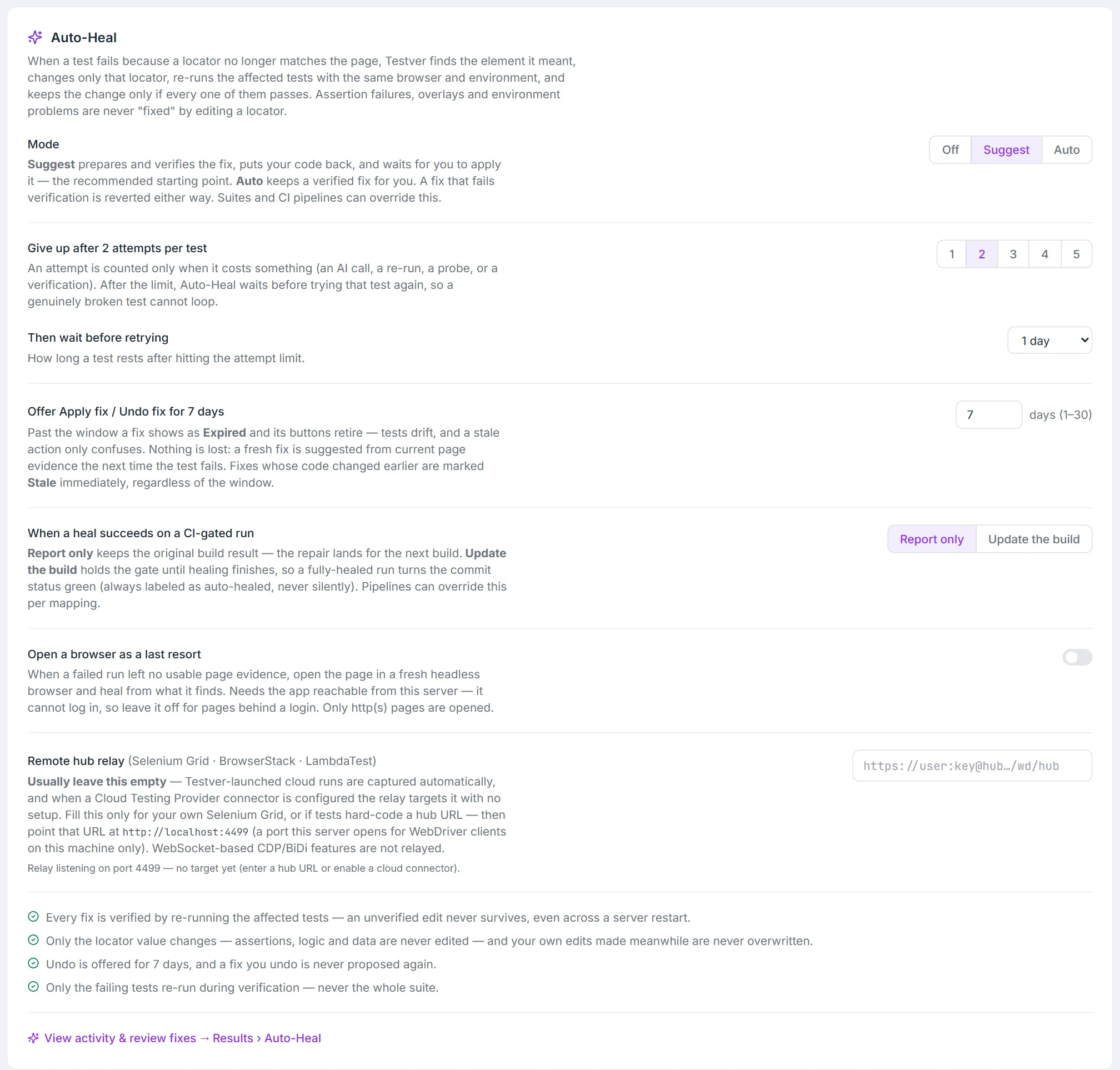
Section titled “Turning it on”Settings → General → Auto-Heal (admins only — the backend enforces it):
| Setting | Values | Notes |
|---|---|---|
| Mode | Off / Suggest / Auto | Default Off. Start with Suggest. |
| Give up after N attempts per test | 1–5 | Attempts are spent only on real cost — free skips never count. |
| Then wait before retrying | 6 hours – 1 week | How long a capped test rests before Auto-Heal tries again. |
| Offer Apply fix / Undo fix for | 1–30 days (default 7) | The review window — see When fixes retire. Saved when you leave the field. |
| When a heal succeeds on a CI-gated run | Report only / Update the build | Per-workspace default; pipeline mappings can override per pipeline. |
| Open a browser as a last resort | On / Off | The live probe. Opt-in; opens only http(s) pages and never cloud metadata addresses. |
| Remote hub relay | URL | Only for your own Selenium Grid or tests with a hard-coded hub URL: point them at http://localhost:4499. Cloud providers configured in Connectors need nothing here. A saved access key is shown as •••••• and never sent back to the browser. |
The section ends with four short guarantees (every fix is verified, only the locator value changes, undo is offered for the review window, only the failing tests re-run) and a View activity & review fixes → Results › Auto-Heal link.
Scopes can override the workspace default either way:
- Suites — each suite can set Inherit (‹mode›) / Off / Suggest / Auto (the suite’s Settings tab → Auto-Heal → Locator repair). Inherit shows what it currently resolves to.
- CI pipelines — each mapping can set Inherit / Off / Heal only / Heal + re-gate. Heal only uses the workspace mode (Suggest when the workspace is Off); Heal + re-gate always keeps verified fixes and holds the gate.
Who can do what: changing these settings needs the admin role; Apply fix and Undo fix need tester (they edit source files, the same bar as editing a file); everyone can view.
How it works, step by step
Section titled “How it works, step by step”- Trigger — strictly after a run completes and is saved. Nothing runs mid-test. Runs that fail while another heal is in progress queue up — nothing is dropped.
- Eligibility — failures where the element could not be found (not found, timed out waiting for an element, strict-mode ambiguity), including Selenium/Appium waits and Python
TimeoutExceptions whose traceback names the element. Failures where the element was found but couldn’t be used (an overlay intercepted the click, it was disabled or re-rendered) are explained and left alone — changing a locator doesn’t fix a page-state problem. Everything else goes to Failure Analysis. - Split by locator — tests are grouped by the exact locator that broke, so two tests failing with similar text on different elements are healed separately.
- Locate first — before spending anything, Auto-Heal finds the broken locator in your code: the test’s own file first, then page objects, helpers and locator repositories (JSON/YAML,
.properties,.env,.csv, Gherkin tables, Katalon.rsobject repositories). It recognizes each framework’s shapes —page.locator('#x'),getByRole('button', { name: 'X', exact: true })(and the Python, Java and .NET spellings),By.id("x"),(By.ID, "x"),@FindBy(id = "x"),AppiumBy.accessibilityId("x"), AndroidUiSelector().resourceId("…"), iOS predicatesname == '…', WebdriverIO'~x', Robotid:x— and your own helpers (this.testId('x'),po.find('button', 'Save')).- The stack decides duplicates. When a locator appears twice in a file or in several page objects, the failing stack trace (JS/TS, Python, Java, C#, Ruby) says which copy ran — the frame’s line, or the declaration of the member it used (
this.submit.click()→submit = …), or the page object the stack went through, or one the test reaches through its imports (test → fixture → base page → page object). Only when none of that decides is it left for a human. - No locator in the message? The failing source line from the stack is read instead; as a last resort one small AI call extracts it — and it must still be found verbatim in your code.
- Built at runtime? Template strings and concatenation (
`#row-${i}`,'#row-' + i,f"#row-{i}","#row-%s" % i) are healed by changing only the static part —#row-${i}→#item-${i}— never the expression. Anything else dynamic is refused with the value that failed spelled out.
- The stack decides duplicates. When a locator appears twice in a file or in several page objects, the failing stack trace (JS/TS, Python, Java, C#, Ruby) says which copy ran — the frame’s line, or the declaration of the member it used (
- Gather evidence and propose — see the next section. Every proposal is checked against your framework’s locator dialect and against the page evidence before anything is edited.
- Apply + verify — the fix is applied as an exact edit of that one locator (journaled first, so a crash is recoverable), then every affected test re-runs headlessly with the original run’s browser, environment and cloud target — by
file:linefor Playwright, by test for pytest and Maven, or your own single-test run command when you have set one. Only the target test decides the verdict; a neighbour in the same file failing for its own reasons doesn’t sink a correct fix. A verification that hangs is cancelled after 5 minutes and counts as failed.- Several broken locators in one test — when the fix works and the test now trips over the next broken locator, that one is healed from the verification run’s own evidence and the test is verified again (up to 3 locators). They are kept or put back together.
- A flaky verification (a failure that has nothing to do with locators) is retried once before anything is decided.
- Keep or put back — all pass → kept (Auto) or put back and offered as Fix ready (Suggest). If the test got further than before — its stack now fails later in the test, or on a locator Auto-Heal couldn’t fix — the change is put back and offered as Fix ready — partially verified, with what happened next; it is never kept unattended. Any other failure → put back and recorded as Reverted. Putting back is surgical: if the file changed meanwhile, only the locator is swapped back.
- Record — the run and each test get a stamp visible in Results; connectors subscribed to Auto-Heal Outcome are notified.
Evidence, cheapest first
Section titled “Evidence, cheapest first”| Evidence | Where it comes from | Cost |
|---|---|---|
| Recorded fallback | The recorder’s ranked alternatives for the step — the // Alt: [css] … (0.93) / // fallbacks: … notes written next to the locator in the code, and *.healing.json next to the test or page object | Free |
| Failure snapshot | Playwright’s accessibility snapshot at the moment of failure | Free |
| Failure page | The Playwright trace’s last DOM snapshot — the page exactly as it was when the test failed, client-rendered apps included | Free |
| Page DOM | The Playwright trace (every attribute on every page the run loaded) | Free |
| Live session | The test’s own browser or app session, captured while it ran — a failure triggers a short burst of captures, and the ones taken at the moment of failure are tried first, then the most recent pages. Pages with web components or iframes are read with shadow roots and same-origin frames included. | Free |
| Capture re-run | One plain re-run of the failing test to regenerate Playwright’s evidence | One test run |
| AI choice | When several page elements fit, one AI call picks one of them by number — the value always comes from the page, never from the model | One AI call |
| AI proposal | One bounded AI call, constrained to your framework’s locator style, told the test, the recorded step and the code around the locator, and checked against the page | One AI call |
| Live probe | Opt-in: open the page fresh — reusing a login saved by Explore & Automate for that site — and follow one same-site link toward the failing page | One headless browser |
Deterministic matching is tried on every piece of free evidence first: renamed test ids, ids, names, classes and attributes; CSS-module classes whose hash changed on rebuild (Button_primary__x7Ks9 → Button_primary__Qz81a); simple XPath values; link text and visible text; Android resource-ids and accessibility ids; for templates, the element family (row-3 → item-3). The variable holding the locator counts as context — this.emailInput points at email-input even when the old id was arbitrary. Only when none of that decides does an AI tier run. A positional selector (div > li:nth-child(3), //div[2]/span) is replaced with a stable one when the AI proposes.
What your code says the element is
Section titled “What your code says the element is”When the old value gives nothing to go on (readonly elementor = this.testId('select') for what is really the remember-me checkbox), Auto-Heal reads the code around the locator:
| Clue | Example | How it’s used |
|---|---|---|
| How the element is used | expect(this.elementor).not.toBeChecked(), .check() → checkbox or radio · .fill(), sendKeys("…"), .clear() → text input · selectOption(), new Select(…) → dropdown | Hard rule — an element of another kind is never proposed, by any tier, AI included. Clicks and visibility checks don’t constrain. |
| Elements already taken | loginForm = this.page.locator('#login-form') in the same page object | Hard rule — an element another locator in the file already targets isn’t the one this locator lost. |
| Your comment | // remember checkbox Element directly above the declaration, or at the end of its line (//, /** */, #, ///); a locator repository’s key (login.remember.checkbox = …) | Ranks candidates that pass the hard rules — “remember” → remember-checkbox; “checkbox” names the kind. |
| Step titles and methods | test.step('Accept the terms', …), Allure @Step("…"), Gherkin step definitions, the method it is used in (acceptTerms()) | Ranks candidates, like the comment. |
These clues decide on their own only when they leave exactly one element — for example, the only checkbox on the page that no other locator uses. Otherwise they narrow the list the AI chooses from and are included in its prompt. A comment can support a fix but never force one: comments go stale, so a comment that disagrees with how the code uses the element is ignored, and a comment that fits several elements equally (a heading like // Form fields) decides nothing. The fix’s explanation says which clues decided it, and a proposal refused because the code contradicts it is named in the skip reason. Verification still decides whether anything is kept.
What it will and won’t touch
Section titled “What it will and won’t touch”| Heals | Never touches |
|---|---|
Playwright getBy* calls in JS/TS, Python, Java and .NET (name / test id — options kept) and string selectors | Assertion values, URLs, waits and timeouts |
CSS selectors (ids, classes, data-testid / data-test / data-cy / data-qa, other attributes) | Expressions inside a template or concatenation — only its static text changes |
Selenium By.id / By.name / By.linkText / simple By.xpath, and @FindBy page factories | Complex XPath (axes, positions) — only the AI tier may propose, and it must return XPath |
| WebdriverIO, Robot Framework, Selenide, Nightwatch, TestCafe, Puppeteer and Katalon locators | Clicks blocked by overlays, disabled or re-rendered elements |
Appium resource-id, accessibility id, Android UiSelector and iOS predicate values | Anything without page evidence to justify it |
Cypress cy.get(…) selectors and cy.contains(…) text | A fix you undid before — it is never proposed again |
Locators in data files: .properties, .env, .csv, Gherkin tables, Katalon .rs | Test reports and logs that merely mention the locator |
Framework support
Section titled “Framework support”| Framework | Evidence | Notes |
|---|---|---|
| Playwright (JS/TS) | Failure snapshot + trace DOM + recorded fallback | Richest evidence; works everywhere Playwright runs. |
| Playwright (Python via pytest-playwright) | Trace (verification runs ask for one) + recorded fallback → live probe | The Python spellings (get_by_role(…, name=…)) are healed in place. |
| Playwright (Java / .NET) | The trace your project saves on failure + recorded fallback → live probe | setName("…") / Name = "…" are healed in place. Java logs getByTestId("x") as internal:attr=[data-testid="x"] — Auto-Heal reads it as the getByTestId call in your code. Java and .NET switch tracing on in the project’s own code, so save context.tracing() to a zip when a test fails: Auto-Heal finds it wherever it is saved (reports/traces/<test>_<time>.zip, bin/…/playwright-traces/…). |
| Selenium (Java, Python, C#, Ruby, Kotlin), Selenide | Live session (local drivers, Grid via the relay, cloud) → live probe | New driver per test is fine — discovery keeps looking all run. |
| WebdriverIO, Nightwatch | Live session → live probe | Web and Appium. |
| Robot Framework (SeleniumLibrary, AppiumLibrary) | Live session → live probe | .robot / .resource files are patched too. |
| Appium (Java, Python, C#, Ruby, JS) | Live app session (the view hierarchy) + recorded fallback | resource-id, accessibility id, UiSelector and iOS predicate values. The probe doesn’t apply to native apps. |
| Cypress | Live page via the browser’s DevTools (local Electron, Chrome, Edge) → recorded fallback → live probe | The app’s own frame is read, never the Cypress runner. Firefox runs have no capture. |
| TestCafe, Puppeteer, Katalon | Recorded fallback → live probe | Their error formats are understood; there is no session to capture. |
Cloud runs heal too: Testver ties each cloud session to the run that created it and reads the page through the vendor’s hub — same evidence quality as local. See Cloud Grid Execution.
Local Firefox and Safari: geckodriver and safaridriver don’t let other programs read their sessions. Point the test at the relay (http://localhost:4499) and Firefox is captured like any Grid session; otherwise the skip reason says so, and the live probe or a recorded test are the fallbacks.
What you see on a run
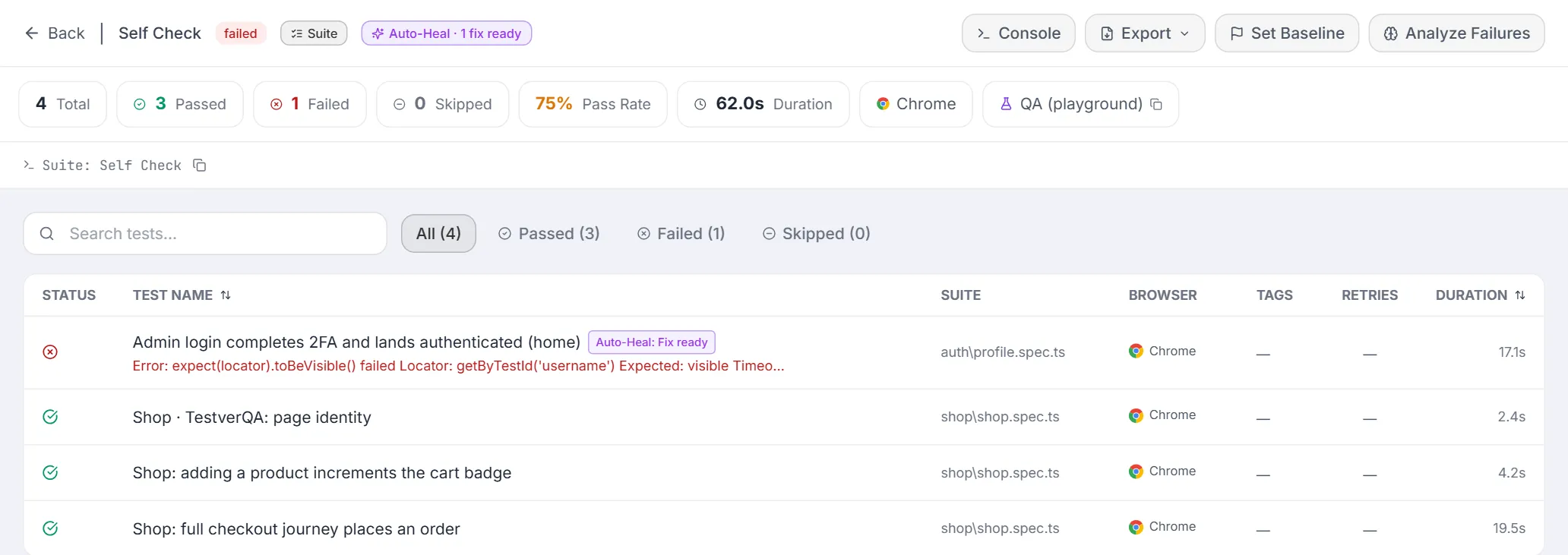
Section titled “What you see on a run”- Run header chip —
Auto-Heal · 1 healed, 2 fix ready, 1 reverted(a suggestion past its review window counts as expired, never as ready). - Test row chips —
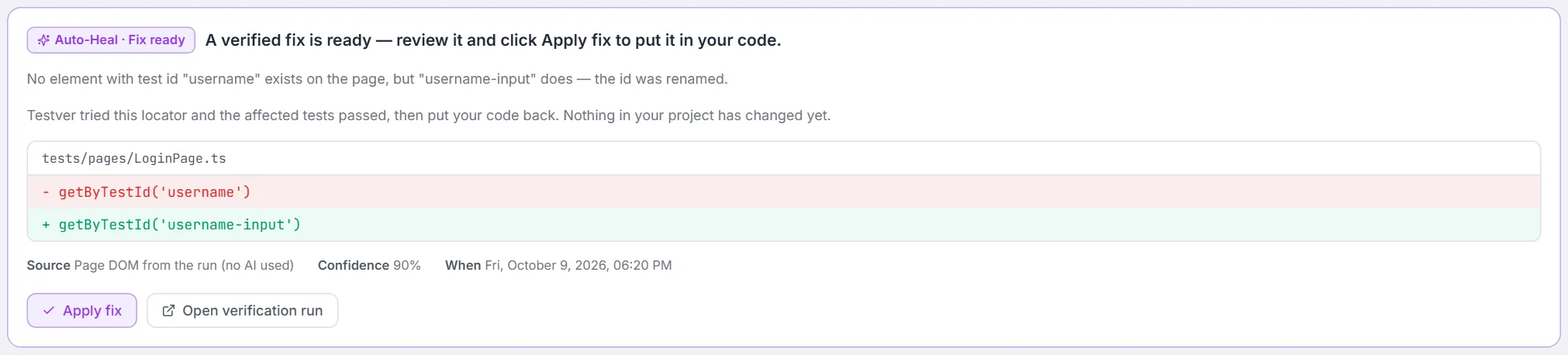
Auto-Heal: Healed / Fix ready / Fix ready (partial) / Reverted / Undone,Fix expired(a suggestion past its review window, never shown as ready), or Not healed (hover for the reason). - Per-test panel — the files the fix touched with the before/after locator (for a chained heal, every repaired locator on one line, separated by ·, plus N repaired together in this test), the evidence source, a confidence percentage, what happened after a partially verified fix, and the next action: Apply fix (Fix ready), Undo this fix (Healed), or Fix in AI Assistant (Reverted / Undone), plus Open verification run when one exists. A fix past its review window, or whose code has changed, says why its button is gone. The Assistant is told what Auto-Heal already tried, so it doesn’t repeat it.
- Not healed card — Not healed automatically with the plain-language reason, Fix in AI Assistant, and View group (N tests) (the test’s Failure Analysis group, when it has one).
- Failure Analysis — each group header shows the same verdict as the test’s Auto-Heal panel, taken from the group’s first stamped test:
Auto-Heal: ‹state›,Auto-Heal: Fix ready (partial),Fix expiredorAuto-Heal: Stalefor a fix that can no longer be applied — orAuto-Heal: not healed, so nobody sends the Assistant after a fix that is already waiting. - Runs list — Auto-Heal’s own verification runs carry a Heal Verify badge.




Reviewing fixes — the Auto-Heal tab
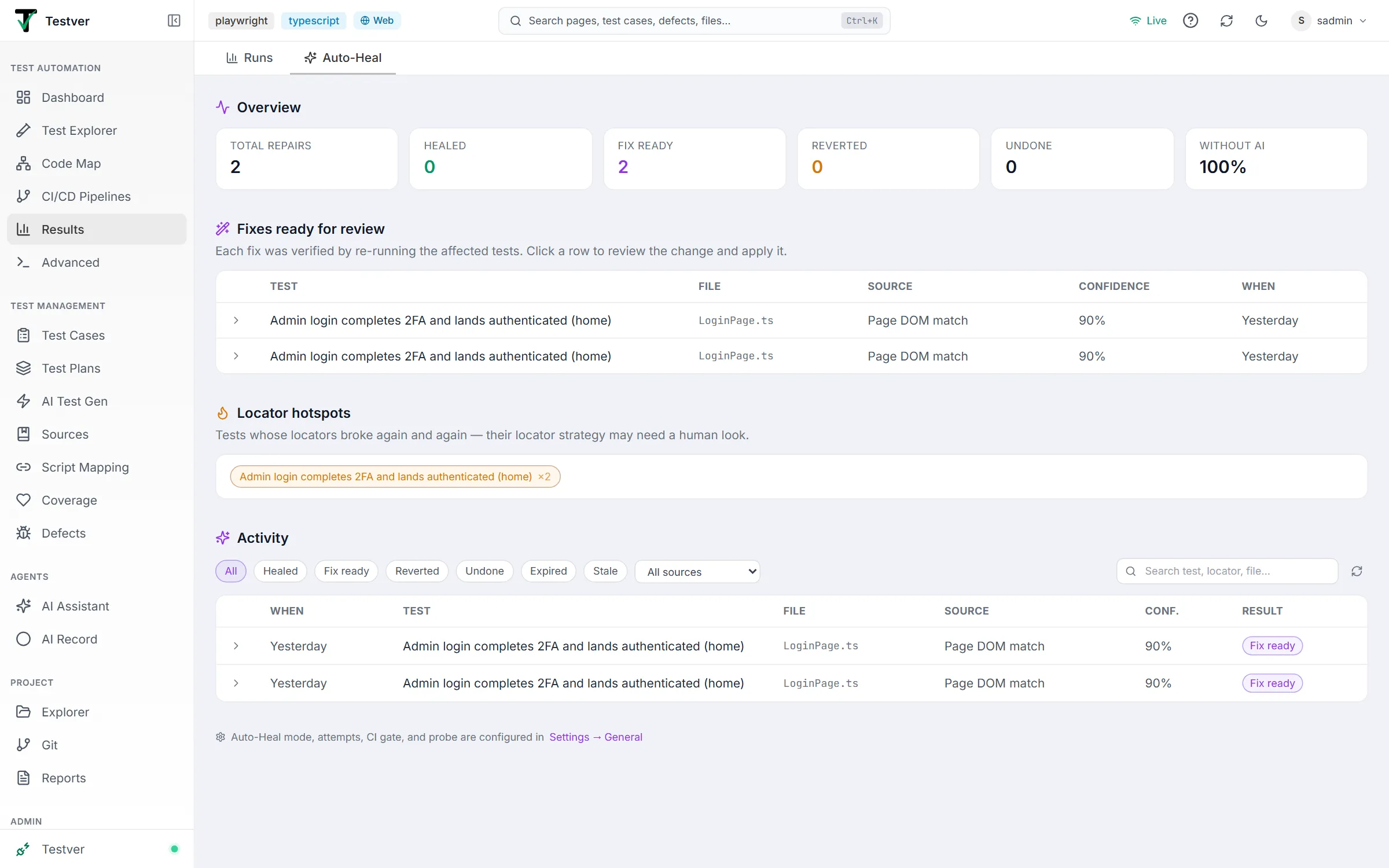
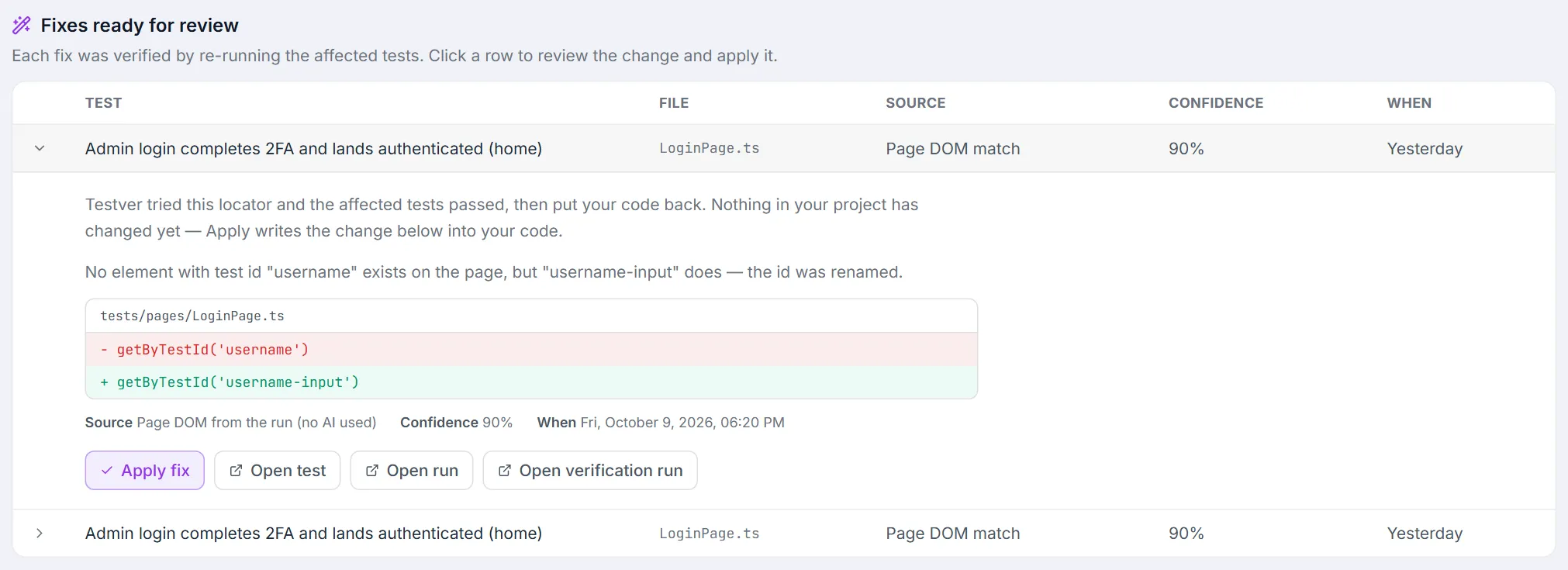
Section titled “Reviewing fixes — the Auto-Heal tab”Results has a dedicated Auto-Heal tab (/results?view=auto-heal) covering every repair across all runs — including suite and cycle runs. It is a work queue first and a log second.
- Overview tiles — total repairs, healed, fix ready, reverted, undone, and the share solved with no AI at all. Fix ready counts only fixes you can still act on.

- Fixes ready for review — the queue: each verified fix with its test, file, evidence source, confidence, and when it was prepared.

- Locator hotspots — up to five tests with two or more Auto-Heal records (shown as ×N): the app changes faster than that test’s locator strategy. Click one to open the test.

- Activity — the full history, filterable by state (All / Healed / Fix ready / Reverted / Undone / Expired / Stale), by evidence source, and by free-text search. Rows expand with a click or the keyboard (Enter / Space).

Expanding a row shows what the state means (for Fix ready, Healed, a reverted fix with a reason, and retired fixes), the rationale, the exact before/after per file, source + confidence + time, how many tests the change healed together, and the actions that apply — Apply fix (Fix ready), Undo this fix (Healed), Fix in AI Assistant (Reverted / Undone), plus Open test, Open run and Open verification run (each in a new tab).
With no repairs yet, the tab reads No Auto-Heal activity yet, names the current mode, and offers Configure Auto-Heal →.
Applying and undoing
Section titled “Applying and undoing”- Apply writes the recorded edit into your files and marks the fix Healed. The same change is often suggested by several runs — applying once retires every sibling suggestion of the identical change, in suite child runs and aggregates alike.
- Undo swaps the healed locator back in every file of the change (all or nothing — never half-undone) and marks the record Undone. It asks for confirmation first (Undo this fix — this cannot be re-applied, with Undo the fix / Keep the fix): the affected tests will most likely fail again, and Auto-Heal remembers the rejection and never proposes that exact change again. Version control is the way back if you change your mind.
- Both refuse while a heal is verifying (try again a moment later), and both re-check the recorded edit against your current files first, so neither can corrupt code that has moved on.
When fixes retire
Section titled “When fixes retire”| State | Meaning | What to do |
|---|---|---|
| Expired | Older than the review window. | Nothing — a fresh fix is suggested from current page evidence the next time the test fails. |
| Stale | The code changed since the fix was prepared, so the recorded edit no longer matches your files exactly once. | Nothing — same as above. |
Retired entries keep their row in Activity with the reason spelled out; only the actions go. The server enforces both rules — Apply and Undo are refused once a fix retires. The test’s Auto-Heal panel, the Failure Analysis group chip and the Auto-Heal tab show Expired and Stale; the run header and test-row chips mark only time-expired fixes (expired / Fix expired).
Auto-Heal and CI
Section titled “Auto-Heal and CI”With a pipeline gated on Testver (delegated execution):
- Report only (default): heals happen and are reported; the build verdict is untouched.
- Update the build: the gate holds while healing is queued or in progress; if all failed tests are healed and verified, the build flips to passed with “healed & verified” pushed to your CI provider. Anything less stays failed. Suggest mode never flips a gate.
- CI Runs rows show the heal detail per run (”✦ N healed & verified” / “N fixes ready” / “N reverted”).
Security
Section titled “Security”- Settings are admin-only and Apply / Undo need the tester role — enforced by the server, not just the UI.
- Verification runs authenticate with a secret that exists only inside the Testver server process; a request that merely claims to be Auto-Heal is rejected.
- The relay on port 4499 serves only WebDriver clients on the same machine: it refuses browser requests and non-local hosts, forwards only to the configured hub, and never sends the hub’s credentials anywhere else.
- The live probe opens only http(s) pages, never cloud metadata addresses, and never follows a link to another site.
Tips for heal-friendly tests
Section titled “Tips for heal-friendly tests”- Name locator variables meaningfully.
this.emailInput = page.getByTestId('…')gives the matcher real context;this.el3gives it nothing. - Describe a locator in a short comment when its name doesn’t say what it is.
// remember-me checkboxabovereadonly elementor = …is enough for Auto-Heal to pick the right element after a rename. Code Testver writes already does this: the AI Assistant, Explore & Automate, the recorder and AI Record, and the framework scaffolds put a one-line description (// "Remember me" checkbox on the sign-in form) above every locator they add, and keep alternative locators on their own// Alt:line — which Auto-Heal also reads, so a recorded test heals even without its.healing.json. - Keep page-object assertions next to the element.
expect(this.rememberMe).not.toBeChecked()tells Auto-Heal the element is a checkbox. - Record with Testver — recorded tests carry ranked fallback locators, the cheapest evidence there is.
- Keep each locator in one place (a page object). A locator copied into several files that the failing test doesn’t use is deliberately left alone.
- Keep traces on for Playwright — the trace is the richest evidence Auto-Heal gets. In Java (JUnit 5), save it from an extension that implements
AfterTestExecutionCallback: it runs before@AfterEachcloses the browser. ATestWatcherruns after it, when there is nothing left to save. Frameworks scaffolded by Testver do this. - A kept heal is a real code edit. It’s in your working tree — commit it like any other change.
- The probe is a fallback, not the plan. It reuses a login saved by Explore & Automate for the site when one exists; otherwise pages behind logins show it the sign-in screen. Session capture doesn’t have that problem.
Troubleshooting
Section titled “Troubleshooting”| What the test says | Meaning | Fix |
|---|---|---|
| ”…was not found in any source file — it may be built dynamically… The failing value was …” | The locator is assembled at runtime in a way that isn’t a simple template — healing it is a judgment call. The value the test actually used is named. | Fix in AI Assistant. |
| ”…appears 2 times in … — refusing to guess…” / “…was found in N files…” | The locator isn’t unique enough to edit safely, and the stack trace didn’t say which copy ran. | Keep it in one page object, or fix by hand. |
| Fix ready — partially verified | The fix got the test past the broken step; it then failed on something else (shown). | Apply it if the next failure is a separate problem, then fix that one. |
| ”…local Firefox (geckodriver) does not let other programs read its session…” | No page evidence exists for a local Firefox / Safari run. | Use the relay, the live probe, or a recorded test. |
| ”…Refused because the code contradicts them: “login-form” (the code uses it as a checkbox…)” | A candidate looked right by name but the code uses the element differently, or another locator already covers it. | Nothing — add a short comment describing the element so the right one can be picked, or fix by hand. |
| ”…Playwright for Java/.NET left no trace…” | The Maven / dotnet run saved no trace for the failing test, so Auto-Heal couldn’t see the page. | Save context.tracing() to a zip when a test fails (see the tip above), or turn on the live probe. |
| ”No safe fix was found … no page evidence was captured” | The session ended before its page could be read and no other evidence existed. | Turn on the live probe, record the test with Testver, or (remote frameworks) point them through the relay. |
| ”…the live probe found no page URL to open…” | Neither the trace, the code, the cloud session log, nor config files revealed the app URL. | Put the base URL in the project config, or rely on session capture. |
| ”Auto-Heal already tried N time(s)…” | Repeated attempts failed — likely not a locator problem at all. | Investigate; it retries after the cooldown. |
| ”Not auto-healable: the element was found but could not be used…” | An overlay, disabled element or re-render — not a locator problem. | Fix the page state / waits by hand or with the Assistant. |
| ”…is one you undid before, so it will not be applied again” | You rejected that exact change earlier. | Fix by hand, or use the Assistant. |
| ”The server stopped while a fix was being verified…” | A restart interrupted a heal; the temporary edit was reverted at startup. | Nothing — it heals again on the next failure. |
| Reverted, with “Note: … was edited while the fix was being verified…” | Someone changed the file mid-verification in a way that made the locator impossible to swap back automatically; the file was left as it is. | Check that file’s locator by hand. |
| Build went green “by itself” | In Update-the-build mode, a fully healed and verified run flips the gate. | Review the heal in Results; Undo if you disagree. |
Will it change my tests without telling me? No. Suggest mode changes nothing until you click Apply. Auto mode keeps verified fixes, but every one is visible in Results with one-click Undo, and it’s an ordinary change in your working tree.
Can I redo an undo? Not from Testver — Auto-Heal remembers undone fixes and never proposes that exact change again. Your version control holds it.
Does it use AI on every failure? No — deterministic matching on free evidence handles the common cases; the AI tier runs once, only when needed, only with evidence, and its answer must match the page before it is tried.
What does verification cost? A headless re-run of the affected tests (on cloud runs, cloud minutes). A suggestion waiting for review is reused when the same test fails again, instead of being verified again.
Can it heal a test that fails behind a login? Yes, when the evidence is a session capture (the test’s own logged-in session) — the default for WebDriver-family and Appium runs.