

Test AutomationCI/CD PipelinesCI Runs tab
CI Runs tab
The CI Runs tab of the CI/CD Pipelines screen (/pipelines?tab=ci-runs) is the complete history of every CI-triggered run, newest first.
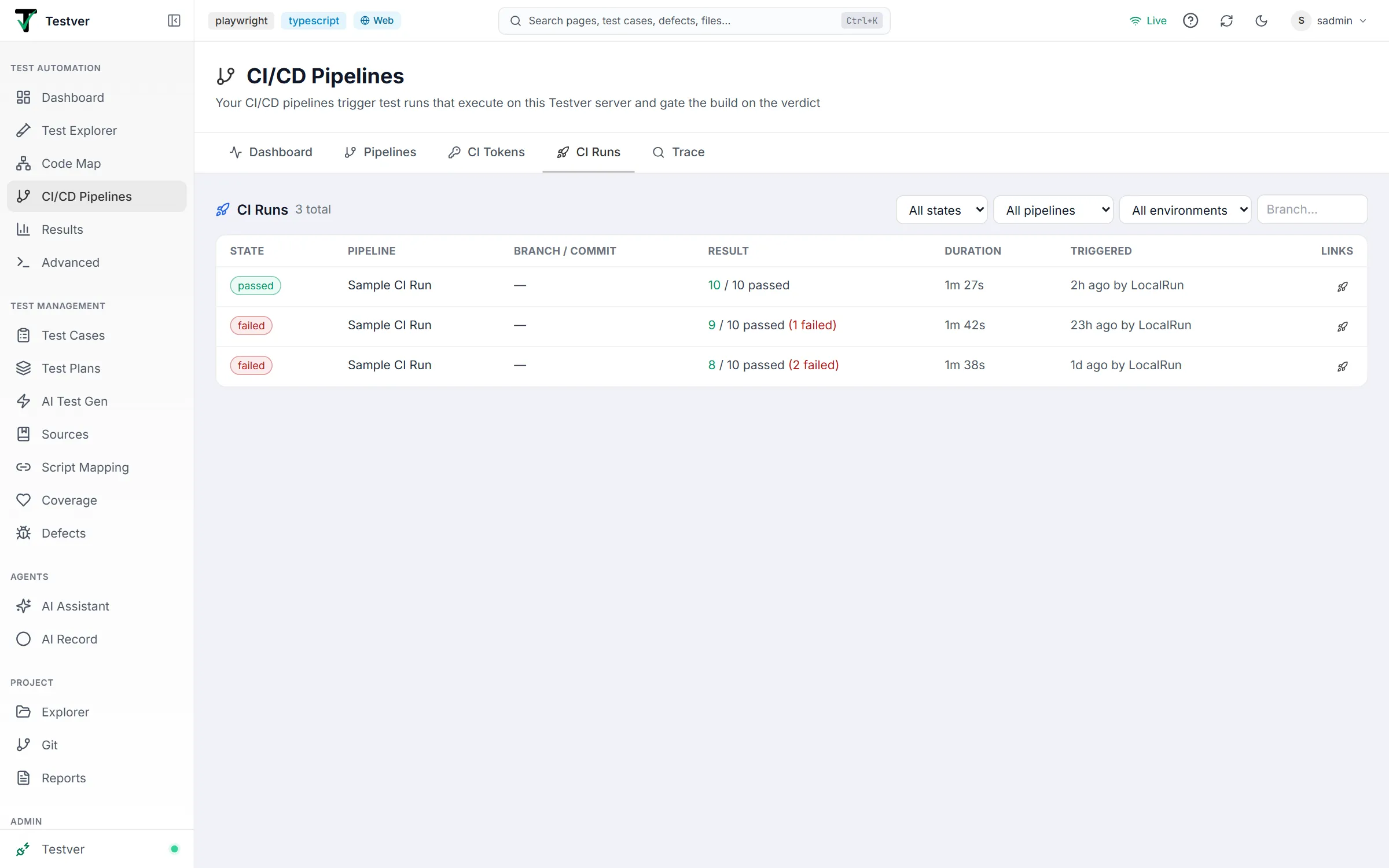
Columns
Section titled “Columns”| Column | What it shows |
|---|---|
| State | The run’s current state (see below). |
| Pipeline | The mapping name, plus the CI build number when the pipeline sent one. |
| Branch / Commit | The branch and short commit from the trigger payload. Shows — when the trigger didn’t include them (for example a plain CLI trigger). |
| Result | Passed / total, with failures called out in red, and the error message for runs that couldn’t complete. PR status not posted appears when status push-back failed. When Auto-Heal ran, a line adds ✦ N healed & verified, N fixes ready, or N reverted. |
| Duration | How long the run took on the Testver server (time waiting in the queue isn’t counted). |
| Triggered | How long ago, and which CI token or CLI started it. |
| Links | ■ cancels a queued or running run (testers and admins); ↗ opens the CI build in your CI platform; the rocket opens the full Testver report in Results. |
Run states
Section titled “Run states”| State | Meaning |
|---|---|
queued | Accepted and waiting for a free execution slot; the position is shown next to the state. CI runs execute one at a time. |
running | Executing on the Testver server right now. |
passed | Finished with no failures — the build was gated green. |
failed | Finished with failures — the build was gated red. |
cancelled | Cancelled from this tab, the CI job, the CLI (Ctrl-C), or the API. |
error | No verdict: the target stayed busy past the retry window, the run found no tests, it exceeded the mapping’s time limit, or the server restarted while it was executing. Counts against the pass rate. |
Cancelling a run
Section titled “Cancelling a run”The ■ button (Cancel this run) on a queued or running row asks for confirmation (Cancel run), then cancels it: a queued run leaves the queue, a running one stops on the Testver server. Either way the CI job — if it’s still waiting — fails with cancelled.
Filters
Section titled “Filters”Four controls narrow the list: state, pipeline, environment, and a free-text branch box. The heading shows how many runs match (3 of 24), and ✕ Clear resets all four at once.

Filters are stored in the address bar, so a filtered view can be bookmarked or pasted to a colleague — for example /pipelines?tab=ci-runs&pipeline=pr-gate-main&state=failed.
The tab loads the latest 200 CI runs; when more exist, the heading says so (latest 200 of …). Once the list spans more than one page, controls appear under the table: Rows per page (10, 20, 50 or 100; default 20), Showing 1–20 of N runs, and «, ‹ Prev, Page n of m, Next ›, ». Changing a filter returns to the first page.
CI runs vs test runs
Section titled “CI runs vs test runs”A CI run is the trigger record — who asked for it, for which commit and build, and what state it reached. The test run is the execution itself, with the tests, artifacts, and analysis, and lives in Results.
The rocket link connects them. Going the other way, a CI-triggered run in Results carries a CI badge and a CI build link, so you can hop between the pipeline and the report from either side.
Related
Section titled “Related”- CI/CD Pipelines overview — how triggering and gating work.
- Dashboard tab — summaries and click-through filtering.
- Trace tab — find the runs that gated a specific commit.
- Results — the full report behind each row.