

Test AutomationCI/CD Pipelines
CI/CD Pipelines
Introduction
Section titled “Introduction”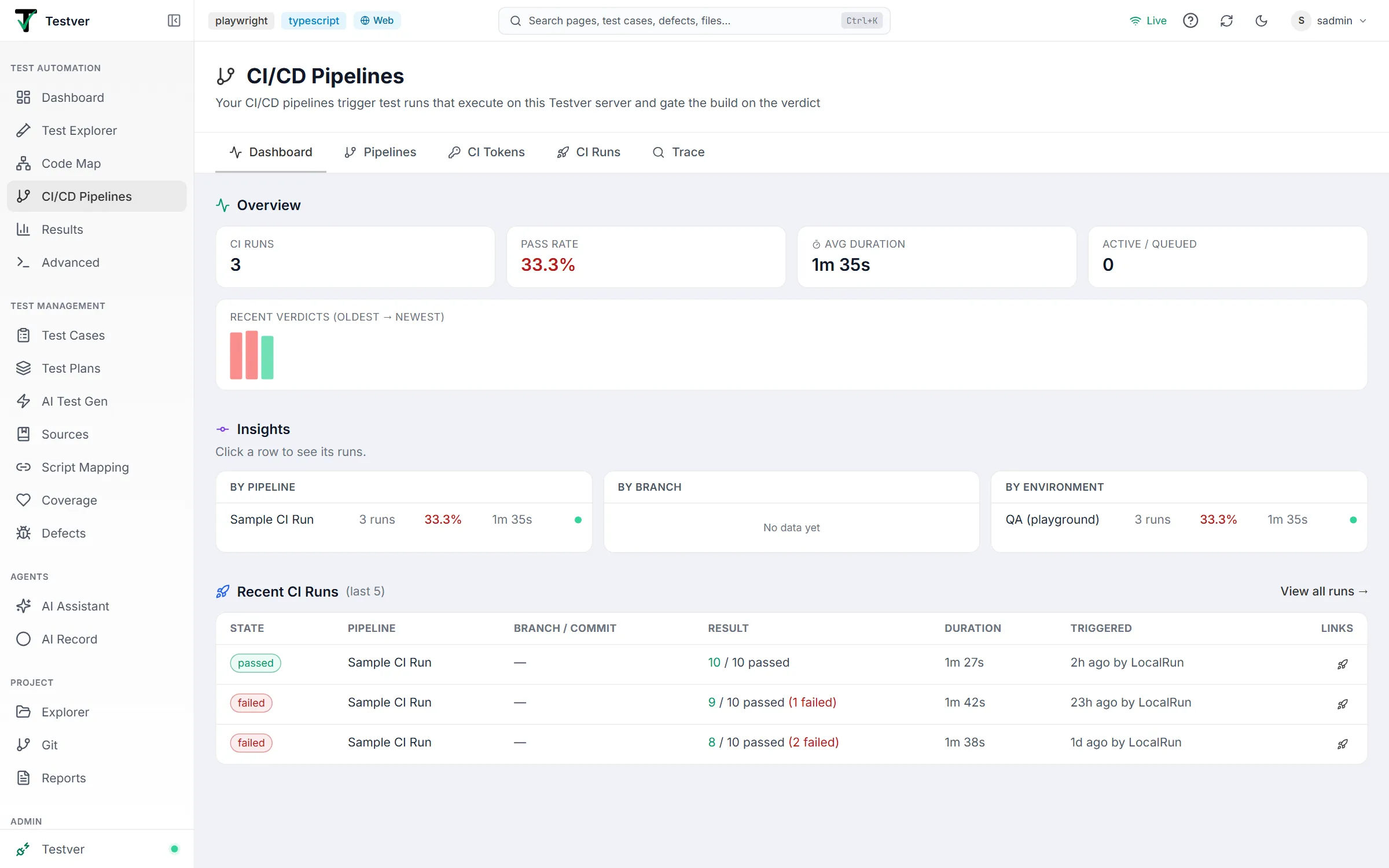
What is the CI/CD Pipelines screen?
Section titled “What is the CI/CD Pipelines screen?”The CI/CD Pipelines screen (at /pipelines) is Testver’s CI/CD control plane. It connects your build pipelines to your test suites so that every push, pull request, or deploy can automatically run tests on your Testver server — and mark the build green or red based on the result.
The key idea is delegated execution. Your CI/CD platform does not install browsers, frameworks, or dependencies, and it does not run the tests. It makes one API call to Testver, waits for the verdict, and passes or fails the build accordingly. Testver does the actual work on its own machine, exactly the way it does when you click Run in the UI.
Why delegated execution?
Section titled “Why delegated execution?”Running browser tests on CI runners is the usual approach, and it has real costs: every job re-installs Node, browsers, and dependencies; runs are slow; and the rich output — screenshots, videos, traces, healing data, AI failure analysis — either doesn’t exist or gets thrown away with the runner.
Because Testver executes the tests itself, every CI-triggered run is a normal Testver run. It appears in Results with full artifacts, feeds the trend charts, can be compared against a baseline, and can be analysed and handed to the AI Assistant to fix — none of which is possible when the run vanishes with an ephemeral CI container.
Who this guide is for
Section titled “Who this guide is for”- QA engineers who want a pull request to fail when a regression suite fails, without maintaining CI YAML.
- Developers who want the PR to show a test verdict, and a link to the full report when it’s red.
- DevOps / build engineers who want a thin, portable CI job instead of a per-project browser-install pipeline.
- Test leads who need to see pass-rate trends per pipeline, branch, and environment — and trace a deploy back to the tests that gated it.
Where to find it
Section titled “Where to find it”CI/CD Pipelines sits in the left navigation under Test Automation, between Code Map and Results, marked with a branch icon.
The active tab is stored in the address bar, so /pipelines?tab=ci-runs opens straight to the CI Runs tab. Filters are stored there too, which makes any filtered view — for example “all failed runs of the pr-gate-main pipeline” — safe to bookmark and share.
The five tabs
Section titled “The five tabs”Each tab has its own guide:

| Tab | Guide | What you do there |
|---|---|---|
| Dashboard | Dashboard tab | See CI health: KPIs, a verdict trend, and insights per pipeline, branch, and environment. |
| Pipelines | Pipelines tab | Create pipeline mappings and generate the CI config for each one. |
| CI Tokens | CI Tokens tab | Create and revoke the machine tokens CI jobs authenticate with. |
| CI Runs | CI Runs tab | Browse and filter the full history of CI-triggered runs. |
| Trace | Trace tab | Find every run that gated a given commit or branch. |
Key terms (glossary)
Section titled “Key terms (glossary)”| Term | What it means in Testver |
|---|---|
| Delegated execution | Tests run on the Testver server; the CI platform only triggers the run and gates the build on the result. |
| Pipeline mapping | A saved rule: “when this pipeline triggers, run this suite / cycle / command with these settings.” Its name is the trigger key. |
| Trigger key | The mapping name your CI job (or the CLI) passes to identify what to run. |
| CI token | A machine token (tvci_…) used by CI jobs and the CLI to authenticate to the Gate API. Scoped to the mappings it may trigger, optionally expiring, created by admins. Shown once at creation. |
| Gate API | The endpoints CI calls: trigger a run, poll its status, cancel it. |
| Gate mode | Whether the CI job waits for the verdict (exit code gates the build) or fires and forgets (a commit status carries the verdict). Explained with examples under Gate mode. |
| CI run | One trigger, tracked by Testver. It points at the underlying test run that actually executed. |
| Queue position | Where a triggered run sits in Testver’s global queue. CI runs execute one at a time so bursts queue instead of overloading the server. |
| Status push-back | Testver posting a commit status to your git host so pull requests show the verdict. |
How it works
Section titled “How it works”- Your pipeline runs a small job that calls Testver’s Gate API, passing the mapping name plus the branch, commit, and build metadata.
- Testver records a CI run and places it in a global queue. It responds immediately with a run id, a report link, and (if the server is busy) a queue position.
- When a slot frees up, Testver executes the mapped suite, cycle, or command exactly as a manual run — the test project as it is on the server, same environments, browsers, artifacts, and reporting.
- The CI job polls until the run reaches a terminal state, prints the summary and report link, and exits 0 (passed), 1 (tests failed) or 2 (no verdict — the run errored, was cancelled, timed out, or Testver couldn’t be reached), so the build is marked pass or fail. (In fire-and-forget mode the job exits immediately and a commit status delivers the verdict instead.)
- The finished run appears in Results with a CI badge and a link back to the CI build.
Getting Started
Section titled “Getting Started”Prerequisites
Section titled “Prerequisites”- Your Testver server must be reachable from your CI runners, over HTTPS whenever that crosses the internet (the token travels with every request).
localhostonly works for a runner on the Testver machine itself; self-hosted runners on the same network use the server’s LAN address, and cloud runners (GitHub-hosted, GitLab.com shared) need a publicly reachable address. The Wire into CI dialog warns when the address you enter can’t work. - The CI runner needs
curlandjq. The generated configs install them where needed (GitLab and Bitbucket use alpine +apk, CircleCI installsjq); on Jenkins agents you may need to install them yourself. - Something to run: a Suite (Test Explorer → Suites), a Test Cycle with mapped automation (Test Plans & Cycles), or a run command.
Set up your first gate in four steps
Section titled “Set up your first gate in four steps”-
Create a pipeline mapping — on the Pipelines tab, click New Mapping, give it a name (this is the trigger key, e.g.
pr-gate-main), and pick what it should run. -
Create a CI token — an admin opens the CI Tokens tab, names a token, chooses which mappings it may trigger and when it expires, and clicks Create Token. Copy the value immediately; it is shown only once. Store it as a secret in your CI platform (conventionally
TESTVER_CI_TOKEN). -
Generate the pipeline config — back on the Pipelines tab, click the config icon on your mapping, pick your platform and branches, and click Generate Config. Save it to your project, then commit and push it. (Jenkins and Azure Pipelines need one more step — see Platform setup.)
-
Trigger it — push a commit, or try it from any terminal first:
Terminal window export TESTVER_CI_TOKEN=tvci_…npx -y testver trigger --server https://testver.your-company.com --mapping "pr-gate-main"
Triggering From Anywhere (CLI)
Section titled “Triggering From Anywhere (CLI)”The Gate API is not CI-only. The same trigger-wait-gate flow ships as a terminal command, usable from any machine that can reach your Testver server — a laptop, a cron job, a git hook, or another team’s tooling.
The Wire into CI dialog on each mapping shows the ready-made command:

# Gate on a saved mapping (waits; exits 0 = passed, 1 = failed, 2 = no verdict)testver trigger --server https://testver.your-company.com --mapping "pr-gate-main" --wait
# Target a suite, cycle, or command directly (needs a token that allows ad-hoc targets)testver trigger --suite "Regression Suite" --env staging --waittestver trigger --cycle <cycleId> --waittestver trigger --command "npx playwright test --grep @smoke" --wait
# Fire and forget — prints the run id and report URL immediatelytestver trigger --mapping "nightly" --no-wait
# Chain it: deploy only if the smoke gate passestestver trigger --mapping "smoke" --wait && ./deploy.sh| Flag | Purpose |
|---|---|
--server | Testver base URL (or set TESTVER_SERVER). |
--token | CI token (or set TESTVER_CI_TOKEN). |
--mapping / --suite / --cycle / --command | What to run. --suite, --cycle and --command are ad-hoc targets — the token must allow them (see CI Tokens). |
--env, --browser | Trigger-time overrides. Must be names from Settings → Run Commands; an unknown name is refused with the list of known ones. |
--sha, --branch, --build-url, --build-number, --provider | Trigger metadata, recorded on the run and used for status push-back and tracing. A sha must be 7–40 hex characters. |
--wait / --no-wait | Wait for the verdict (default) or return immediately. |
--json | One machine-readable JSON object (ciRunId, runId, state, summary, reportUrl, error) for every outcome. |
--timeout | Seconds to wait before giving up and cancelling the remote run (default 3600). |
Exit codes — the same for the CLI and the generated CI jobs:
| Code | Meaning |
|---|---|
0 | Passed (or, with --no-wait, triggered). |
1 | The tests ran and some failed. |
2 | No verdict: the trigger was refused, the run errored, was cancelled or timed out, or Testver couldn’t be reached. |
130 | Interrupted with Ctrl-C. |
Pressing Ctrl-C while waiting — or the CI platform cancelling the job — cancels the remote run as well, so an abandoned gate doesn’t keep occupying the queue.
Gate API reference
Section titled “Gate API reference”The generated CI jobs and the CLI use three endpoints. Every call sends the CI token as Authorization: Bearer tvci_….
POST /api/ci/trigger
Section titled “POST /api/ci/trigger”| Field | Meaning |
|---|---|
mapping | Name of a pipeline mapping (current or previous name). |
suite / suiteId, cycleId, command | Ad-hoc target instead of a mapping — only when the token allows it. |
environment, browser | Overrides; names from Settings → Run Commands. |
sha, branch | The commit being built (7–40 hex) and its branch. Recorded on the run; used by status push-back and Trace. |
buildUrl, buildNumber, provider | Link back to the CI build, its number, and the CI platform name. |
Answers 202 with ciRunId, runId (once dispatched), state (queued or running), queuePosition, mapping, reportUrl and statusUrl. Refusals answer 400 (bad input), 401 (token invalid, revoked or expired), 403 (outside the token’s scope), 404 (no such mapping or suite), 409 (mapping disabled) or 429 (queue full), each with an error message.
GET /api/ci/runs/:id/status
Section titled “GET /api/ci/runs/:id/status”Answers ciRunId, state (queued, running, passed, failed, cancelled or error), queuePosition, mapping, runId, summary (total, passed, failed, skipped), error, createdAt, finishedAt and reportUrl. A token only sees runs it may trigger; other ids answer 404.
DELETE /api/ci/runs/:id
Section titled “DELETE /api/ci/runs/:id”Cancels a queued or running run and answers ciRunId, state and an optional note.
Results Integration
Section titled “Results Integration”CI-triggered runs are ordinary Testver runs. In Results they carry a CI badge from the moment they start, and the run header shows CI · <pipeline> #<build> plus a CI build link back to the pipeline. Everything else behaves exactly as for a manual run: live progress while executing, per-test detail, screenshots and videos, console output, trends, comparison and baselines, Failure Analysis and Fix in AI Assistant.
Common Tasks (How Do I…?)
Section titled “Common Tasks (How Do I…?)”| I want to… | Do this |
|---|---|
| Gate a GitHub pull request on a suite | Create a mapping targeting the suite → create a CI token → Wire into CI → GitHub Actions → Wait & gate → Generate Config → Save to project, commit, and add the token as a repo secret. See the Pipelines tab. |
| Run a release cycle’s automation from CI | Create a mapping with the Cycle target and wire it into your release pipeline. |
| Use different settings per pipeline | Add Environment / Browser overrides on the mapping instead of duplicating the suite. |
| Make sure the gate tests the new build | Deploy the build to the environment your tests use first, then trigger the gate. |
| Show the verdict on a PR without holding a CI runner open | Enable status push-back on the mapping, then generate the config in Fire-and-forget mode. |
| Trigger a run from a shell script | testver trigger --mapping "…" --wait — it exits 0 on pass, 1 on fail, 2 when there is no verdict. |
| Stop a running CI run | Click the ■ (Cancel this run) button on the run in the CI Runs tab, cancel the CI build (the waiting job passes the cancel on — fire-and-forget jobs have already exited, so cancel those in Testver), press Ctrl-C in the CLI, or call DELETE /api/ci/runs/:id. |
| Rename a mapping without breaking CI | Rename it — the old name keeps triggering it until you click Forget old names. |
| See only failed runs of one pipeline | On the Dashboard, click that pipeline in Insights, then filter state to failed. |
| Find what tested a deploy | Trace tab → paste the deployed commit SHA. |
| Retire a pipeline safely | Disable the mapping (triggers are rejected) or revoke its token, then remove the CI config. |
Tips & Best Practices
Section titled “Tips & Best Practices”- One mapping per pipeline purpose. A
pr-gateon a fast smoke suite and anightlyon the full matrix beats one mapping you keep re-configuring. - Keep the server’s test project current. Runs use the test code as it is on the Testver server — pull the latest test changes there (for example from the Git screen) before a gate depends on them.
- Set a time limit on long pipelines. A run that exceeds its mapping’s limit (default 240 minutes) is cancelled on the server and ends in
error, so a hung run can’t block the queue forever. - Use fire-and-forget for long suites. A 40-minute suite holding a hosted CI runner open costs CI minutes; a commit status delivers the same verdict for free.
- Name mappings after the pipeline, not the suite. The name is a contract with your CI config —
pr-gate-mainsurvives a suite rename;regression-suitedoesn’t. - Keep the queue in mind. CI runs execute one at a time. If several pipelines fire together, later ones queue — expected behavior, and the queue position appears in the CI log. The queue holds up to 100 waiting runs; beyond that, triggers are refused with
429until it drains. - Test the mapping from a terminal first.
testver trigger … --waitproves the mapping, token, and connectivity before you debug it through a CI job.
Troubleshooting & FAQ
Section titled “Troubleshooting & FAQ”| Symptom | Likely cause / fix |
|---|---|
Invalid or revoked CI token (401) | The token is wrong, revoked, or the secret isn’t reaching the job. Re-create it on the CI Tokens tab and update the CI secret. |
CI token "…" has expired (401) | The token passed its expiry date. Create a new one and update the CI secret. |
… is not allowed to trigger this pipeline mapping / may only trigger saved pipeline mappings (403) | The token’s scope doesn’t cover this mapping, or it doesn’t allow ad-hoc --suite / --cycle / --command targets. Use a token with the right scope. |
No pipeline mapping named "…" (404) | The mapping was deleted, or the CI config has a typo. Names must match exactly (a renamed mapping still answers to its old names until you forget them). |
Pipeline mapping "…" is disabled (409) | The mapping’s Enabled switch is off. |
… is not a commit sha / not a valid branch name (400) | The CI job passed something other than a commit sha or branch name. Check the variables the job passes. |
| Unknown environment or browser (400) | The override isn’t a name in Settings → Run Commands. The error lists the known names. |
The Testver CI queue is full (429) | 100 runs are already waiting. Retry later, or look for a pipeline that triggers far too often. |
Run sits in queued for a long time | Another CI run is executing — runs are serialized. The position is shown in the log; it starts automatically when a slot frees. |
Run ends in error mentioning a busy target | The suite or cycle was already running (for example started from the UI) and stayed busy for about 10 minutes of retries. Re-trigger once it’s free. |
Run ends in error: “finished without any test results” | Nothing matched the suite, cycle, or command — or the results couldn’t be read. An empty run never passes a gate. |
Run ends in error: “Timed out after N minutes” | The run exceeded the mapping’s time limit and was cancelled. Raise the limit on the mapping if the suite really takes that long. |
| CI job can’t reach Testver | Cloud runners can’t see a localhost or LAN-only server. Expose Testver over HTTPS or use self-hosted runners on the same network. |
| Jenkins job fails at the first command | The agent is missing curl or jq. Install them, or run the stage in a container that has them. |
| A run reports “The Testver server restarted while this run was executing” | The server restarted mid-run. Waiting runs survive a restart and start again in order; the one that was executing can’t be resumed — trigger it again. |
| CI runs don’t appear in Results | They do — look for the CI badge. If a run shows no badge, it may have been triggered before this feature was enabled. |
Related
Section titled “Related”- Dashboard tab · Pipelines tab · CI Tokens tab · CI Runs tab · Trace tab
- Results — where every CI-triggered run lands.
- Test Explorer → Suites — build the suites pipelines target.
- Test Plans & Cycles — cycles you can gate a release on.
- Schedules — time-based runs, the complement to pipeline-triggered ones.