

Test AutomationCI/CD PipelinesCI Tokens tab
CI Tokens tab
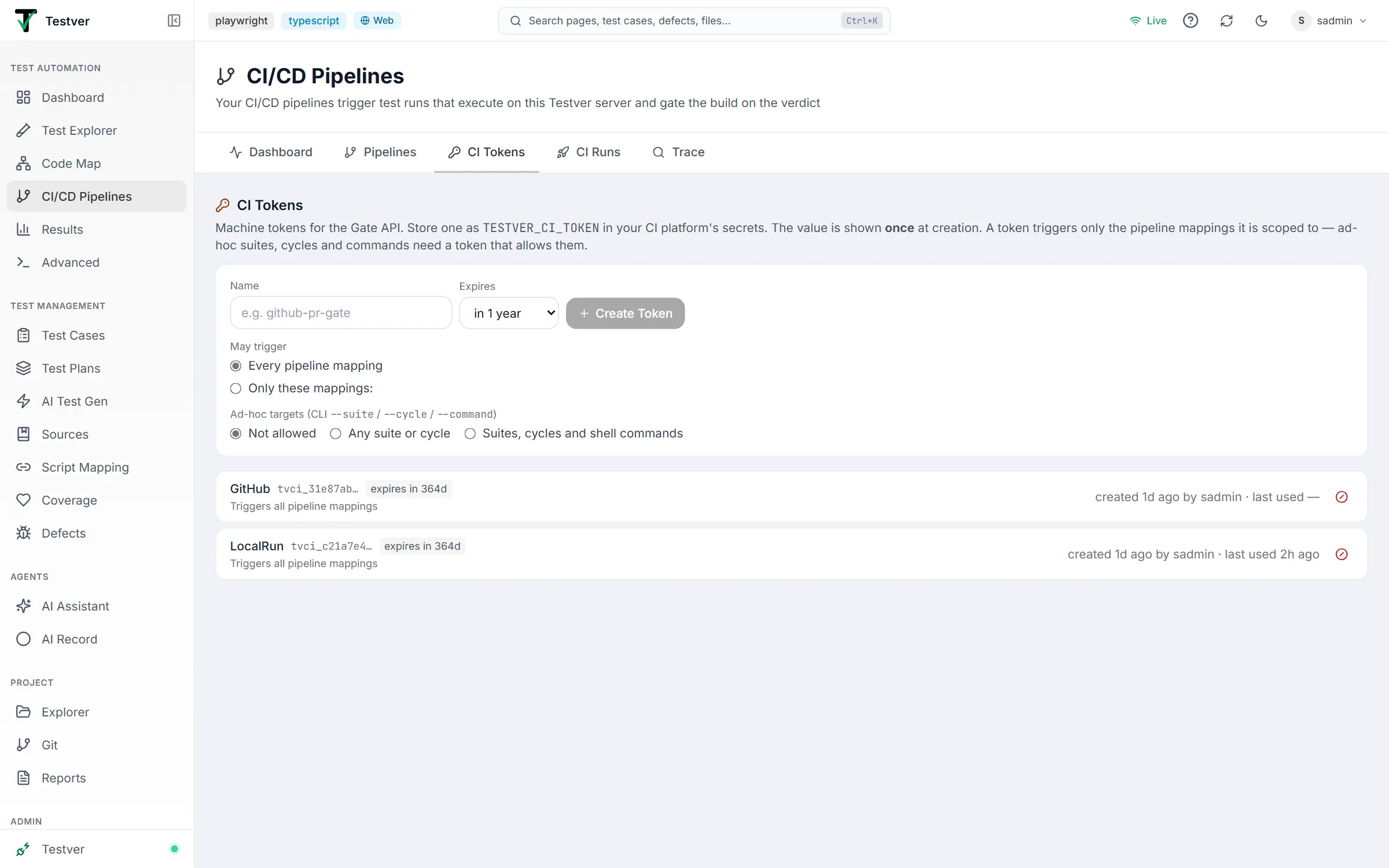
The CI Tokens tab of the CI/CD Pipelines screen (/pipelines?tab=tokens) manages the credentials CI jobs authenticate with.
What a CI token is
Section titled “What a CI token is”A CI token is a machine credential — separate from user logins — that can do three things: trigger runs, read their status, and cancel them. It cannot browse test cases, change settings, or read your project. Tokens start with tvci_ and are stored hashed on the server, which is why the value can only be displayed once.
Only admins create and revoke tokens. Testers and viewers see the list.
Creating a token
Section titled “Creating a token”Type a descriptive name (e.g. github-pr-gate, jenkins-release), choose its scope and expiry, and click Create Token (or press Enter). The value appears in a dialog with a copy button and the next setup steps.
May trigger decides which pipeline mappings the token can start:
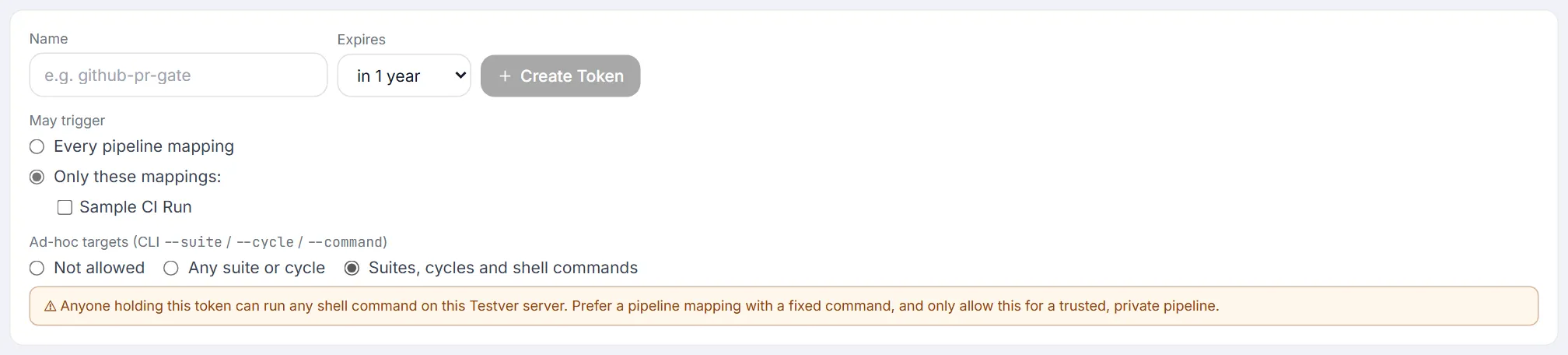
- Every pipeline mapping — any mapping, including ones created later.
- Only these mappings — just the ticked ones. A token scoped this way also only sees and cancels runs of those mappings.
Ad-hoc targets decides whether the token may bypass mappings with the CLI’s --suite, --cycle and --command flags:
| Setting | Allows |
|---|---|
| Not allowed (default) | Saved pipeline mappings only. |
| Any suite or cycle | Also --suite and --cycle. |
| Suites, cycles and shell commands | Also --command — any shell command on the Testver server. |
Expiry
Section titled “Expiry”Tokens expire after 30 days, 90 days, 1 year (the default), or never. An expired token is refused with CI token "…" has expired, and the list marks it expired. Create a new one and update the CI secret before the date.
Store it as a secret in your CI platform, conventionally named TESTVER_CI_TOKEN:
| Platform | Where the secret goes |
|---|---|
| GitHub Actions | Settings → Secrets and variables → Actions |
| GitLab CI | Settings → CI/CD → Variables (tick Masked) |
| Jenkins | Manage Jenkins → Credentials → Secret Text, with id testver-ci-token |
| Azure Pipelines | Pipeline → Edit → Variables, tick Keep this value secret |
| Bitbucket Pipelines | Repository settings → Repository variables, tick Secured |
| CircleCI | Project Settings → Environment Variables (or a shared context) |
For local use, export it instead: export TESTVER_CI_TOKEN=tvci_…, or pass --token to testver trigger.
The token list
Section titled “The token list”Each row shows the token name, its prefix (the first few characters, enough to tell tokens apart without revealing the value), what it may trigger, when it expires, who created it and when, and when it was last used. Tokens that may run shell commands carry a runs commands badge.

Revoked tokens are hidden under Revoked tokens (n) at the bottom; expand it to see who revoked each one and when.
Revoking a token
Section titled “Revoking a token”The ⊘ button asks for confirmation, then revokes the token immediately. Any job still using it fails at the trigger step with Invalid or revoked CI token, which is what you want when a token leaks or a project is retired.
Revoking is permanent — it does not delete the record, so the name stays visible in your history, and the name becomes available for a new token again. Creating and revoking tokens, and every trigger and cancel a token makes, is recorded in the Audit Log.
Good practice
Section titled “Good practice”- One token per pipeline or team, scoped to its mappings. Sharing a single token everywhere means a leak forces you to rotate every pipeline at once — and lets it trigger everything.
- Give tokens an expiry. A yearly rotation is cheap insurance against a forgotten secret.
- Name tokens after where they live, not what they do —
github-pr-gatetells you exactly which secret to update after revoking it. - Rotate on people changes. Tokens outlive employees; revoking and re-issuing costs a minute.
- Never commit a token. It belongs in your CI platform’s secret store, not in the pipeline file — the generated configs read it from a secret for exactly this reason.
Troubleshooting
Section titled “Troubleshooting”| Symptom | Likely cause / fix |
|---|---|
Invalid or revoked CI token (401) | The token was revoked or mistyped, or the CI secret isn’t reaching the job. Confirm the secret name matches the pipeline config. |
CI token "…" has expired (401) | Create a new token and update the CI secret. |
… is not allowed to trigger this pipeline mapping (403) | The token is scoped to other mappings. Use a token that includes this one. |
… may only trigger saved pipeline mappings / may not run ad-hoc commands (403) | The CLI used --suite, --cycle or --command with a token that doesn’t allow it. Trigger a mapping instead, or use a token with ad-hoc access. |
| No Create Token form | Only admins can create or revoke tokens. |
| I lost the token value | It cannot be recovered. Revoke it and create a replacement. |
| ”An active token named … already exists” | Names must be unique among active tokens. Pick another name, or revoke the old one first. |
| Last used stays empty | Nothing has authenticated with it yet — the CI job may still be failing before it reaches Testver. |
Related
Section titled “Related”- CI/CD Pipelines overview — where tokens fit in the setup flow.
- Pipelines tab — generate the config that consumes this token.
- CI Runs tab — the Triggered by column shows which token started each run.