

Test AutomationCI/CD PipelinesPipelines tab
Pipelines tab
The Pipelines tab of the CI/CD Pipelines screen (/pipelines?tab=pipelines) is where you define pipeline mappings — the rules that say “when this pipeline triggers, run this” — and generate the CI config that calls them.
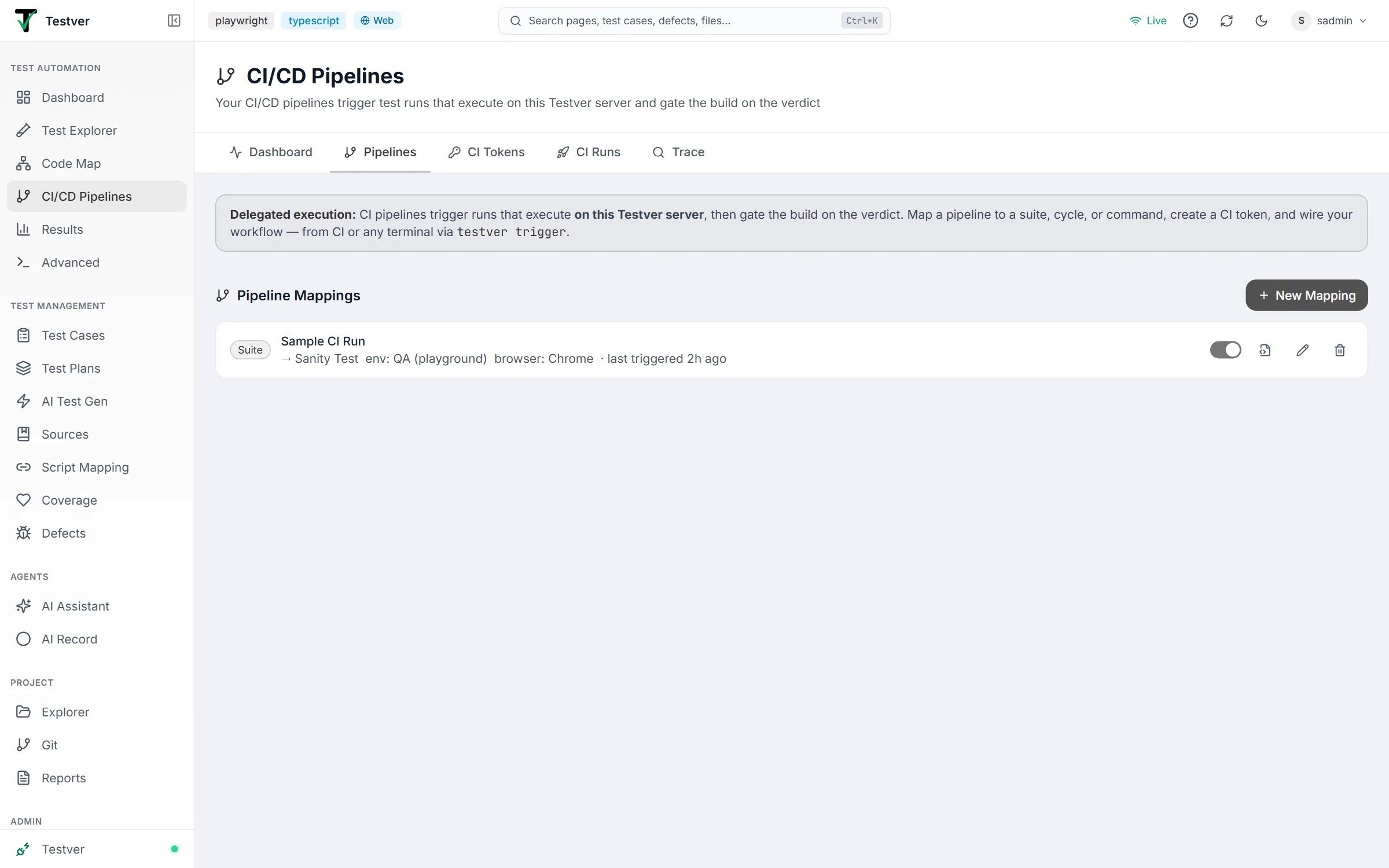
The mapping list
Section titled “The mapping list”Each card shows the target type (Suite, Cycle, or Command), the mapping name, what it runs (the suite or cycle name, or the command itself), any environment and browser overrides, PR status → provider when status push-back is on, and when it was last triggered. A disabled mapping is dimmed and tagged disabled. A warning appears when the suite or cycle it runs no longer exists — triggers of that mapping would fail. Testers and admins see these actions on the right; viewers see the list only:

| Action | What it does |
|---|---|
| Switch | Enable or disable the mapping in place. Triggers of a disabled mapping are refused. |
| Config icon | Opens Wire into CI — the CLI snippet and generated pipeline config. |
| Pencil | Edit the mapping. |
| Trash | Delete the mapping, after a confirmation. |
Creating a mapping
Section titled “Creating a mapping”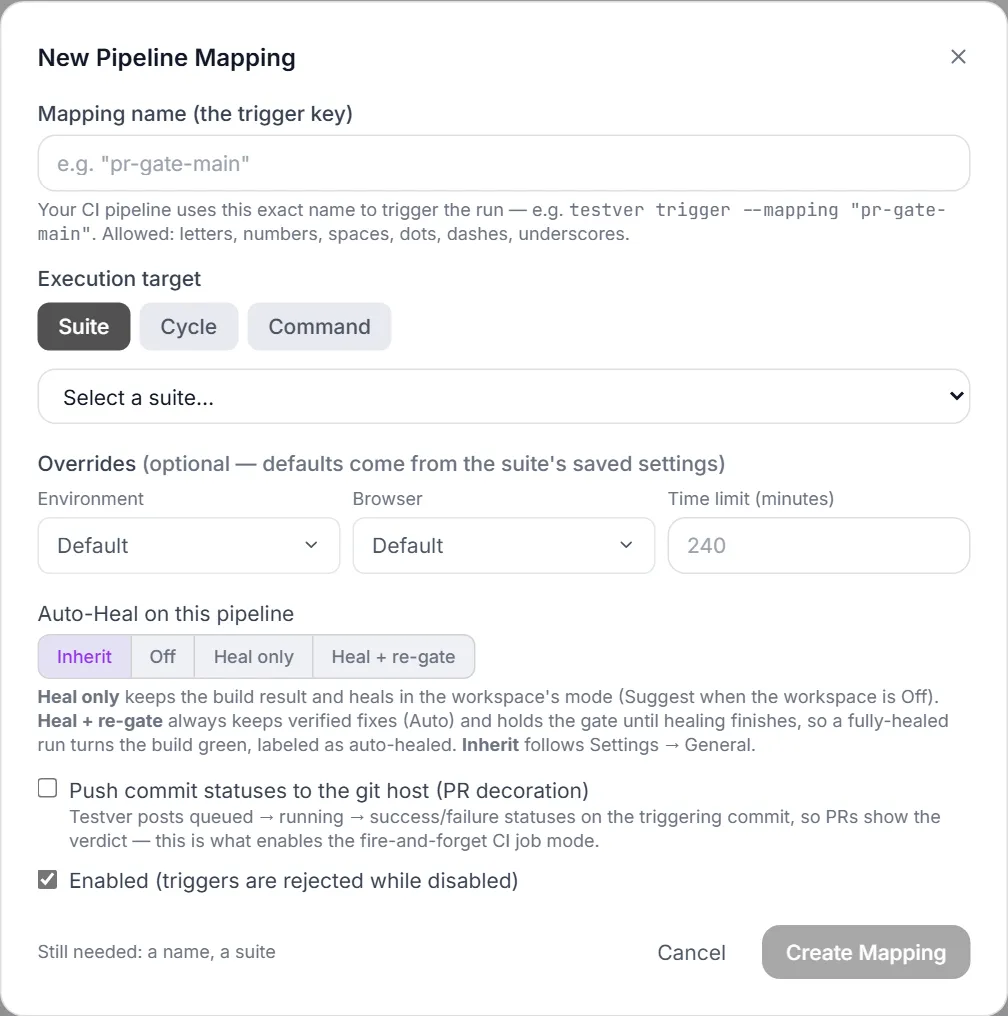
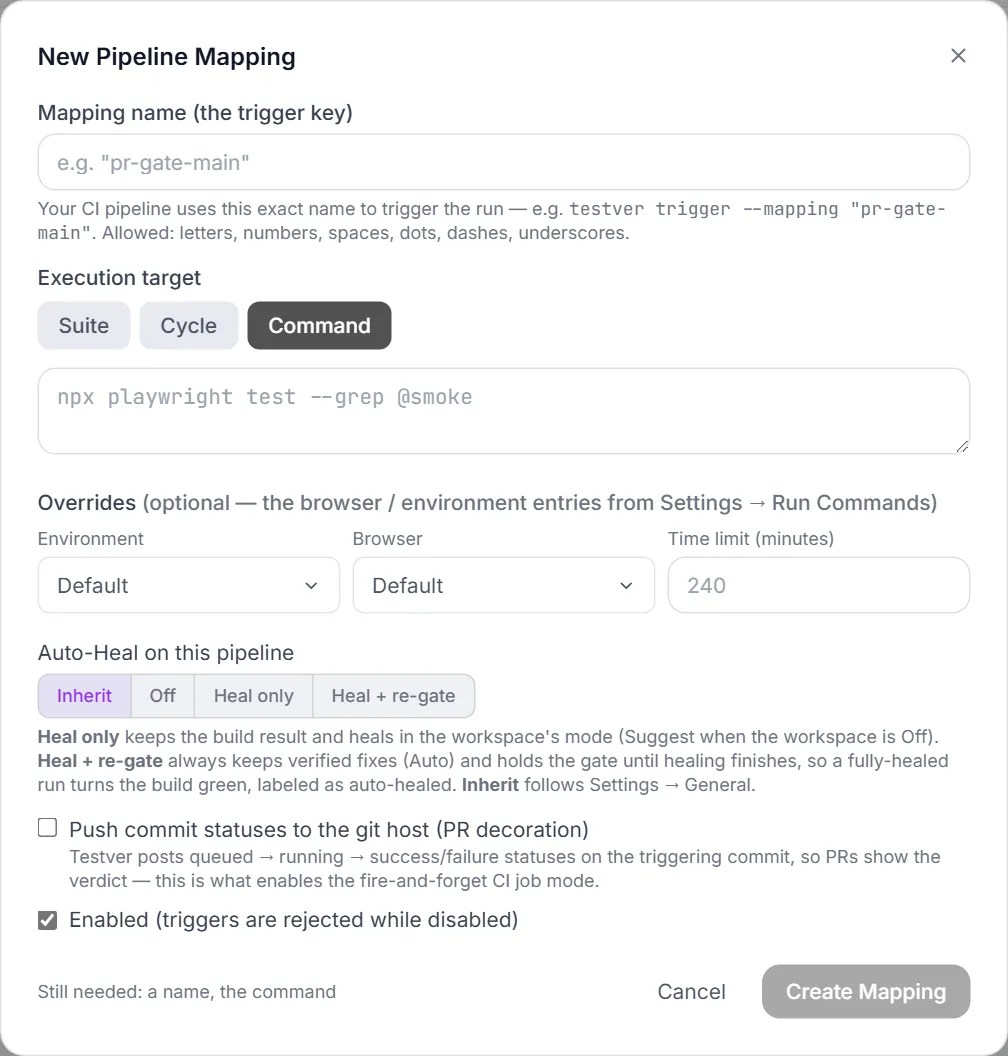
Mapping name (the trigger key)
Section titled “Mapping name (the trigger key)”This is what CI passes to identify the run. Because the name is embedded in generated config files and commands, it accepts only letters, numbers, spaces, dots, dashes, and underscores, must start with a letter or number, and is capped at 60 characters. The hint under the field shows the exact CLI command your name produces, updating as you type.
Renaming is safe: the mapping remembers its old names, and CI files that still use one keep triggering it. The card shows also answers to ”…” until you update those files and click Forget old names.
Editing an existing mapping opens the same dialog with its saved values:
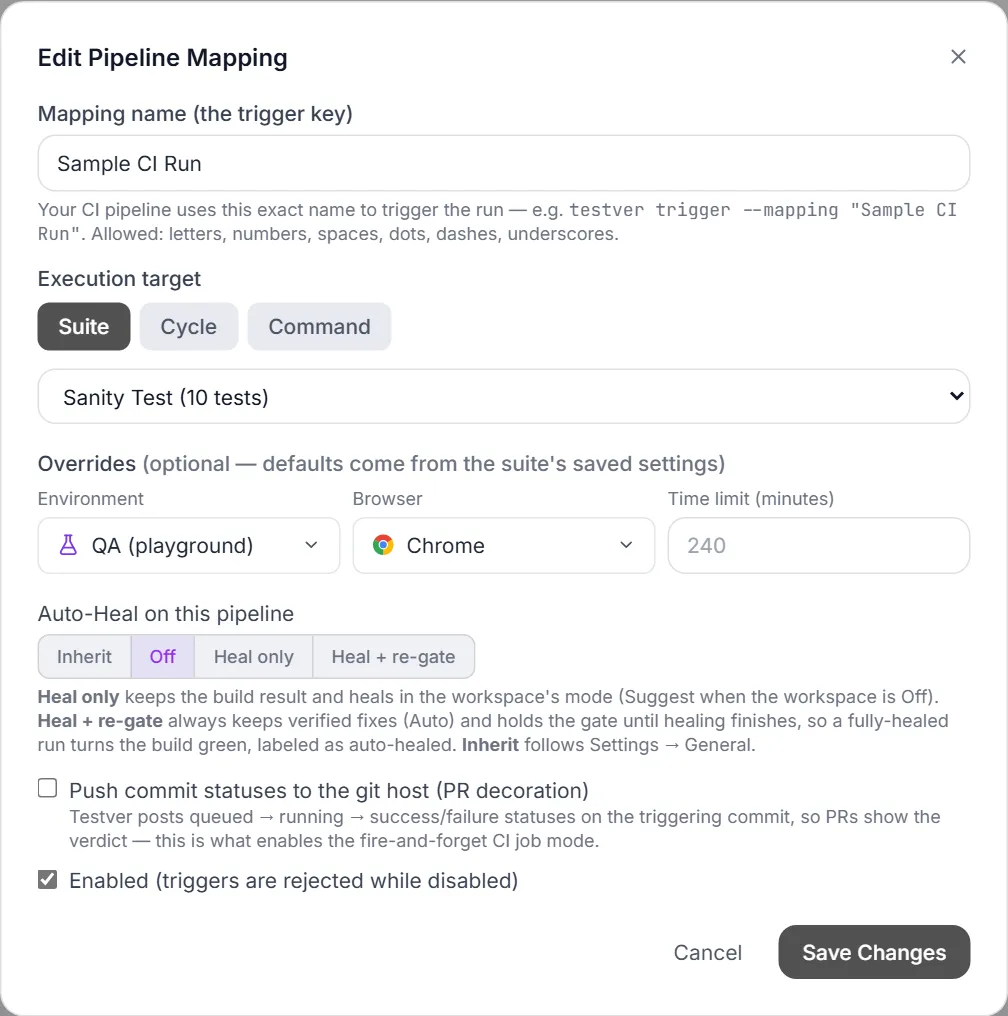
Execution target
Section titled “Execution target”| Target | Use it when | Notes |
|---|---|---|
| Suite | The common case — a regression or smoke suite. | Runs with the suite’s saved browser matrix, concurrency, and retries — and where the suite is set to run: its saved target, including a cloud provider, device and app. |
| Cycle | Release gates that should update cycle tracking. | Pick a plan, then a cycle. Cycles with no mapped automation scripts are disabled — a CI trigger could not run them. |
| Command | A one-off filter, e.g. npx playwright test --grep @smoke. | Overrides pick a browser / environment entry from Settings → Run Commands, applied the same way as a run from the Runner. Like any run, it waits while another run in the project is writing the same report files, then starts. |
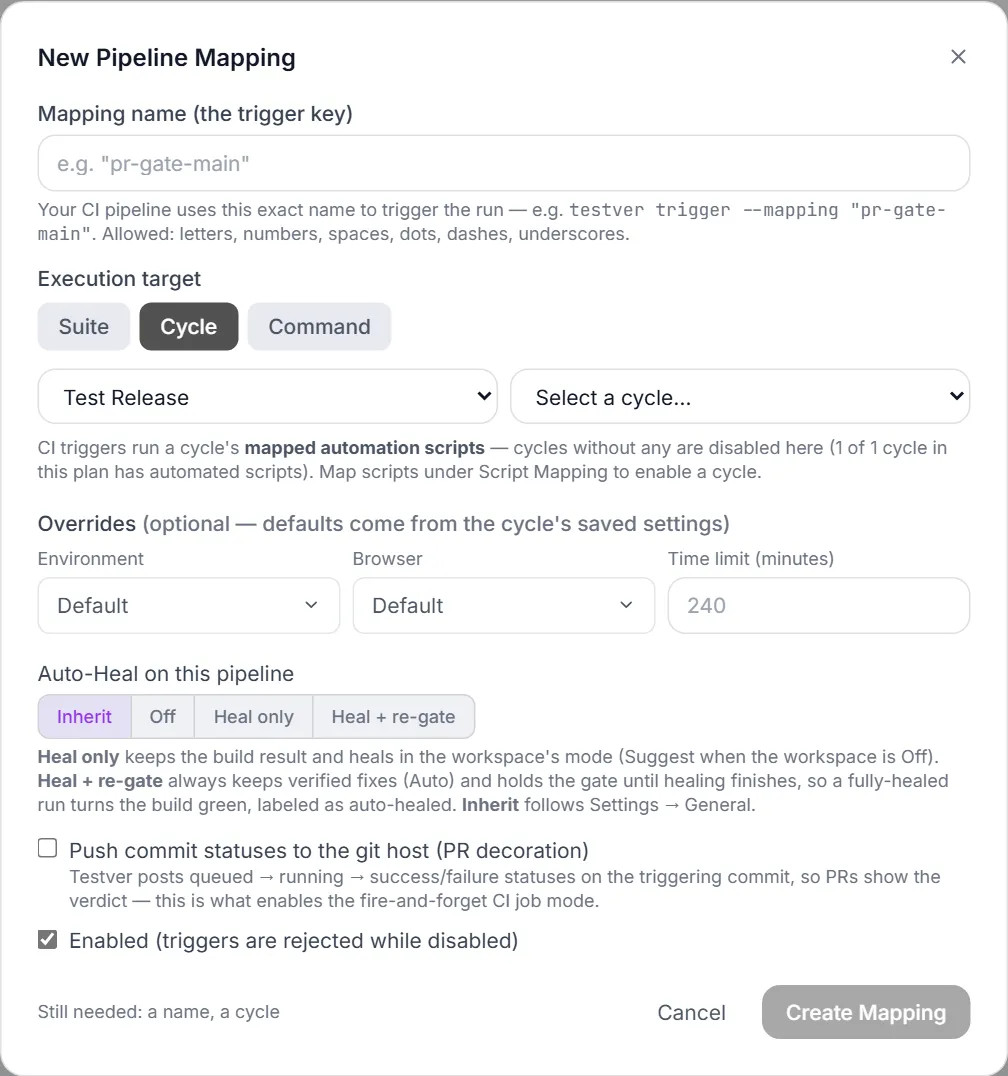
Overrides
Section titled “Overrides”You can pin an Environment and a Browser for this pipeline — for example the same regression suite running staging + Chrome for the PR gate and the full matrix nightly. Both pickers use the same icons as the rest of Testver. Leave them on Default to inherit the target’s saved settings.

Time limit (minutes) caps how long a triggered run may take on the server — 1 to 1440, default 240. A run that exceeds it is cancelled and ends in error, so a hung run can’t hold the queue.
Below the overrides, Auto-Heal on this pipeline chooses Inherit, Off, Heal only, or Heal + re-gate:

Three layers decide how a triggered run executes, highest first:
- Trigger-time overrides — a small whitelist (environment, browser) passed in the trigger payload. They must be names from Settings → Run Commands; anything else is refused. Audit-logged with the run.
- Mapping overrides — what you set here. Persistent and visible in the UI.
- The suite’s or cycle’s saved settings — the default. With no overrides at all, a CI trigger runs exactly what clicking Run in the UI would run.
Which code runs
Section titled “Which code runs”A triggered run uses the test project exactly as it is on the Testver server — the same files a Run click in the UI would use. Testver never switches branches or commits for a CI run. The commit and branch a pipeline sends are recorded on the run, used for status push-back and searchable on the Trace tab.
The application under test is whatever is deployed at the environment your tests point to (for example staging) — deploy the build first, then trigger the gate.
Status push-back
Section titled “Status push-back”Push commit statuses to the git host. Testver posts a pending status when the run is queued and again when it starts, then a success / failure status when it finishes, so pull requests show the verdict. A failed post is retried up to three times; if it still fails the run shows PR status not posted with the reason. This is also what makes fire-and-forget mode possible.
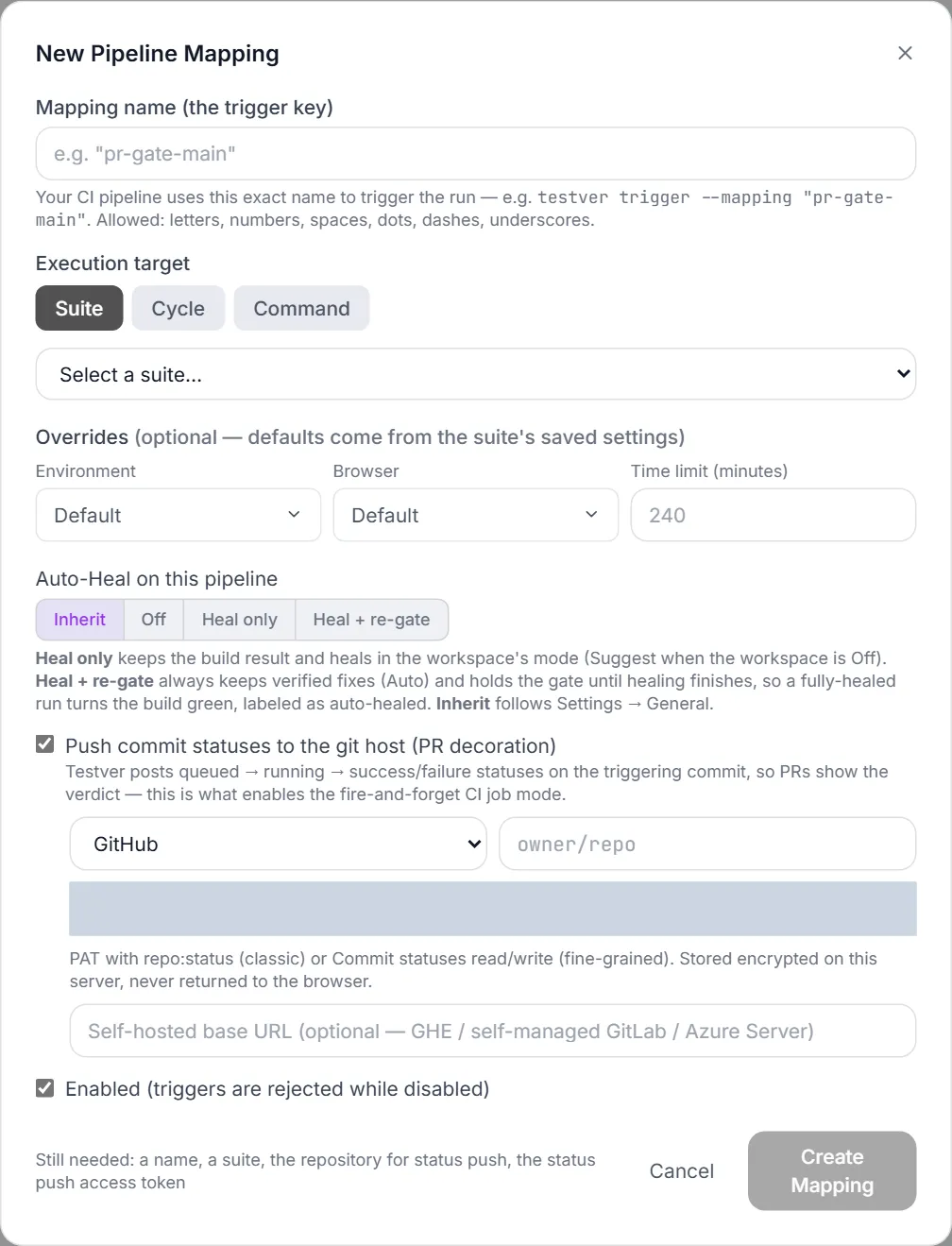
| Provider | Repository format | Token needs |
|---|---|---|
| GitHub | owner/repo | PAT with repo:status (classic) or Commit statuses read/write (fine-grained). |
| GitLab | group/project or the numeric project id | Access token with api scope. |
| Azure DevOps | org/project/repo | PAT with Code (Status) scope. |
| Bitbucket | workspace/repo | username:app_password with Repositories:Write (or a workspace/repository access token). |
A base URL field supports self-hosted installs (GitHub Enterprise, self-managed GitLab, Azure DevOps Server). The token is stored encrypted on the server and never returned to the browser — when editing an existing mapping the field shows a mask; leave it untouched to keep the saved token, or type a new value to replace it. Changing the provider or base URL clears the field: the saved token is never sent to a different host, so enter the token for the new one.
Enabled
Section titled “Enabled”Disabling a mapping keeps it configured but rejects triggers — useful for temporarily muting a gate without deleting it or touching the CI config. The switch on the mapping card does the same without opening the dialog.
Wiring a mapping into CI
Section titled “Wiring a mapping into CI”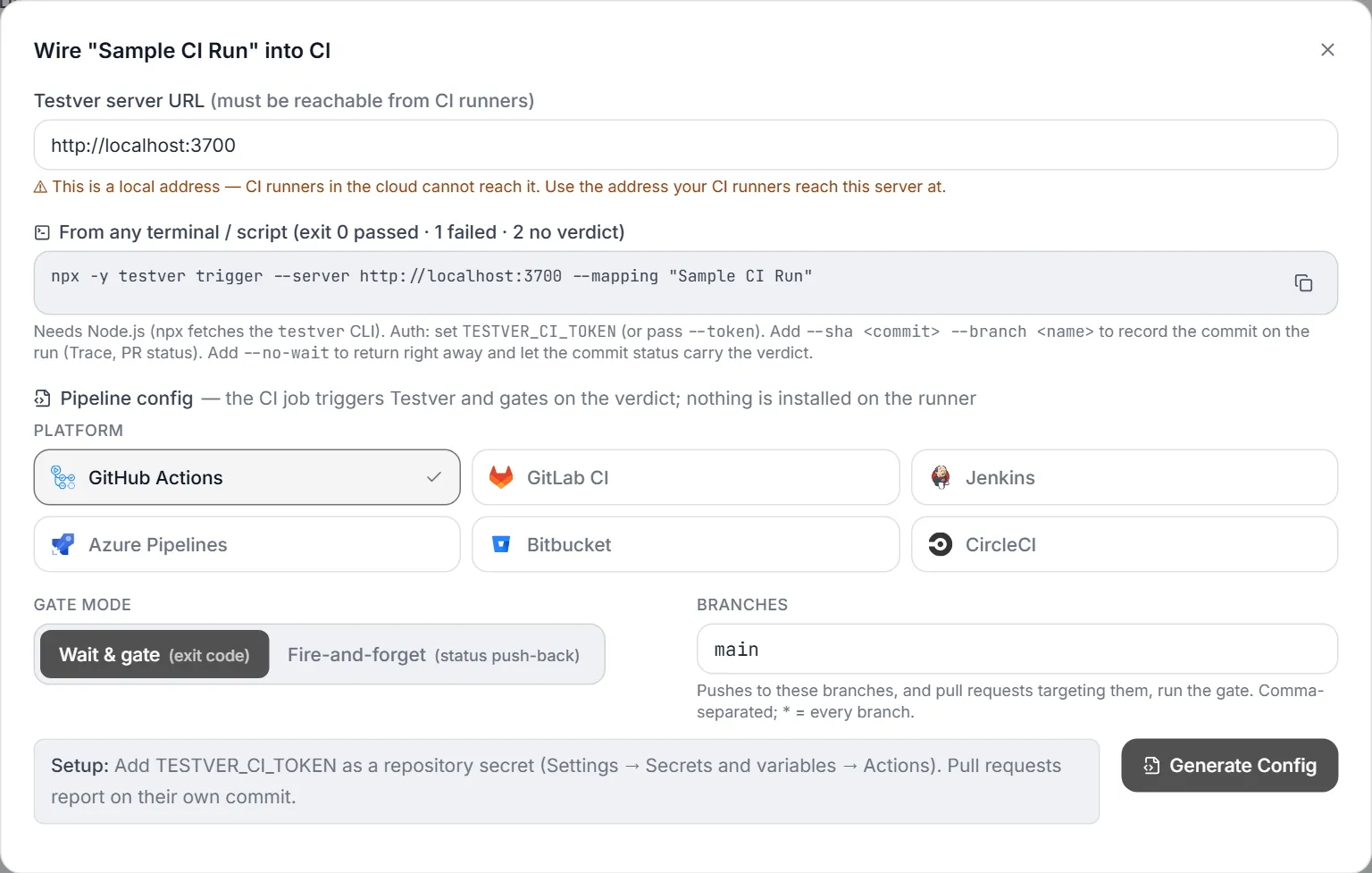
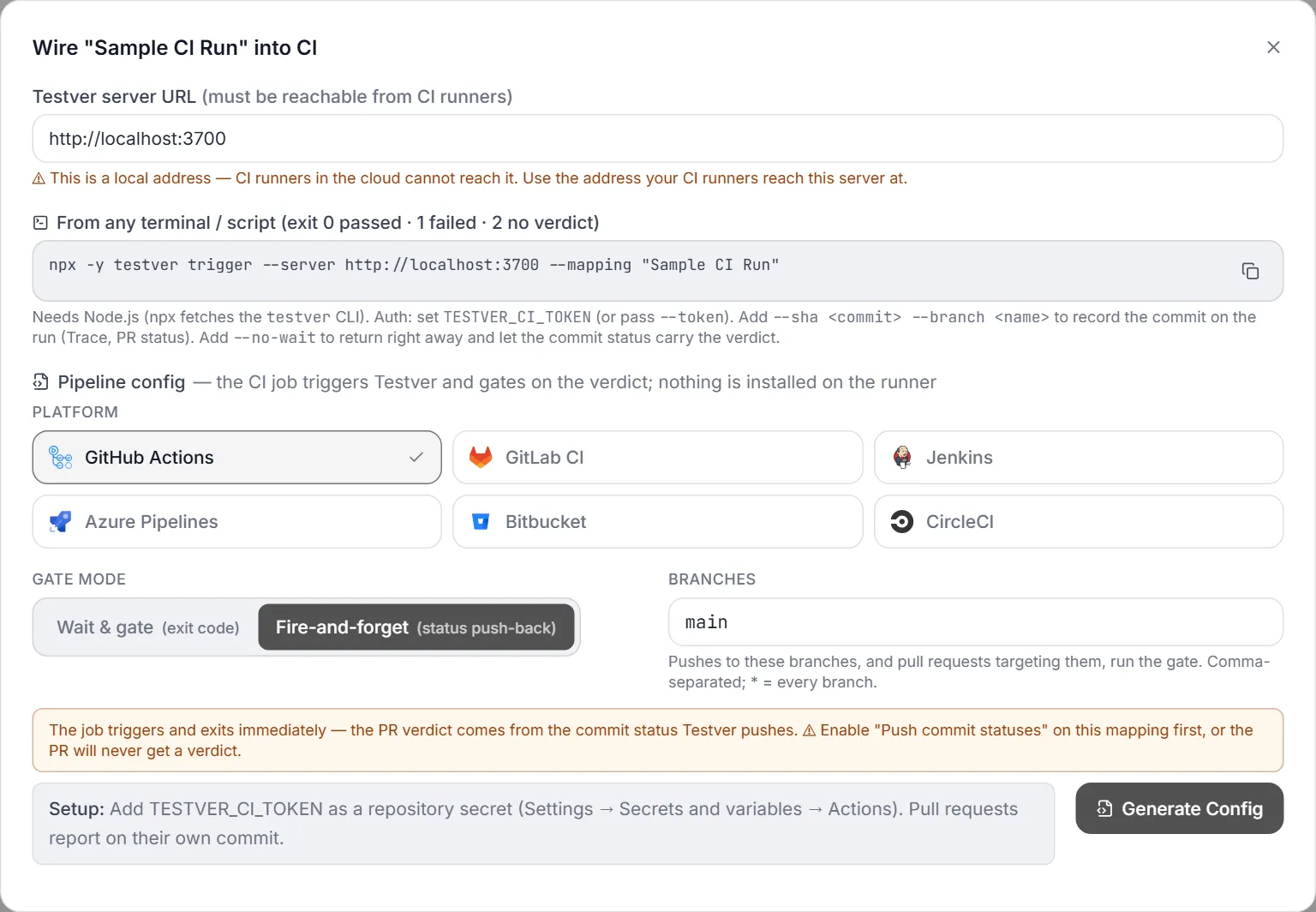
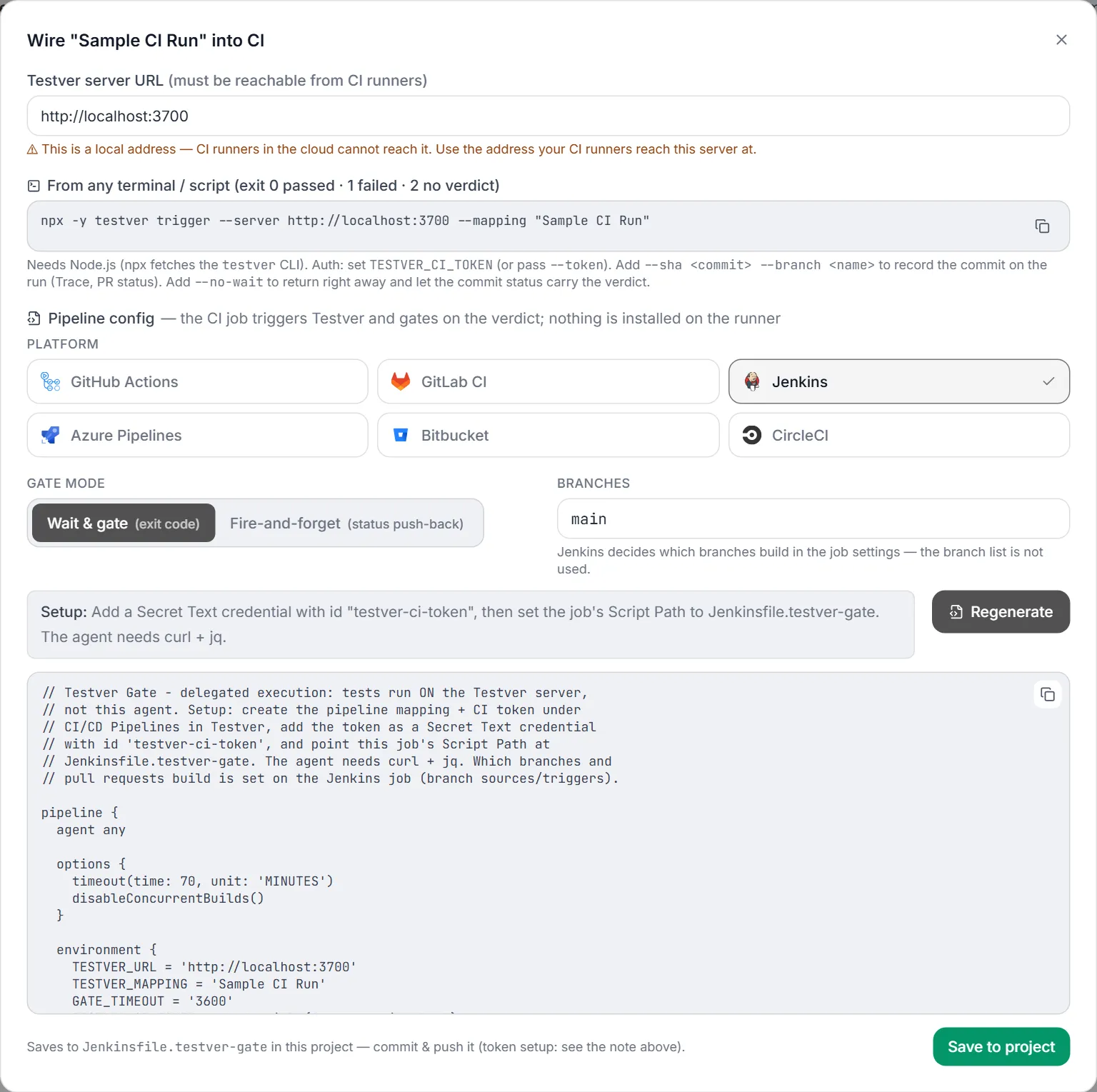
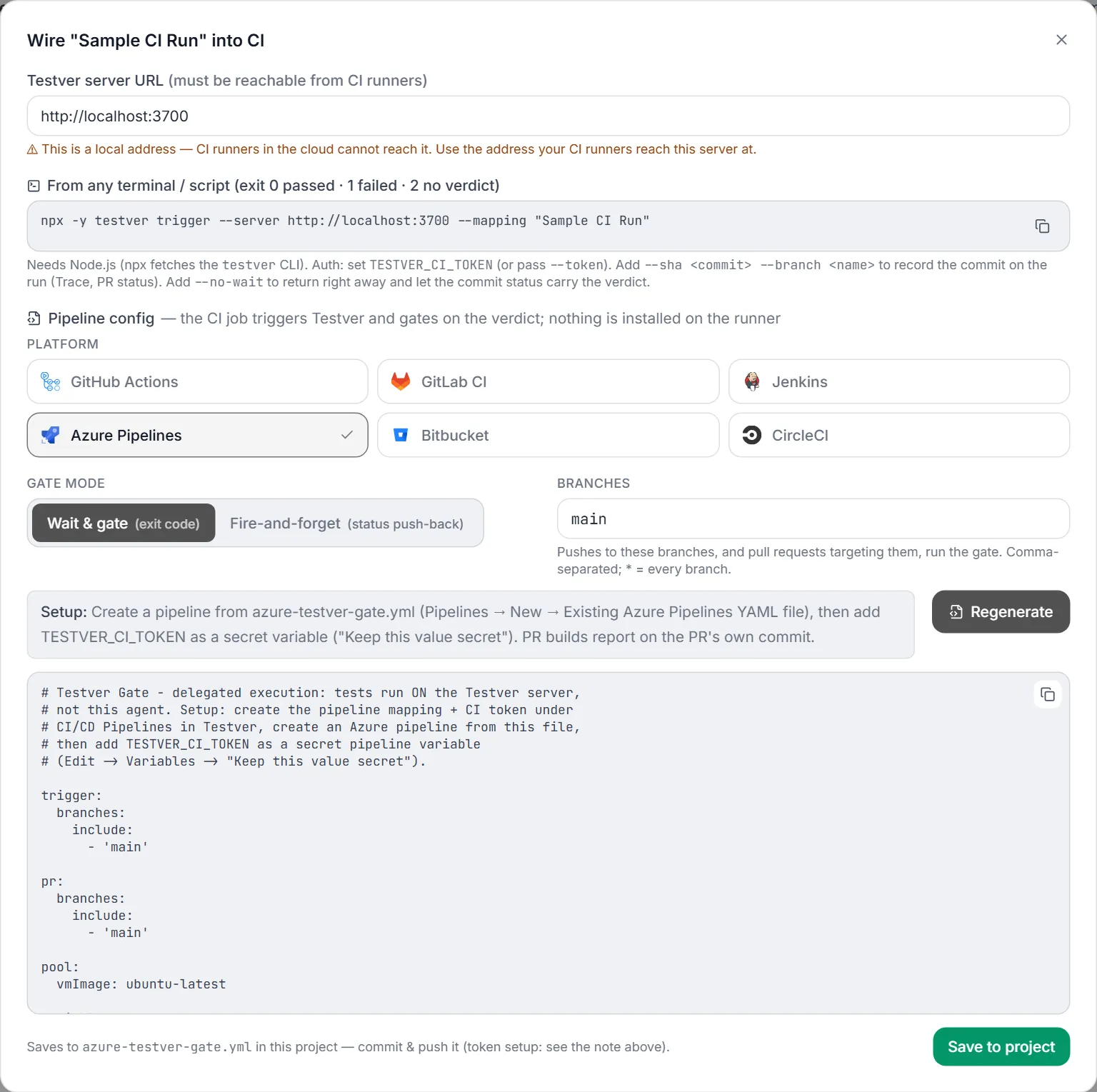
The config icon on a mapping opens the Wire into CI dialog:
- Testver server URL — the address your CI runners will call. Defaults to the address you’re browsing; change it if runners reach the server by a different hostname. A
localhostaddress or plainhttpgets a warning. - CLI snippet — a ready
npx -y testver trigger …command for scripts, cron jobs, or a quick manual test. It needs Node.js and the token inTESTVER_CI_TOKEN. - Platform — pick one of the six supported CI systems: GitHub Actions, GitLab CI, Jenkins, Azure Pipelines, Bitbucket, or CircleCI. The selected card shows a ✓, and the panel below it tells you exactly where that platform expects the
TESTVER_CI_TOKENsecret. - Gate mode — Wait & gate or Fire-and-forget; see below.
- Branches — which branches run the gate, comma-separated (default
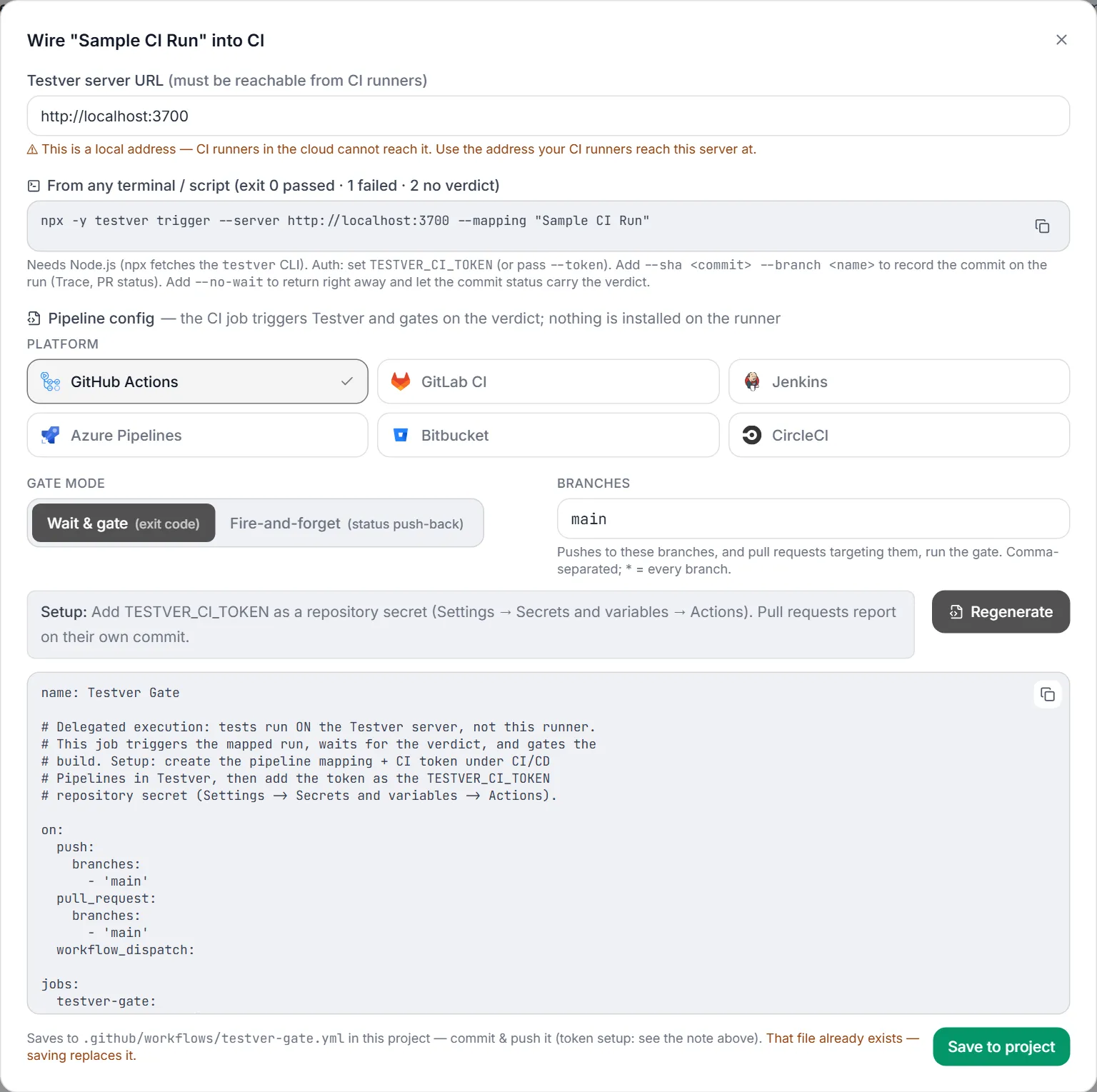
main;*= every branch). Pushes to these branches and pull requests targeting them are gated. - Generate Config (then Regenerate after a change) → a preview to review or copy → Save to project, which writes the file into your repository for you to commit. If the file already exists, Testver asks before replacing it.
The dialog warns when there is no active CI token yet, with a link to the CI Tokens tab.
After Generate Config, the preview appears under the setup note, with the file it saves to:
Gate mode
Section titled “Gate mode”The gate mode decides how your CI job learns the result. Both modes start the same way — the CI job asks Testver to run the mapping, and the tests run on the Testver server. What differs is what the CI job does next.
Wait & gate (exit code) — the default
Section titled “Wait & gate (exit code) — the default”The CI job stays open and waits for the result, then passes or fails with it.
Developer pushes / opens a PR → CI job starts → job: "Testver, run pr-gate-main" → job checks every 15 s: queued… running… passed 12 / failed 0… → tests finish (say 20 minutes later) → job exits 0 → CI build GREEN (all passed) or 1 → CI build RED (tests failed) or 2 → CI build RED (no verdict: error, timeout, cancelled, Testver unreachable)- The job log shows live progress and ends with the report link.
- Cancelling the CI job also cancels the Testver run.
- No extra setup — only the CI token secret.
- Cost: the CI runner is busy the whole time the tests run. A 40-minute suite holds a hosted runner (and its paid CI minutes) for 40 minutes.
Use it for most pipelines, and whenever a later step depends on the result — for example deploy only if the tests pass, which works because the job fails before the deploy step.
Fire-and-forget (status push-back)
Section titled “Fire-and-forget (status push-back)”The CI job only starts the run and finishes straight away. Testver posts the result to your git host (GitHub, GitLab, Azure DevOps or Bitbucket) when the tests finish.
Developer opens a PR → CI job starts → job: "Testver, run pr-gate-main" → job exits 0 in a few seconds → CI job GREEN (it only means "triggered") … meanwhile the tests run on Testver … → PR shows a check "testver/pr-gate-main": Queued → Running → tests finish → Testver updates that check: success or failure (the check's "Details" link opens the Testver report)- Cost: the CI runner is free after a few seconds — no CI minutes spent waiting.
- Required: the mapping must have Push commit statuses to the git host turned on, with the repository and an access token. Without it nobody gets the result: the CI job is green and the PR never shows a Testver check. The dialog warns you when it isn’t set up.
- Blocking merges: the CI job is always green, so it doesn’t block anything by itself. In your git host’s branch protection, make the
testver/<mapping name>check required instead. - Cancelling: cancelling the CI job does nothing (it has already finished) — cancel the run from the CI Runs tab.
- Later steps: nothing after this job can depend on the result, so a deploy if passed step doesn’t fit this mode.
Use it for long suites on pull requests, where holding a runner open is wasteful and a PR check is all you need.
Side by side
Section titled “Side by side”| Wait & gate | Fire-and-forget | |
|---|---|---|
| CI job runs for | The whole test run | A few seconds |
| CI build colour means | The test result | ”Run triggered” only |
| Where you see the result | CI job log and build status | The PR / commit check testver/<mapping name> |
| Extra setup | None | Push commit statuses on the mapping + branch protection |
| Later CI steps can use the result | Yes | No |
| Cancelling the CI job stops the tests | Yes | No — cancel in the CI Runs tab |
| Same thing from the CLI | testver trigger … | testver trigger … --no-wait |
Generated files
Section titled “Generated files”| Platform | Generated file | Secret setup |
|---|---|---|
| GitHub Actions | .github/workflows/testver-gate.yml | TESTVER_CI_TOKEN repository secret. |
| GitLab CI | .gitlab-ci.yml | TESTVER_CI_TOKEN masked CI/CD variable. |
| Jenkins | Jenkinsfile.testver-gate | Secret Text credential with id testver-ci-token; agent needs curl + jq. |
| Azure Pipelines | azure-testver-gate.yml | TESTVER_CI_TOKEN secret pipeline variable. |
| Bitbucket Pipelines | bitbucket-pipelines.yml | TESTVER_CI_TOKEN as a secured repository variable. |
| CircleCI | .circleci/config.yml | TESTVER_CI_TOKEN as a project environment variable (or context). |
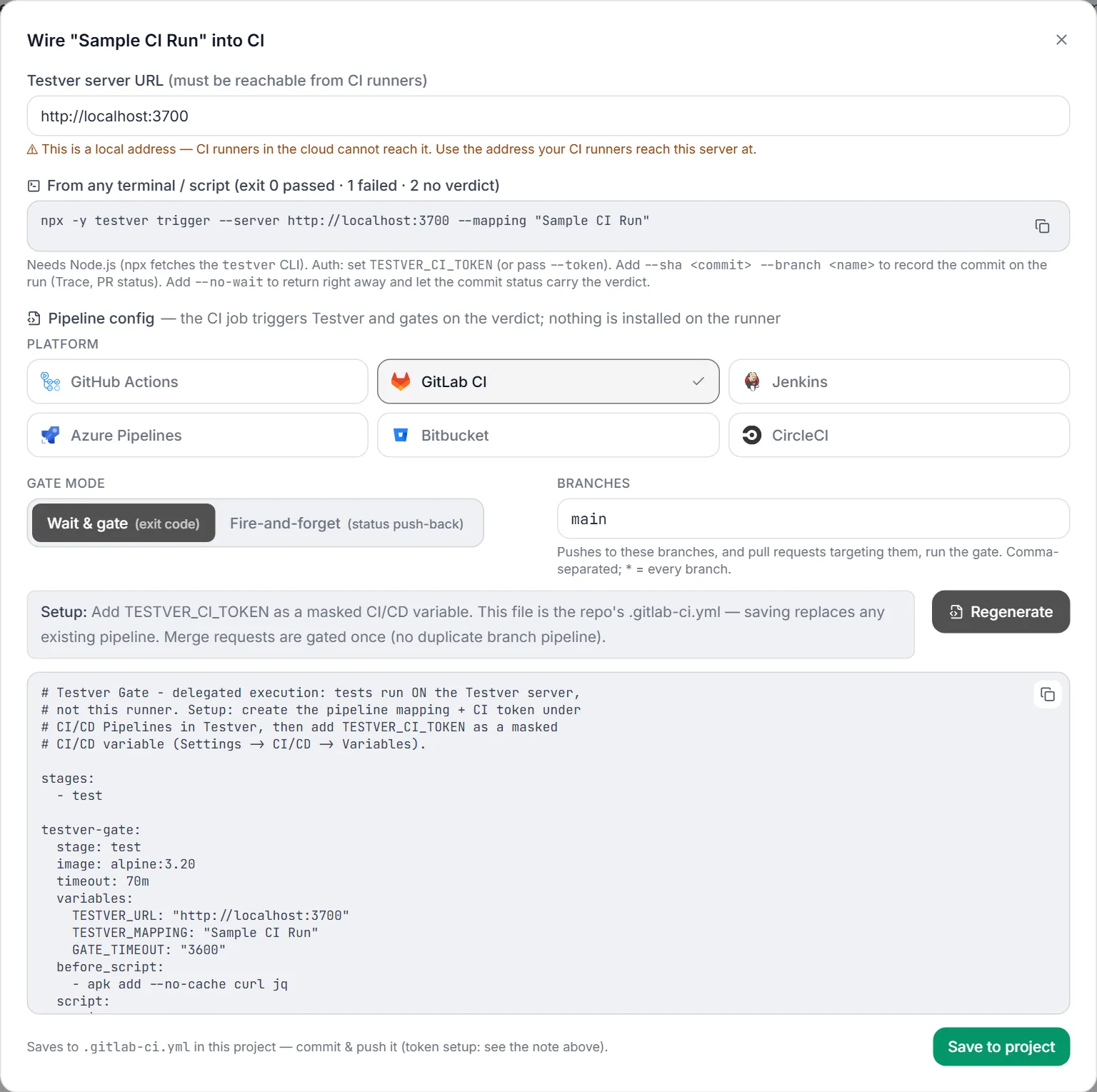
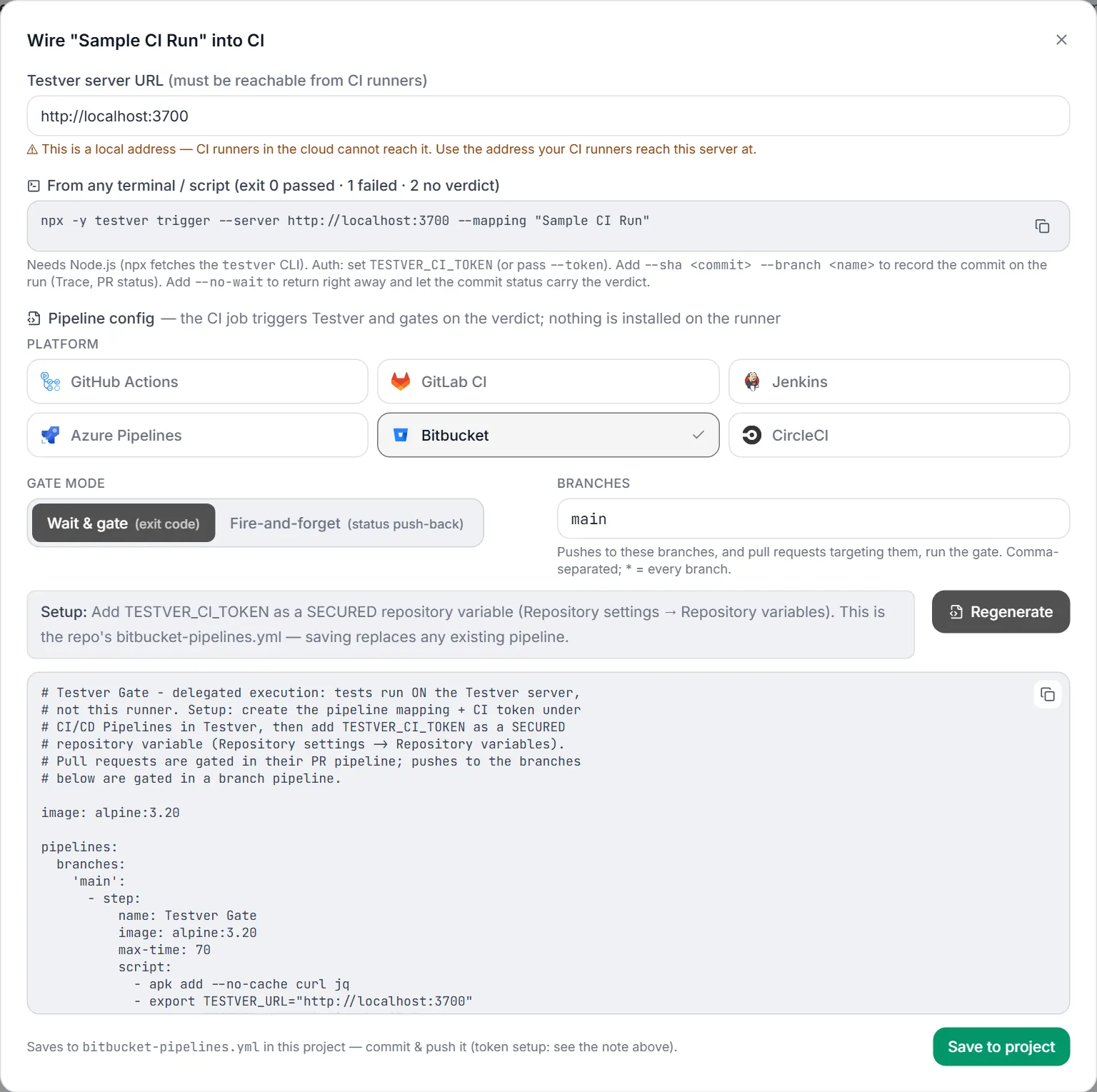
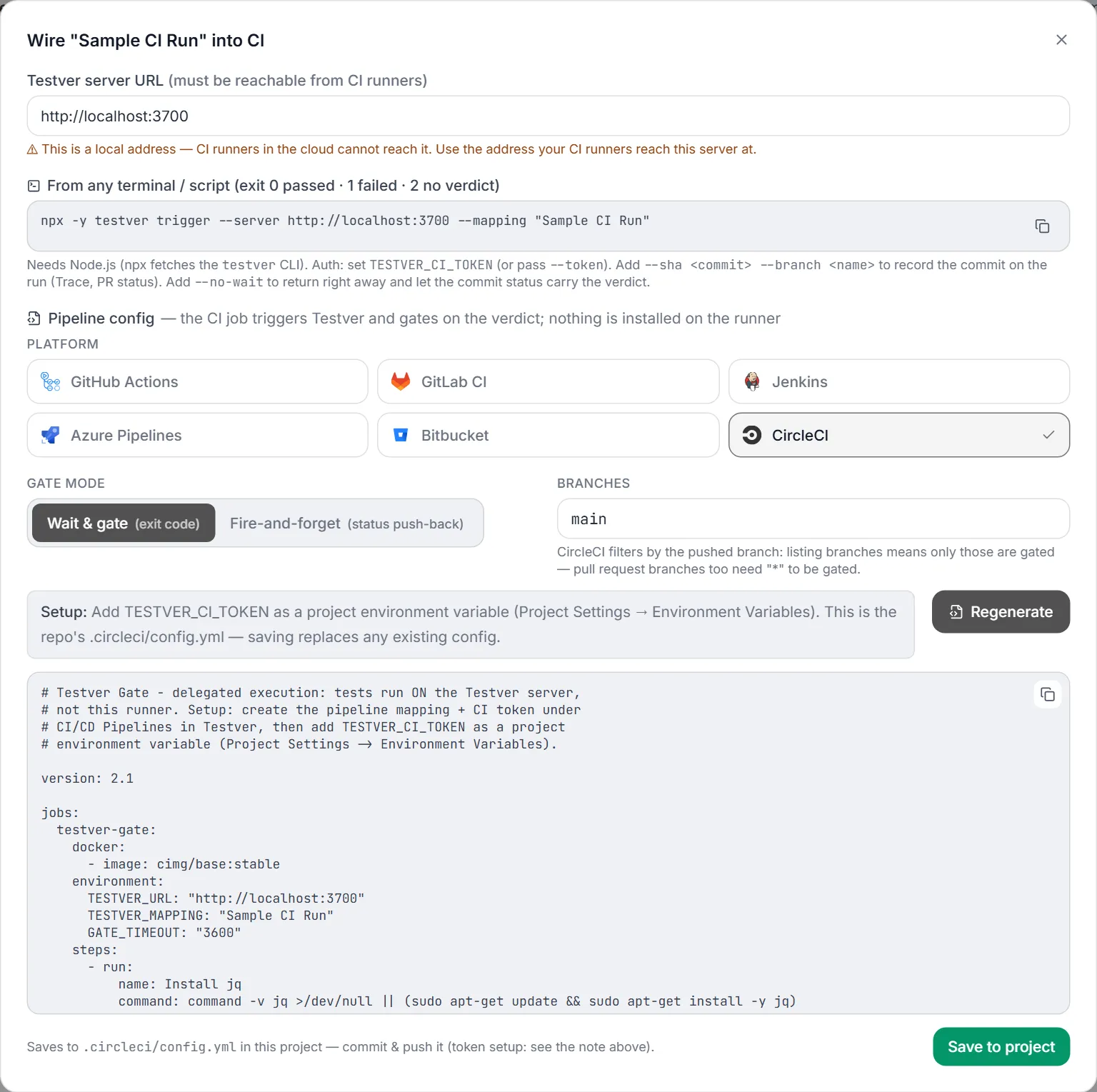
The generated job sends the token to Testver on standard input, never on the command line, so it can’t leak into process listings or CI logs. Pull-request builds report on the pull request’s own commit, and a cancelled CI job cancels the Testver run.
Platform setup
Section titled “Platform setup”Most platforms pick the file up as soon as it’s pushed. Two need one more step:
- Jenkins — create (or edit) a Pipeline job, set Definition to Pipeline script from SCM and Script Path to
Jenkinsfile.testver-gate. Add the token as a Secret text credential with idtestver-ci-token. Which branches build is set in the job, not by the Branches field. - Azure Pipelines — Pipelines → New pipeline → Existing Azure Pipelines YAML file, pick
azure-testver-gate.yml, then addTESTVER_CI_TOKENas a variable with Keep this value secret ticked.
On CircleCI, listed branches filter the pushed branch itself — pull-request branches are only gated with *.
Troubleshooting
Section titled “Troubleshooting”| Symptom | Likely cause / fix |
|---|---|
| Create Mapping / Save Changes stays disabled | Still needed: … next to the buttons lists what’s missing — a name, a target, a valid time limit, or a repository and access token for status push-back. |
| The git host changed — enter the access token for it. | The provider or base URL changed. The saved token is only reused for the same host — type the token for the new one. |
| The saved access token can’t be read on this machine — on save, or as PR status not posted on a run | The token was saved with a key file this machine doesn’t have (.testver/secret-store.key wasn’t copied with the project, or the token was saved by Testver 1.2.3 or earlier). Open the mapping, type the access token again and save. |
| A mapping shows “no longer exists — triggers will fail” | Its suite or cycle was deleted. Edit the mapping and pick another, or delete it. |
| A cycle is greyed out in the dropdown | It has no mapped automation scripts. Map them under Script Mapping. |
| Editing a mapping shows a masked token | By design: status-push tokens are never sent back to the browser. Leave the mask to keep the token, or type a new one to replace it. |
| PR status not posted on a run | The git host rejected the status. Check the token scope, the repository format for that provider, and the base URL for self-hosted installs. |
Related
Section titled “Related”- CI/CD Pipelines overview — the concept, the CLI, and prerequisites.
- CI Tokens tab — the token your generated config needs.
- CI Runs tab — what happens after a mapping fires.
- Test Explorer → Suites · Test Plans & Cycles · Script Mapping