

Create a Framework with AI
Introduction
Section titled “Introduction”What this guide covers
Section titled “What this guide covers”Starting a test automation project is the slowest part: choosing a structure, wiring configuration, reports, logging, test data and page objects, then getting one test to actually pass. The AI Assistant does all of that for you. You pick a framework skill, tell it what you want to test, and it builds a complete, working framework in your project folder — then proves it works by writing and running one smoke test.
This guide walks you through it from an empty folder to a green first test, one framework at a time, with prompts you can copy for each.
What you get
Section titled “What you get”| Part | What it is |
|---|---|
| A layered structure | Separate folders for tests, page (or screen / service) objects, reusable components, test data, helpers and configuration — specs contain no plumbing. |
| Configuration, not hard-coding | The application address, browser and credentials come from a config file or environment variables (.env, config.properties, appsettings.json …). A committed .env.example lists every key; the real .env is kept out of Git. |
| Every browser, chosen at run time | All supported browsers declared once, selected from the command line (--project=firefox, --browser firefox, -Dbrowser=firefox …) — so CI and Testver’s Run Commands can pick one. |
| Page objects | Classic or fluent page objects (screen objects for mobile, service objects for APIs), with stable locators and a short description comment on each element. |
| Test data | Data files and factories in data/, ready for data-driven tests. |
| Native reports | The tool’s own reports only — HTML and JUnit XML / JSON — plus screenshots or traces on failure. |
| Logging | One logger with levels, attached to the report. |
| One passing smoke test | Written for the scenario you choose, run by the assistant, and fixed until it passes. |
| A README | How to install, configure and run it. |
The frameworks you can create
Section titled “The frameworks you can create”| Skill | Languages | Test type | Pick it when… |
|---|---|---|---|
| Framework: Playwright | TypeScript / JavaScript · Java · C# (.NET) | Web UI (and API calls) | You want fast, reliable, modern web tests with traces. The usual first choice. |
| Framework: Cypress | JavaScript / TypeScript | Web UI | Your team works in JavaScript and likes Cypress’s interactive runner. |
| Framework: Selenium | Java · Python · C# | Web UI | You need WebDriver, an existing Selenium skill set, or a grid of real browsers. |
| Framework: WebdriverIO | JavaScript / TypeScript | Web UI | You want WebDriver with a Node.js runner and plugins. |
| Framework: Cucumber | JavaScript · Python (behave / pytest-bdd) · Java | Web UI, BDD | Scenarios are written in plain-language Gherkin (Given / When / Then) with business readers. |
| Framework: PyTest | Python | Web UI (Playwright or Selenium) or API | Your team works in Python. |
| Framework: REST Assured | Java (TestNG / JUnit, Maven or Gradle) | API | You test REST APIs from Java. |
| Framework: Appium | TypeScript / JavaScript (WebdriverIO) · Python (pytest) · Java (TestNG) · C# (NUnit) · Ruby (RSpec) | Mobile (Android, iOS, hybrid) | You test native or hybrid mobile apps. |
| Framework Architecture | Any | All | Not a framework on its own — the shared blueprint. Always select it together with one of the skills above. |
Who this guide is for
Section titled “Who this guide is for”- Testers starting automation who want a proper framework without learning its plumbing first.
- Automation engineers who want a consistent, best-practice starting point in minutes.
- Team leads standardising how new projects are set up.
You do not need to know the framework’s setup steps. You do need the language’s runtime installed on the machine (see Before you start).
Key terms
Section titled “Key terms”| Term | Meaning |
|---|---|
| Framework | The folders, configuration, helpers and conventions your tests are built on. |
| Scaffold | Create that framework from nothing. |
| Agent Skill | Written instructions the AI Assistant follows. The framework skills tell it exactly how to build each framework. |
| Project folder | The folder Testver was started in. The framework is created directly in it — never in a sub-folder. |
| Page object | A class that holds one page’s locators and actions (login(user)), so tests read like steps. Mobile uses screen objects; API frameworks use service objects. |
| Smoke test | The one small test that proves the whole setup works: open the application and check it loaded. |
| Native report | The report the tool itself produces (HTML, JUnit XML, JSON) — no extra reporting products. |
How it works
Section titled “How it works”- You select the skills (Framework Architecture + your tool) and describe what you want.
- The assistant asks before building — for your application’s address (or app + device, or API base URL) and the first scenario to automate. If you do not give a scenario, it proposes one and waits for your OK. It never invents a placeholder such as
example.com. - It creates the framework in your project folder: structure, configuration, reports, logging, data, page objects, README.
- It writes one smoke test for your scenario, installs what is needed, runs it, and fixes it until it passes.
- It stops and tells you how to run it. It does not generate a full suite until you ask.
Every file it creates and every command it runs appears in the conversation; in Manual mode you approve each one.
Before you start
Section titled “Before you start”1. Start Testver in the folder that will hold the framework
Section titled “1. Start Testver in the folder that will hold the framework”The folder Testver is started in is the framework’s root. Create a new, empty folder for a new project and start Testver there:
mkdir shop-e2ecd shop-e2etestver serveTo add a framework to an existing repository, start Testver in that repository’s root instead — the assistant builds in place and follows what is already there.
2. Install the language runtime
Section titled “2. Install the language runtime”The assistant installs the framework’s packages, but not the language itself:
| Framework | Needs on the machine |
|---|---|
| Playwright (TS/JS), Cypress, WebdriverIO, Cucumber (JS) | Node.js 18 or newer |
| Playwright (Java), Selenium (Java), REST Assured, Cucumber (Java), Appium (Java) | Java 17+ (JDK) and Maven (or Gradle) |
| Playwright (C#), Selenium (C#), Appium (C#) | .NET SDK |
| pytest, Selenium (Python), Cucumber (Python), Appium (Python) | Python 3.9+ and pip |
| Appium (Ruby) | Ruby and Bundler |
| Appium (any language), local devices | The Appium server and driver (uiautomator2 for Android, xcuitest for iOS on macOS); Android also needs the Android SDK. Cloud devices need only a cloud provider in Settings → Connectors. |
3. Turn the skills on
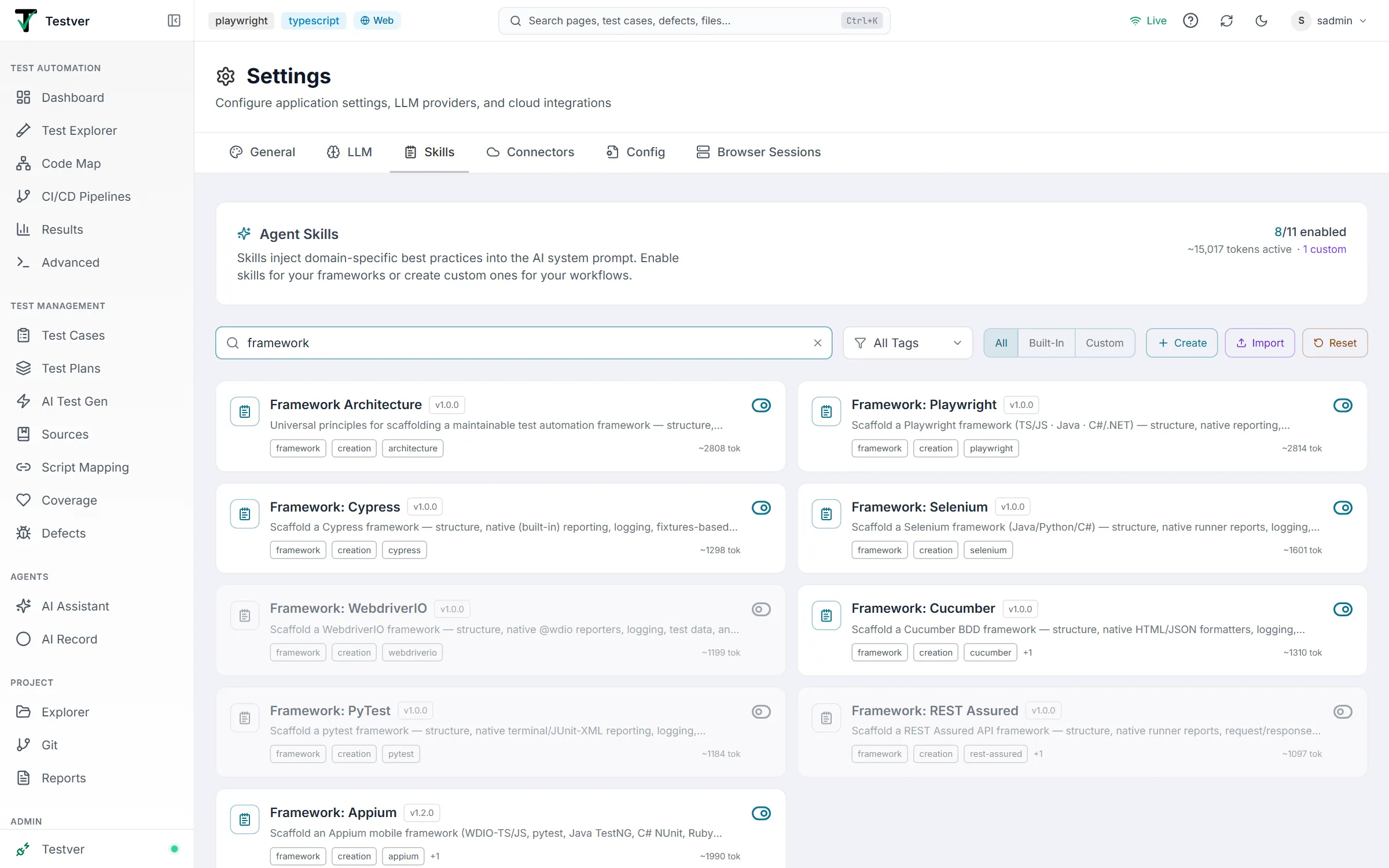
Section titled “3. Turn the skills on”Skills are off until an admin enables them:
- Open Settings → Skills.
- Turn on Framework Architecture and the skill for your tool (for example Framework: Playwright).
4. Pick the mode and the skills in the AI Assistant
Section titled “4. Pick the mode and the skills in the AI Assistant”-
Open the AI Assistant and choose the mode that matches the framework:
Framework Mode Playwright, Cypress, Selenium, WebdriverIO, Cucumber, pytest (web) Web REST Assured, pytest (API) API Appium Mobile -
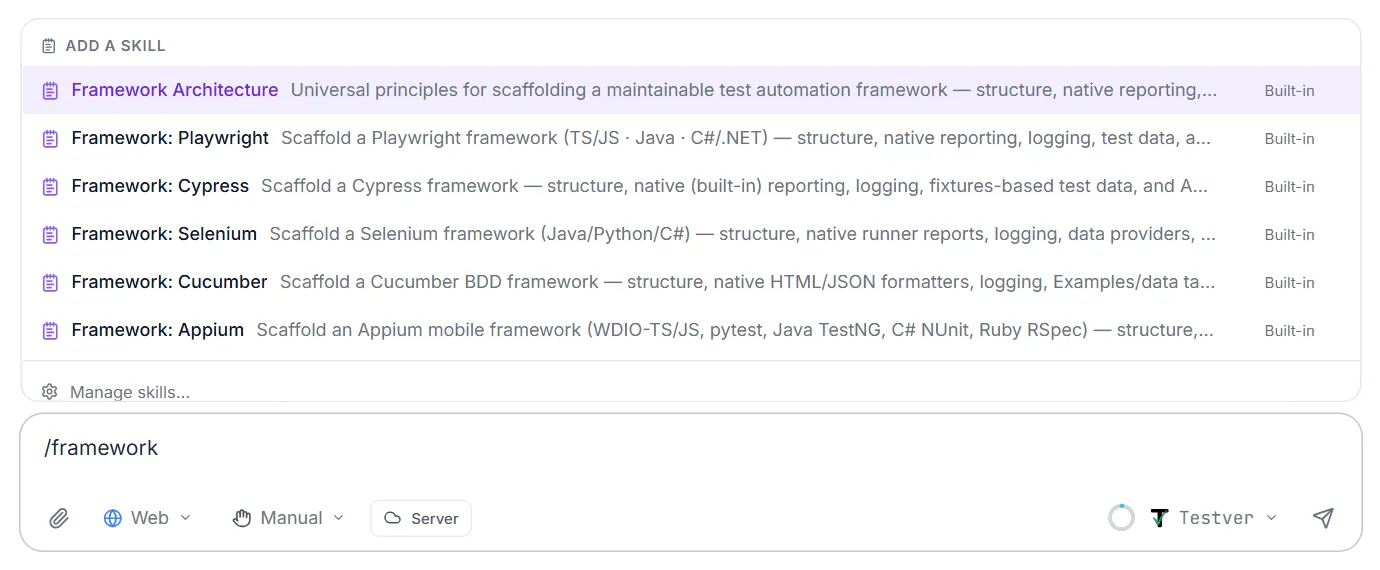
Type
/at the start of the message box, choose Framework Architecture, type/again and choose your tool’s skill. Both appear as chips above the message box. -
Choose Manual (approve each step) or Auto (let it work through the setup) in the permission picker.

Your first framework, step by step (Playwright)
Section titled “Your first framework, step by step (Playwright)”1. Ask for it. With Web mode and the two skills selected:
Create a Playwright framework in TypeScript for https://staging.shop.example.com. First scenario: log in with a valid user and see the dashboard.
2. Answer its questions. If anything is missing it asks — typically the address, the first scenario, and where the login credentials come from. Credentials always go into environment variables (TEST_USER, TEST_PASSWORD), never into a test file.
3. Watch it build. It creates, directly in your project folder:
shop-e2e/├── tests/ # specs only│ └── login.spec.ts # the smoke test├── pages/ # page objects (LoginPage, DashboardPage)├── components/ # shared widgets (header, modal)├── fixtures/ # page objects handed to tests├── data/ # test data files├── utils/ # logger and helpers├── playwright.config.ts # browsers, base URL, native reporters├── .env.example # every setting, committed├── .env # your values, not committed└── README.md4. It runs the smoke test (npx playwright test), reads the result, and fixes anything until it passes. You see the command output and the result in the conversation.
5. It stops and reports — the files created, the run command, where the report is (npx playwright show-report), and what to do next. Ask for more tests when you are ready.
Lesson 1: Playwright
Section titled “Lesson 1: Playwright”Languages: TypeScript / JavaScript (Playwright Test), Java (JUnit + Maven), C# (.NET + NUnit).
It asks for: the application URL and the first scenario.
It builds: tests/ pages/ components/ fixtures/ data/ utils/ playwright.config.ts (TS/JS); pom.xml + src/test/java/… (Java); *.csproj + Tests/ Pages/ (C#).
Browsers: chosen on the command line — npx playwright test --project=firefox (TS/JS) · mvn test -Dbrowser=firefox (Java) · dotnet test -- Playwright.BrowserName=firefox (C#).
Reports: TS/JS — Playwright’s HTML report and JUnit XML; Java — Surefire reports in their default Maven folder; C# — TRX. Traces and screenshots on failure.
Run: npx playwright test · mvn test (Java) · dotnet test (C#).
Example prompts
Section titled “Example prompts”Create a Playwright framework in TypeScript for https://staging.shop.example.com. First scenario: search for “laptop” and see results.
Scaffold a Playwright framework in Java with Maven for https://qa.bank.example.com. Start with: log in and see the account summary. Use fluent page objects.
Set up Playwright with C# and NUnit for https://portal.example.com, with Chrome, Firefox and Edge, and a first test that checks the home page loads.
Create a Playwright framework in JavaScript for https://app.example.com that uses component objects for the header, sidebar and data tables. First scenario: open the Orders page.
Lesson 2: Cypress
Section titled “Lesson 2: Cypress”Languages: JavaScript / TypeScript.
It asks for: the application URL and the first scenario.
It builds: cypress/e2e/ cypress/support/ cypress/fixtures/ cypress/pages/ cypress.config.js.
Page objects: Cypress-style App Actions and custom commands (for example a programmatic cy.login), or page objects — selectors as data-cy attributes.
Browsers: npx cypress run --browser firefox.
Reports: Cypress’s built-in reporter plus JUnit XML for CI, with screenshots on failure and video.
Run: npx cypress run · npx cypress open (interactive).
Example prompts
Section titled “Example prompts”Create a Cypress framework in TypeScript for https://staging.shop.example.com. First scenario: add a product to the cart.
Scaffold Cypress for https://qa.crm.example.com with a custom login command that signs in through the API, then a first test that opens the Contacts page.
Set up Cypress in JavaScript for https://app.example.com using page objects and fixtures for test data; start with a failed-login test that checks the error message.
Lesson 3: Selenium
Section titled “Lesson 3: Selenium”Languages: Java (TestNG or JUnit with Maven), Python (pytest), C# (NUnit / MSTest).
It asks for: the application URL and the first scenario.
It builds: tests, page objects (classic, fluent or PageFactory), components, data, a DriverFactory that creates the browser, a logger, and configuration.
Browsers: chosen by the DriverFactory — mvn test -Dbrowser=firefox · pytest --browser=firefox.
Reports: the runner’s own — Surefire / TestNG XML in their default Maven locations, pytest’s JUnit XML, or .NET TRX — plus screenshots on failure.
Run: mvn test · pytest · dotnet test.
Example prompts
Section titled “Example prompts”Create a Selenium framework in Java with TestNG and Maven for https://qa.insurance.example.com. First scenario: log in and open the Policies page.
Scaffold Selenium with Python and pytest for https://staging.shop.example.com, Chrome and Firefox, with a first test that searches for a product.
Set up Selenium in C# with NUnit for https://portal.example.com using PageFactory page objects; first test: the login page shows an error for a wrong password.
Create a Selenium Java framework with JUnit 5 that can run in parallel, for https://app.example.com; start with the home page smoke test.
Lesson 4: WebdriverIO
Section titled “Lesson 4: WebdriverIO”Languages: JavaScript / TypeScript.
It asks for: the application URL and the first scenario.
It builds: test/specs/ test/pageobjects/ test/data/ utils/ wdio.conf.js, with class-based, fluent page objects.
Browsers: declared as capabilities, chosen with a --browser= argument.
Reports: WebdriverIO’s own spec (console) and JUnit reporters, with screenshots on failure.
Run: npx wdio run wdio.conf.js.
Example prompts
Section titled “Example prompts”Create a WebdriverIO framework in TypeScript for https://staging.shop.example.com. First scenario: log in and see the dashboard.
Scaffold WebdriverIO in JavaScript for https://qa.example.com with Chrome and Firefox; start with a test that checks the navigation menu links.
Set up WebdriverIO with Mocha for https://app.example.com and data-driven login tests from a JSON file; implement only the first valid-login test for now.
Lesson 5: Cucumber (BDD)
Section titled “Lesson 5: Cucumber (BDD)”Languages: JavaScript (cucumber-js), Python (behave or pytest-bdd), Java (Cucumber-JVM).
It asks for: the application URL and the first scenario — which becomes your first .feature file.
It builds: features/ features/step_definitions/ support/ pages/ data/ and the Cucumber configuration. Steps stay thin and call page objects; shared state lives in the World.
Reports: Cucumber’s own HTML, JSON and JUnit formatters, with screenshots attached on failure.
Run: npx cucumber-js · behave / pytest · mvn test.
Example prompts
Section titled “Example prompts”Create a Cucumber framework in JavaScript with Playwright for https://staging.shop.example.com. First feature: “As a customer I can log in” with one valid-login scenario.
Scaffold a Java Cucumber framework with Selenium and JUnit for https://qa.bank.example.com; first feature: transferring money between my own accounts.
Set up behave in Python for https://app.example.com with a “Search” feature and a Scenario Outline for three search terms — implement only the first example for now.
Create a Cucumber framework where the business team writes features in plain English; start with a login feature for https://portal.example.com and explain how to add new steps.
Lesson 6: pytest
Section titled “Lesson 6: pytest”Languages: Python — with Playwright (pytest-playwright) or Selenium for web, or an HTTP client for APIs.
It asks for: the application URL (or API base URL) and the first scenario.
It builds: tests/ pages/ conftest.py data/ utils/ pytest.ini, with page objects provided through fixtures in conftest.py.
Browsers: pytest --browser firefox.
Test data: @pytest.mark.parametrize, fixtures, and data files.
Reports: pytest’s terminal report and JUnit XML, with screenshots on failure for UI tests.
Run: pytest · pytest -m smoke -n auto (parallel).
Example prompts
Section titled “Example prompts”Create a pytest framework with Playwright for https://staging.shop.example.com. First scenario: log in and check the order history.
Scaffold pytest with Selenium for https://qa.example.com; Chrome and Firefox selectable with —browser; first test: the home page loads.
Set up a pytest API framework (API mode) for https://api.example.com/v1 with a first test that GET /health returns 200 and “status”: “UP”.
Lesson 7: REST Assured (API)
Section titled “Lesson 7: REST Assured (API)”Mode: API.
Languages: Java with TestNG or JUnit, Maven or Gradle.
It asks for: the API base URL plus one known endpoint (a health check is ideal), and the first request to automate.
It builds: clients/ (service objects — one per API area), models/ (request/response classes), data/ (payloads), utils/, config/ and pom.xml. Requests and responses are logged into the report.
Reports: Surefire / TestNG XML in the default Maven locations.
Run: mvn test.
Example prompts
Section titled “Example prompts”Create a REST Assured framework with TestNG and Maven for https://api.example.com/v1. First test: GET /health returns 200.
Scaffold REST Assured with JUnit 5 for https://qa-api.shop.example.com; first scenario: log in with POST /auth/login and use the token for GET /orders.
Set up a REST Assured framework with service objects for Users and Orders and POJOs for their responses, for https://api.example.com; implement only GET /users/1 for now.
Lesson 8: Appium (mobile)
Section titled “Lesson 8: Appium (mobile)”Mode: Mobile. Languages: TypeScript / JavaScript (WebdriverIO), Python (pytest), Java (TestNG), C# (NUnit), Ruby (RSpec). It asks for: the app and a device / platform, and the first scenario. The app file must match the platform:
| Platform | App file |
|---|---|
| Android | .apk or .aab |
| iOS real device or cloud | .ipa |
| iOS simulator (macOS only) | .app |
It builds (per language):
| Language | Structure | Run |
|---|---|---|
| TS/JS | test/specs/ test/screens/ wdio.conf.ts | npx wdio run wdio.conf.ts |
| Python | tests/ screens/ conftest.py | pytest |
| Java | src/test/java/ screens/ pom.xml | mvn test |
| C# | Tests/ Screens/ *.csproj | dotnet test |
| Ruby | spec/ screens/ Gemfile | bundle exec rspec |
Screen objects prefer accessibility ids. The framework reads the device and app you pick in Testver’s Mobile session bar (Testver passes them in when it runs the tests), and falls back to .env values when you run it on its own. Cloud credentials stay in Settings → Connectors, not in the project. Hybrid apps switch into their web views only when one is really there.
Example prompts
Section titled “Example prompts”Create an Appium framework in TypeScript with WebdriverIO for my Android app (apps/shop.apk) on an Android emulator. First scenario: the app opens on the login screen.
Scaffold Appium with Python and pytest for the iOS app shop.ipa on a BrowserStack iPhone; first test: log in and see the home screen.
Set up an Appium Java TestNG framework for our Android app on a local device, with screen objects and a base screen for swipes; start with the onboarding carousel.
Create an Appium framework in C# with NUnit for a hybrid app; first scenario: open the in-app help page (a web view) and check its title.
Lesson 9: Growing the framework
Section titled “Lesson 9: Growing the framework”Once the smoke test passes, ask for more — the assistant follows the structure it created.
Example prompts
Section titled “Example prompts”Add tests for the checkout flow: add two products, apply coupon SAVE10, and check the total.
Add data-driven login tests from data/users.csv — valid, locked and wrong-password users.
Add a GitHub Actions workflow that runs the suite on every pull request and publishes the native report.
Make the suite run in parallel with 4 workers and retry failed tests once.
Add an API helper that creates a test user before each test and deletes it afterwards.
Other ways to add tests to the new framework:
- AI Record — click through a journey and get a test in your framework’s style.
- Explore & Automate — let the assistant explore a web app and automate every journey it finds.
- Test Explorer — run, group and schedule the tests once they exist.
After scaffolding: connect it to Testver
Section titled “After scaffolding: connect it to Testver”- Run commands — open Settings → General → Run Configuration and check the commands Testver uses to run one test, a file and the whole suite (the assistant tells you the right ones).
- Browsers and environments — already done. Once the smoke test passes, the assistant registers every browser your new framework accepts and each environment you gave it under Settings → Run Configuration, checked against the code it wrote (for example
Firefox→--project=firefoxfor Playwright,-Dbrowser=firefoxfor Maven,Staging→BASE_URL=https://staging…). Pick them by name in Test Explorer, Suites and Cycles. When it asks whether you have other environments (a Staging URL, for example), answering is optional — you can add more later with Suggest in Settings or by asking the assistant. - Your values — fill in
.env(orconfig.properties/appsettings.json) with real addresses and test accounts. Keep secrets out of Git; CI supplies them as secret variables. - Run it from Testver — open Test Explorer, find the smoke test and run it.
Choosing a framework
Section titled “Choosing a framework”| If… | Choose |
|---|---|
| You are starting fresh with a web app and have no strong preference | Playwright (TypeScript) |
| Your team writes Java | Playwright (Java) or Selenium (Java + TestNG) |
| Your team writes Python | pytest (with Playwright) |
| Your team writes C# | Playwright (C#) or Selenium (C#) |
| Business people read or write the scenarios | Cucumber |
| You already have Selenium Grid or WebDriver-based infrastructure | Selenium or WebdriverIO |
| Your front-end team lives in Cypress | Cypress |
| You test REST APIs from Java | REST Assured |
| You test Android / iOS apps | Appium in your team’s language |
Writing good prompts
Section titled “Writing good prompts”- Name the tool and the language — “Playwright in TypeScript”, “Selenium with Java and TestNG”.
- Give the real address of a test environment (or the app + device for mobile, the base URL + a health endpoint for APIs).
- Describe one first scenario in a sentence. Keep it simple — it only has to prove the setup works.
- Mention preferences up front — fluent page objects, component objects, JUnit 5 instead of TestNG, Maven or Gradle, which browsers.
- Say where credentials come from — “the user and password are in environment variables TEST_USER and TEST_PASSWORD”.
- Ask for more tests afterwards, one area at a time.
Rules every framework follows
Section titled “Rules every framework follows”These are built into the skills, so you get them without asking:
| Rule | Why |
|---|---|
| Built in the project folder, never in a sub-folder | Testver finds the tests, runs them and reads their results from the project folder. A nested project breaks that. |
| Nothing hard-coded — address, browser and credentials come from configuration | The same tests run against QA, staging or production by changing one setting. |
.env.example committed, .env ignored | The next developer and CI know every setting; no secret is committed. |
| Native reports only — no Allure, Extent, ReportPortal, Mochawesome | Nothing extra to install and maintain; Testver reads the native results. |
| Java projects keep Maven/Gradle’s default report folders | Standard tools and Testver’s result readers expect them there. |
| Browsers selectable from the command line, the application URL from one setting | CI and Testver’s pickers pass a flag or variable — and the assistant registers them in Settings → Run Configuration after the smoke test. |
| Screenshot and trace saved when a test fails | You can open the trace in Playwright’s viewer, and Auto-Heal reads it to repair broken locators. In Java the trace is saved before the browser closes, which is what makes it usable. |
| A short description comment on every element locator | Makes the page objects readable, and helps Auto-Heal find the right element when a locator breaks. |
| One smoke test, run until it passes, then stop | You get a proven starting point, not a large untested suite. |
Troubleshooting & FAQ
Section titled “Troubleshooting & FAQ”The skill isn’t in the / list. It is not enabled. Turn it on in Settings → Skills (an admin can).
My browsers or environments aren’t in Settings. Ask the assistant “register the browsers and environments for this project”, or use Suggest under Settings → Run Configuration. If your role is Tester, changes to entries that already exist wait there for an Admin.
Auto-Heal says “Playwright for Java/.NET left no trace”. The framework doesn’t save a trace when a test fails (older scaffolds saved it too late, after the browser had closed). Ask the assistant: “Save the Playwright trace from an AfterTestExecutionCallback when a test fails” — or turn on the live probe in Settings → Auto-Heal.
The framework was created inside a sub-folder. Tell the assistant: “Move the framework to the project root — nothing should be nested.” Then check the runner configuration file (playwright.config.ts, pom.xml, *.csproj …) is directly in the project folder.
It keeps asking for the URL. By design — it never guesses an address. Give the real address of a test environment in your prompt.
Every test fails immediately with an undefined URL (JavaScript / TypeScript). The .env file isn’t loaded, or has no values. Fill in .env from .env.example; the configuration file loads it with dotenv.
java, mvn, dotnet or python is “not recognized”. The language runtime isn’t installed or isn’t on the PATH. Install it (see Before you start) and ask the assistant to run the smoke test again.
The Appium project isn’t treated as mobile. Testver recognises a mobile project by its Appium dependency (for example Appium-Python-Client in requirements.txt, io.appium:java-client in pom.xml). Ask the assistant to add it.
“App format doesn’t match the platform”. Android needs .apk / .aab, iOS devices and clouds need .ipa, the iOS simulator needs .app.
Can I add Allure or Extent reports? The skills deliberately use each tool’s own reports: they need no extra setup, and they are what Testver reads for results, history and dashboards.
Can I scaffold into an existing project? Yes. Start Testver in that project’s root; the assistant builds in place and follows the conventions already there.
Can I change the structure it chose? Yes — ask in plain words (“rename pages to page-objects”, “use Gradle instead of Maven”), or say what you want before it starts.
Related
Section titled “Related”- AI Assistant — modes, permissions, the chat
- Agent Skills — enabling, previewing and writing skills
- API Testing with AI — testing and automating APIs in API mode
- Explore & Automate — explore a web app and automate what it finds
- AI Record — record a journey into a test
- Settings — Run Configuration and browsers